

Forum Replies Created
-
AuthorPosts
-
Barry
MemberHi Mario,
Thanks for your patience 🙂
Here’s a fairly lightweight means of doing what I think you want:
add_filter( 'tribe_events_hide_from_upcoming_ids', function( $ids ) {
	return tribe_is_month() ? [] : $ids;
} );
This could be added either to a custom plugin (preferred) or else to your theme’s functions.php file.
It may not cover all eventualities but I hope if nothing else it serves as a starting point that you can tweak and adjust as needed.
Thanks!
MemberThere’s actually an open feature request for this, Emma – though not many users seem to have requested the same thing in recent times.
Here’s a snippet, though, that might help:
https://gist.github.com/barryhughes/02be595a05483c4c0a03b2a9bb1cd363
It could be added either to a custom plugin (preferred) or else to your theme’s functions.php file.
This will include events from other months on initial load only but can easily be modified so that it behaves in a similar fashion if you page forward/backwards.
Hope it helps 🙂
MemberHey there @dnssab,
Please do feel free to follow along but if you require any additional help, it would be appreciated if you could create a fresh topic of your own 🙂
Can attendee info (including custom fields, ideally) be exported?
Absolutely. In the simplest case, visit the attendee screen and click on the export button. Custom attendee data should be included in the resulting CSV.
They had an integration that I built automation workflows off of, using “recipient received ticket” as a trigger. … Can that functionality be replicated here?
I don’t believe we have a direct equivalent to “recipient received ticket”, but we do have an action (“wootickets-send-tickets-email”) that fires when the emails for tickets purchased through WooCommerce are dispatched.
Last but not least, please remember that custom development is beyond what we can provide in-depth support for. We’re happy to steer you in the right direction if we can, but building customizations is really something that needs to be driven forward under your own steam 🙂
MemberWe do 🙂
MemberHi @salilou,
Sadly, this turns out to be a known bug. While I can’t offer any guarantees, we’ve been working hard to fix it and expect to ship a fix in our very next release.
Thanks for your patience in the meantime 🙁
MemberHi @jaladesign,
I think there was a little confusion on that point specifically: attendee records do not map 1:1 to WordPress user accounts 🙂
Orders placed via WooCommerce are typically associated with a user account (though guest purchases are also possible). When tickets are purchased, one or more attendee records will be generated and they will be associated both with the order and with the ticket product itself.
In other words, one user can purchase multiple tickets (creating multiple attendee records) in a single transaction.
For tickets sold via WooCommerce, the attendee records can be found in the posts table using a post type of “tribe_wooticket”.
I hope that helps!
MemberHi Marcel,
theeventscalendar.com/knowledgebase/woocommerce-specific-ticket-settings
Looking at your system information, it seems your site is currently configured to send out ticket emails when the status is either “on hold” or “complete” (see the above article to learn more).
In this case, you could also check the box for “processing” and the ticket email will then be sent out when the order reaches that status. This is not enabled by default because, at that stage, payment may not actually be confirmed, but if you’re happy to do this it would potentially solve the problem.
Alternatively, you could work with WooCommerce and its PayPal settings to ensure that IPN, PDT and anything else that might be needed to ensure your site receives updates about transactions and maintains the correct order status are all in order.
I hope that helps 🙂
MemberHi @jmkreege,
Thanks for following up.
We began to look into this but, unfortunately, found we needed to re-establish our testing credentials with meetup.com (hence the delay in responding in your earlier topic).
We’d love to help more but either we’ll need to wait a few more days until we’re positioned to try and replicate this ourselves or, if you’re happy to, you could link us to one of your existing meetups (or a new one that you could create for testing purposes): once we’ve imported it you could then make an amendment and we might get visibility into the problem.
I realize that second approach isn’t ideal, so it may be easier to hold tight for a few more days until we’re ready to test this under our own steam.
Let me know what you’d like to do and apologies for the hold up on this one.
MemberWe’re the same team, so not a problem – but we’ll go ahead and close this one and help you out over there instead 🙂
MemberExcellent, hope they can steer you in the right direction 🙂
We’ll leave this open though for the time being in case they identify anything we can poke at from our side.
MemberHey there, Andrew.
We can’t always help with custom dev questions like this one, but we’d be happy to try and at least giving you a starting point.
https://gist.github.com/barryhughes/70c1da206f7bd1b828f3295e0646a61f
Does this work for you? It could be added either to a custom plugin (preferred) or else to your theme’s functions.php file.
Hope it helps 🙂
MemberI expect so, it sounds like the issue is kicking in past the point where we have any control over things. Are you able to raise a support ticket with PayPal?
MemberHi Marcel,
I’m curious: if you test this a further time and then edit the order in WooCommerce, can you try and resend the ticket email and let me know if it is correctly populated with ticket information at that point?
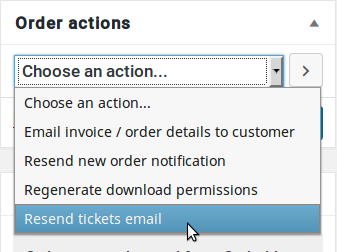
Can you also confirm what the order status is at this point?
Thanks!
MemberI see it now, too 🙂
I can’t replicate the same PayPal error, though. While I didn’t complete the transaction I was successfully able to login to PayPal and select a payment method (this was true whether I used the PayPal button on the cart page or if I completed the checkout page and went to PayPal from there).
When did this error show up – was it after you selected a payment method, or did you not even get that far? As you are using WooCommerce to sell the tickets, can you confirm if you experience the same thing if you create a ‘regular’ product, unrelated to ticketing, and try to purchase that?
Thanks!
MemberThis reply is private.
-
AuthorPosts