

Forum Replies Created
-
AuthorPosts
-
Barry
MemberAwesome, glad you were able to adapt it 🙂
MemberGlad that worked for you!
Is there a way to make the tickets permanently visible? some code for functions.php or something?
Without being too general and setting all new products (not just tickets) so that their catalog visibility defaults to something other than hidden, I don’t think we currently have a particularly clean avenue for accomplishing this.
If that’s not a concern, though, just let me know and I’d be happy to furnish you with a snippet. If it is a concern and you’re in need of something more, it’s probably worth proposing a new feature or supporting any suitable existing feature request you find here:
Thanks!
MemberI’m unfamiliar with SQLyog, but it definitely sounds like something is going wrong there – the value of that field after copy clearly isn’t the same as the original.
Is it possible you are copying from the wrong database/wrong set of tables? If you’re positive that’s all in order, then it might be worth trying some other tool.
MemberHi William,
Awesome – what I’ll do is close out this topic but if anything else crops up or you need to revisit this, please just create a new topic and one of the team will be happy to help.
Quick question: is this support forum custom built by Modern Tribe or is there a company that sells this service? It’s very clean and easy to use so please let me know if this is a product we can find.
Thanks!
It’s based on the excellent bbPress plugin, overlaid with some customizations of our own (we have a bespoke set of support tools to help us manage topics and their assignment to staff members, for instance, however those tools exist as an internal project only – at least at this point in time) 🙂
MemberNo problem at all, Linda – I think we’re all constantly learning about these things 🙂
The first thing I’d note is that – just as with search results – this is all in the hands of a third party service and even if Google is consuming the JSON-LD data that doesn’t necessarily mean it will include it in those places the knowledge graph is exposed.
To turn the question around, can you give me some examples of where you expect your events to be included in knowledge-graph related results, but do not – for instance, are you testing this by asking the Google app specific questions but finding your events are not included?
Can you provide examples of those questions if so?
MemberHi Vincent,
But hey, I just found out this option_value is from my online database. But online there is no problem with the settings. Only offline is an issue.
OK, so what I was interested in was the way the option data looked immediately after importing it. If what you shared was actually the original data from the source site, that doesn’t help too much.
Can you try importing to your local site/a new test site and let me know what that value is immediately after importing? What tools or commands are you using to perform the import/export work?
July 9, 2015 at 7:09 am in reply to: Eventbrite imported events are not shown on the map view #985009MemberHi Cliffy,
I am logged into my account and under The Main Menu along the top under “MY ACCOUNT”, there is a menu item called “My Support Threads” but the URL is just https://theeventscalendar.com/ ??
There’s a small bug at work which is literally being fixed as I type – thanks for highlighting this and apologies for any confusion.
Anyway. I have created an event in eventbrite – https://www.eventbrite.com/e/this-is-a-test-event-to-import-to-my-site-tickets-17701838676
So if I visit the venue map on eventbrite.com it looks as if the country wasn’t actually set (note how it reads “None” in the screenshot, below) which is why you are having to set that manually.
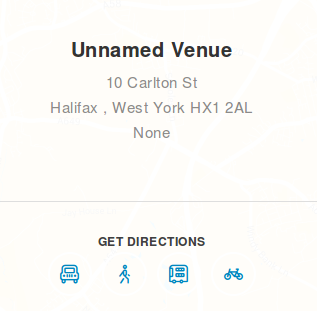
You will see there are a number of imported events but none show on the map.
I do see that. Interestingly, it works fine for me if I import it locally – Google’s geolocation API is returning the coordinates correctly and it appears in map view as expected.
What I note on your site, though, is that the coordinates do not seem to have been established. There are a number of possible reasons for that, but after looking at the list of plugins you are using (several seem to have the potential to also make use of the Google geolocation API) and given it worked for me I wonder if you are hitting either or both of these issues:
- A straightforward conflict with one of those other plugins (our standard troubleshooting steps would help to discover this)
- Perhaps you are hitting up against Google’s rate limiting (ie, if too many requests are made in a certain timeframe, it will refuse to respond with more geolocation data)
Here’s how I would suggest proceeding:
- Switch to a default, unmodified theme such as Twenty Fifteen
- Deactivate all plugins except for The Events Calendar and Events Calendar PRO, both of which should be up-to-date
- Add a new event and setup a new venue, providing a full and valid address
- Visit map view and see if it appears there
What you do from here will vary according to the result of that test.
If you find map view does contain this new event, start incrementally reactivating your other plugins and ultimately your theme, repeating the same test (each time with a fresh venue). If you find after activating one in particular the problem returns, then you have found the conflict.
If on the other hand you visit map view and the new test event isn’t there, please try:
- Editing the newly created venue
- Check the use latitude + longitude box
- You will now be able to view the coordinates – note the values
If they are set to zero or empty and the address is definitely complete and valid, then it’s very likely that Google is refusing to serve you more data.
On the other hand, if they are set, then that again suggests a conflict somewhere along the line is preventing its inclusion in map view and the same troubleshooting process outlined above should be followed.
Let me know how you get on and if you need further clarification on this process 🙂
MemberHi Heather,
I’m sorry to hear you have hit up against some difficulties.
Tickets are something of a special case and in the case of WooCommerce Tickets the “catalog visibility” of the ticket products is automatically set to hidden.
If you edit those products and change the catalog visibility, does that allow you to then follow one of the avenues you’ve outlined?
MemberHi Donna: how are you getting on here – do you require any further assistance?
MemberHi @starfiresports,
How are you getting on here? Were you able to do some further troubleshooting/did you find the solution?
MemberHi Brittany,
How are you getting on with this problem – were you able to workaround the tax issues?
MemberHi @tpsonline, how are you getting on with this?
MemberOK. So is that the way the option looks after importing it? It certainly looks as if those settings are being carried across, as expected.
Staying with the event slug issue for the moment – what are you actually experiencing? If you visit month view, for instance (on the target site) do the URLs utilize that slug as expected or not? If they do, is the problem that they lead to a 404 page?
MemberHi Will,
In the first instance can you visit Settings → Permalinks (you don’t actually need to change anything, though) then see if the submission page becomes available?
If that does not work, can you:
- Share your system information with us, by private reply?
- Try running through our standard troubleshooting steps, in case there is a conflict?
Thanks – and let me know how you get on!
MemberNo problem – if you can’t track down the conflict (or even if you do – we’d love to know what it is) please just let us know 🙂
-
AuthorPosts