

Forum Replies Created
-
AuthorPosts
-
Barry
MemberHi Sarah,
Thanks for considering WooCommerce Tickets 🙂
Can I add a customized ticket that will be received by email once the purchase has been made?
Once a ticket is purchased and the order is completed, a couple of emails will normally be sent to the customer. One is the normal receipt generated by WooCommerce, the other contains the ticket or tickets.
The ticket email is very flexible. Like virtually all our views, it can be completely (and safely!) customized by placing a copy in your theme directory and modifying it there – there is also the ability to add a header image to every ticket for a particular event 🙂
Will the ticket include information about woocommerce or ModernTribe?
Nope – there is no branding included though, as above, you can certainly customize them and add items. By default we’ve aimed for a straightforward design that works well across different email clients, here’s an example:
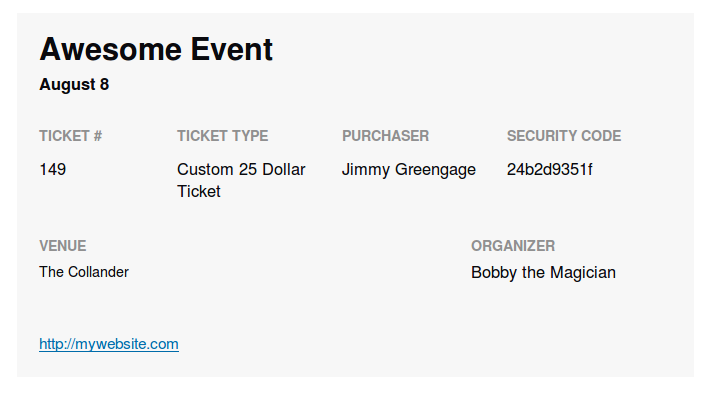
Will every ticket have unique codes?
They do indeed and we also provide check-in facilities within the admin environment (the attendees admin screen) which you can use, or not, at your option.
Will users receive a printable ticket by email?
Exactly. Example above.
Can we download/export the information about attendees to have a list for the managers working on the day of the event?
Absolutely. This is again managed via the attendees admin screen 🙂
Is it compatible with the theme SuperNews by Theme Junkie?
I’m afraid we cannot guarantee compatibility with any third party plugins or themes (the exception in this case, of course, is that we obviously strive for a high degree of compatibility with WooCommerce itself) — but generally there is no problem with themes that follow established WordPress best practices.
Though I don’t have any particular knowledge of SuperNews by Theme Junkie, you are welcome to search our premium forums for past topics about that theme – though you will not be able to post in the forums until you have a valid license, they are open for research by prospective users 🙂
Our website is in French. Can the plugin be translated easily so it’s coherent with the rest of the website?
Yes!
We follow WordPress best practices and work hard to allow our plugins to be translated – the actual translations are submitted by community members and you would also be welcome to do so if for instance you found any missing translations or corrections, etc 🙂
I hope that answers your questions, but do let me know if we can help with anything else.
MemberHi Kris,
I’m sorry to hear you are experiencing difficulties.
I don’t find the same thing when I try to replicate locally. Just to confirm, are you clicking the Save This Ticket button after setting the start and end sale dates/times or are you using the main Update/Publish button provided higher up the screen?
MemberHi!
We actually already have some JSON for Linking Data in place in relation to events – is this failing to meet your needs here?
It is certainly something that can be adapted via the tribe_google_event_data filter hook if you do need to change it 🙂
Let me know if that helps!
MemberHi Rainer,
Does the following snippet (which you might add to your theme’s functions.php file or any other suitable place) help?
https://gist.github.com/barryhughes/bd8690b9bb8b6006da50
So long as your site uses the | symbol as the separator (ie, Upcoming Events | Single Event Title | Site Name) it should do the job – and if you are using something else as the separator we could easily tweak it.
Let me know how you get on 🙂
MemberHi Vincent,
It’s not a problem that should happen and I have often performed the same operation with success.
If you look inside the export data, or within the options table once imported, do you see an entry where the option name is tribe_events_calendar_options? Can you copy and paste its value in here and confirm what you are expecting the default template setting, etc, to be so I can compare?
One possibility is that custom code, your theme or a plugin was overriding the values stored in the database via filters, so I’d like to explore that idea first of all and the above would help in such a scenario.
Thanks!
MemberHey Martino,
I wish we could go further – but the reality is there just isn’t enough time to go into detail on topics like this one while still serving the needs of the broader community.
Beyond inspecting src/Tribe/resources/js/tribe-events-ajax-map.js for a greater understanding of how our own systems work I’m not sure that I can offer up much more guidance.
I know this is quite complex: do you have any contact for a paid solution?
Please see this advice – there are some ideas in there and of course there are lots of other places (freelance marketplaces, etc, that it doesn’t cover) that could be worth a look 🙂
July 7, 2015 at 6:16 am in reply to: Upgraded ECPro 3.10 & Fllter Bar Have LOST the Title TAG causing SEO Errors. #976618MemberHi!
It’s been a while so I’m going to go ahead and close this topic.
- Need help with anything else? Go right ahead and post a new topic, one of the team will be only too happy to help
- Still need help with this issue and need to re-open it? Again, please simply create a new topic and link to this one to provide the team with some context
Thanks!
July 7, 2015 at 6:15 am in reply to: Import event changes setting for displaying # of remaining tickets in EventBrite #976617MemberI’m going to close this for the time being, but we’ll post an update as soon as we have some progress to share.
MemberI’m going to close this for the time being, but of course we’ll do our best to re-open and post an update as soon as we can.
MemberHi!
It’s been a while so I’m going to go ahead and close this topic.
- Need help with anything else? Go right ahead and post a new topic, one of the team will be only too happy to help
- Still need help with this issue and need to re-open it? Again, please simply create a new topic and link to this one to provide the team with some context
Thanks!
MemberHi!
It’s been a while so I’m going to go ahead and close this topic.
- Need help with anything else? Go right ahead and post a new topic, one of the team will be only too happy to help
- Still need help with this issue and need to re-open it? Again, please simply create a new topic and link to this one to provide the team with some context
Thanks!
July 7, 2015 at 6:14 am in reply to: I updated Version 3.10 but it still says that I need to update. #976613MemberHi!
It’s been a while so I’m going to go ahead and close this topic.
- Need help with anything else? Go right ahead and post a new topic, one of the team will be only too happy to help
- Still need help with this issue and need to re-open it? Again, please simply create a new topic and link to this one to provide the team with some context
Thanks!
MemberHi!
It’s been a while so I’m going to go ahead and close this topic.
- Need help with anything else? Go right ahead and post a new topic, one of the team will be only too happy to help
- Still need help with this issue and need to re-open it? Again, please simply create a new topic and link to this one to provide the team with some context
Thanks!
MemberHi!
It’s been a while so I’m going to go ahead and close this topic.
- Need help with anything else? Go right ahead and post a new topic, one of the team will be only too happy to help
- Still need help with this issue and need to re-open it? Again, please simply create a new topic and link to this one to provide the team with some context
Thanks!
MemberHi Matt,
Right now our licenses expire after a year so you would need to renew WooCommerce Tickets after that point if you still want to benefit from official updates and support – but yes, other than that, the two other major components (The Events Calendar and WooCommerce) are free 🙂
-
AuthorPosts