

Forum Replies Created
-
AuthorPosts
-
Barry
MemberHi Vincent,
That data isn’t actually JSON-formatted (instead it is serialized PHP), which is probably why the JSON viewer is throwing some errors.
s:15:"singleEventSlug";s:9:"evenement";This section means your single event slug should be “evenement”. Taking this as a starting point, are your single event slugs something other than this, on the site where you imported the data?
Can you also confirm that the value you quoted is in place in the local/target database now that you have imported it? Are you using any forms of caching on the local/target site?
MemberHi James,
We’d be happy to help but I’d ask that you create a new support topic – the problem seems to be quite different in your case than in Donna’s (partly because of the possible link with Facebook, but also because of the structure of the duplicated events).
Creating a new topic for your own specific problem gives us a better chance of being able to help both you and the original poster in this topic (Donna) in a timely fashion with minimal confusion.
Thanks!
July 10, 2015 at 5:02 pm in reply to: "Month View" Listings aren't showing up in chronological order #985563MemberHi Lance,
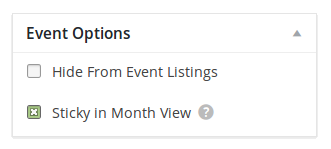
Can you confirm if any of those events are “sticky in month view”?
 Member
Exactly – if doing this manually is your preferred approach that is exactly the right strategy 🙂
MemberWe’re definitely open to doing something here, please just post on our UserVoice page (or if you can find a suitable existing request, up-vote it!).
But, yes – there is a photo showing and I can’t find where the heck that rascal is being pulled from. Would adding an image create a hack for the version?
I think that’s worth a shot, whether via the add html before event content field or via a template override – you could potentially even delve into Facebook’s developer docs and figure out how to mark a specific image as worthy of their attention.
Does that help at all?
MemberThe second issue seems slightly different in nature – it’s similar insofar as your theme is taking over and trying to weave its magic, but the result of the find out more link is a 500 Internal Server Error rather than a valid and complete response.
If you try to reach one of those same events directly (try this link for example) the same thing occurs (but without the “frame” provided by the theme, we see a blank page instead).
My suspicion is a theme conflict somewhere along the line, but I see that as a fundamentally different problem and we’d need to enable debugging to figure that one out – but since it looks like a separate matter let’s open a separate topic for that.
Your third question of course is more of a general usage issue, so please do post a new topic for that also.
MemberGlad it’s all sorted 🙂
July 10, 2015 at 4:40 pm in reply to: Unable to publish through review and submit of email notification link #985555MemberHi Judy,
It looks like Josh asked for some further details in the other topic and it was ultimately closed after a long period of inactivity – unfortunately, no further action was taken.
I do see your point though and have logged a bug report – so hopefully we’ll see a substantive fix before too long (and we’ll do our best to post an update in this topic when that happens).
In the meantime, one option would be to override the email template by placing a copy of:
src/views/community/email-template.php
In your theme directory as follows:
themes/YOUR_THEME/tribe-events/community/email-template.php
This new copy should then be used instead of the original. Then, find this line:
echo $this->getEditButton( $post, sprintf( __( 'Review %s', 'tribe-events-community' ), $events_label_singular ) );
Replace it with these three lines:
$query    = array( 'action' => 'edit', 'post' => $post->ID );
$edit_url = add_query_arg( $query, get_admin_url( null, 'post.php' ) );
echo '<a href="' . $edit_url . '">Review event</a>';
This will take the reviewer (who will have to have administrative privileges) to the event editor where they can publish, trash or otherwise deal with the submission – that might help in the interim until we get an official fix in place.
MemberHi @wfsec28,
I’m sorry you’ve hit up against difficulties.
Unfortunately I cannot replicate this. Is there anything you can think of that I would need to do beyond selecting two or more posts, using the bulk edit facility and applying some new tags?
Can you also confirm if in addition to deactivating other plugins, you tried switching to a default, unmodified theme like Twenty Fifteen (and did that make any difference if so)?
Let me know!
MemberHi John,
That is completely normal.
The Events Calendar is our free, core plugin which provides most of the essential functionality for operating a calendar. Events Calendar PRO is one of our premium plugins and this provides additional features and enhancements – but it cannot exist in isolation, it depends on The Events Calendar being present and activated.
Does that clarify things?
MemberHi @garysmith 🙂
The Events Calendar itself does not suggest that any particular image should be used in these scenarios – so it could be that your theme or another plugin is influencing things or simply that Facebook is making its best guess based on those images that happen to be present on that page.
Is the choice of image problematic or are you just curious because you’d like to exercise more control over this area?
MemberHi Toby,
I’m sorry to hear you’ve had some issues integrating with this particular theme (Bridge).
We’re always happy to help as best we can – but we do have a policy of sticking to one issue or question per support topic. With that in mind, let’s deal with your first question here and if you need further help for your second/third items please do go ahead and create new support topics for those 🙂
1. I have an issue with the Export Listed Events button: http://bit.ly/1LUIAgG
If you click on it, it does not download the file? It also just shows a blank page.It seems as if your theme is loading each page by ajax (ie, it is intercepting clicks on links and takes over loading of the content, I’m guessing to give a slightly different transition effect than one would normally see).
That’s not going to work here because the iCal button is basically a link to iCal data and it doesn’t make sense to do this in that particular scenario. It seems to me they must (or should) have a way of marking links that shouldn’t be subject to this sort of behaviour – can you reach out to the theme’s authors/support crew and ask about that? Basically:
How can I stop the ajax-loading behaviour for specific links? Is there a class or wrapper I can apply to mark them as links the theme should not interfere with?
Hopefully they already have a strategy for this (I’m guessing they must, for links to RSS feeds and so on), we can investigate applying it to the iCal export button.
Let me know how you get on 🙂
MemberHi Alan,
Thanks for contacting us and I’m sorry you’ve had some difficulties.
We do try to stick to one question or issue per support topic, though, so let’s deal with the margins issue here and if you can go ahead and create a new topic for the other question that would be great 🙂
I’m losing left and right hand margin spacing when viewing a single event if I reduce the browser width below approx 1040 pixels. Interestingly the margin reappears again at < 750 pixel width. Any ideas how I can sort this?
Before we try anything more complicated, I wonder if you could try visiting the Events → Settings → Display admin screen.
There is a setting here allowing you to change the template used for event pages: if you try some different options, do any solve the problem with regards to your margins?
July 10, 2015 at 7:20 am in reply to: "Month View" Listings aren't showing up in chronological order #985337MemberHi Lance,
I’m sorry to hear you’ve hit up against difficulties.
That is a little odd – but I notice you seem to have custom templates in place (ie, within your theme’s tribe-events subdirectory).
Did you add those before the most recent update? Can you (temporarily) try removing them to see if this specific problem is cleared up? Though I appreciate you may not want to lose your customization work, this would at least potentially tell us where the seat of the problem is.
An easy way of “removing” them is simply to rename the tribe-events directory to something like disabled-tribe-events then you can rename them again after testing.
Can you give that a go and let me know what the result is?
Thanks!
MemberHi Floyd,
I’m sorry you are experiencing difficulties.
So, to clarify, the iframe HTML is present but just isn’t visible? It sounds to me rather like a possible styling issue. Does this occur even if you flip to a default, unmodified theme like Twenty Fifteen?
-
AuthorPosts