

Forum Replies Created
-
AuthorPosts
-
Barry
MemberHi! Did you have a chance to check out Hunter’s recommendation? How are you getting on with this issue?
MemberHi Phil,
WordFence appears to be blocking access to your site (for me) at the moment, but I’d love to take a look at an example of a recurring event /all/ page where the events are out of order, if you’re able to facilitate that.
Thanks!
MemberHi Brenda – just a note that I’m happy to assist further if needs be 🙂
MemberHi Luz — thanks for contacting us! I was reviewing this topic and wanted to provide some further clarity.
1. Can you change a one-time imported event to a scheduled import? If not, is there anyway to automatically update the one-time imported event?
One-time imports are not saved, however if you create a scheduled import then you can select on demand as the frequency: when you initially save this, it will import events from the source URL and you can subsequently visit the Events → Imports → Scheduled Imports tab to run it again any time you want.
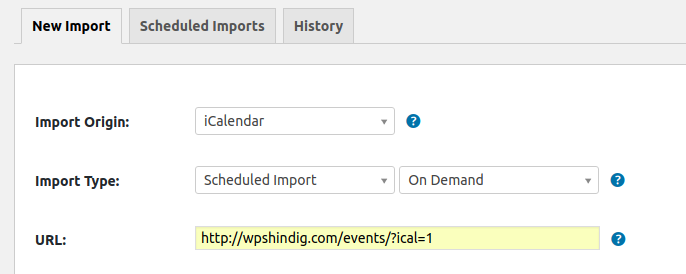
Following from this, you can also visit Events → Imports → Scheduled Imports to edit the saved import task and change it from on demand to a different frequency such as hourly, daily or weekly.
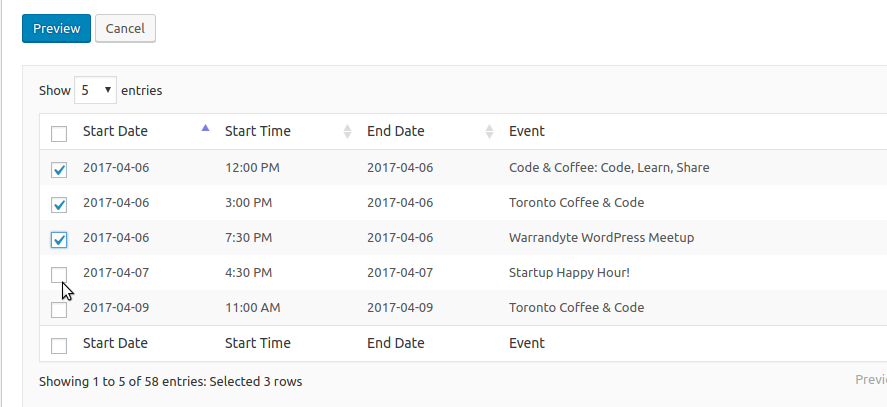
2. Is there any way to pick and choose the events you want to import when previewing during a scheduled import?
This isn’t possible for saved or scheduled imports, but for one time imports you definitely can:
I hope that helps!
MemberHi Andrew,
Thanks for contacting us!
I just want to make sure I’m understanding your question correctly in the first instance. Taking our demo site as an example, is it the Near/Location field in the search bar that you wish to change to a dropdown?
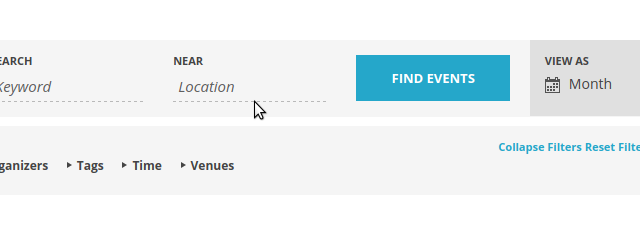
If so, that would definitely fall into custom development territory and I’m afraid it is not something we can provide much assistance with here in the support forums (though you could certainly propose a new feature for this). On our demo site you will also see the presence of the following filter fields, including a dropdown venue filter:
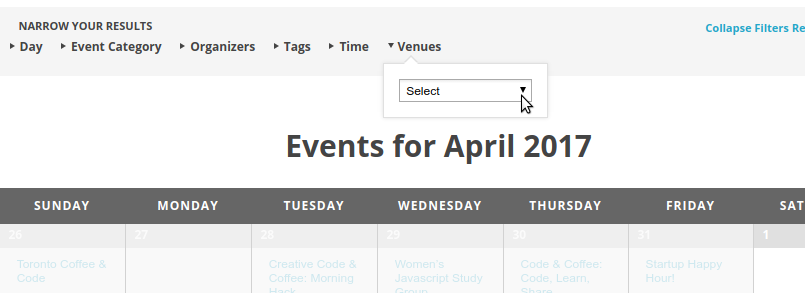
This is actually a feature of Filter Bar – which is its own plugin.
MemberHi Micheal,
Thanks for contacting us.
Custom development is typically beyond the scope of support we provide here, but I’d be happy to bounce a few ideas around with you 🙂
Can we just use the cpt already provided by the plugin and change the admin view structure/fields based on the event category ?
On the basis that they are all events and you presumably want them to appear in the various calendar views, this seems like the path of least resistance to me.
I’m not sure how you visualize this, but if you want to inject new user interface elements into the main event details meta box you can use hooks such as tribe_events_details_bottom for that purpose.
Also, can we create bidirectional links among events ? Lets say, a group of url fields which are used to to select other events and link each other. Everytime a url with an event path is filled out, a url field should automatically be created and filled out on the linked event too.
If I understand you correctly, that definitely seems possible. Before you reinvent the wheel, though, have you checked out Posts 2 Posts? It is a well established plugin that provides the plumbing for just this sort of task – might be worth evaluating in the context of your project.
I hope that helps!
MemberHi Bobbi,
Thanks for contacting us and apologies for the delayed response — we’ve been experiencing higher demand than normal and additionally have had some staff outages.
Could you add a filter that will let me change event data AND skip the import of the specific event, if I need to?
That sounds reasonable — I will log an issue on our internal tracker so we can think this one through and discuss the best approach.
That’s the only way I can see to do it, without hacking the plugin myself.
You don’t need to hack the plugin to achieve your goals: though perhaps not ideal, you could use WordPress’s standard save_post_{POST_TYPE} action to examine each venue, organizer and event that has been created and then amend or delete them as appropriate.
Combining this with some tests to check if your callbacks are operating in the context of the importer admin screen or a cron job could help you to further tighten this process up.
I hope that gives you some further options to explore and, again, I’ll be sure to log an item for us to look at adding additional hooks in our own code to better facilitate your goals in the future.
Thanks!
MemberThat sounds … pretty weird.
How about this: can you create a fresh installation of WordPress for testing purposes (this could be as simple as installating it in a subdirectory, ie example.com/test-site and add only Event Tickets Plus, Event Tickets, WooCommerce and nothing else — then try to replicate?
Does the same thing happen there, too? I realize setting this up seems like a lot of extra work but it might help us to better isolate if this strange behaviour is specific to the live site or a more general issue.
Please also note that, due to some compatibility issues with WooCommerce 3.0, it may be best to stick with the 2.6.14 release for the time being.
MemberOK, let me dig into this a little more. Can you also confirm which license key you wish to retain?
MemberDefinitely, if we could confirm this as a bug it would be great to fix it. As before, however, have been unable to replicate this (nor have we seen comparable reports from other users). We’ll definitely keep and eye out, though.
Thanks again for reporting this: since in your case the problem is resolved I’ll go ahead and close this topic – but if we can assist with anything else please do let us know and one of the team will be only too happy to assist 🙂
April 4, 2017 at 8:23 pm in reply to: Second Page of Results not Displaying Unless Page is Refreshed #1264589MemberHi Monica,
I’m sorry to hear that and wish we could help further, however we don’t provide technical assistance here in the pre-sales forum.
If you have a valid license key can I ask you to login and then post in the relevant premium forum? Alternatively, if you don’t yet have a license, you can seek help via the wordpress.org forum.
Thanks!
MemberSorry to hear you have hit up against problems while updating – that’s not good 🙁
If you continue to experience this then it’s possible file permissions are getting in the way and so removing The Events Calendar completely (by deleting the plugin folder) and reinstalling might be worth a try.
As we don’t generally provide technical assistance here in the pre-sales forum, though, I’d ask that if you need further support you either login and post within our premium forums or else open a topic in our wordpress.org forum.
Thanks!
MemberThanks for clarifying!
This appears to be a valid bug and – as such – I’ve logged a bug ticket and we’ll do our best to update you as soon as a fix is available.
Though not ideal, the workaround for the time being is simply to continue using the buttons as you have been doing (since they still allow you to check users in).
MemberThanks for the update.
If you edit the problematic event you mentioned in WooCommerce’s product editor and change the stock there directly, does the change stick?
(To clarify, if you edit the event the tickets belong to you can hover over the ticket and choose to open it in WooCommerce – where stock levels can also be adjusted.)
MemberHi Paul,
Where are my featured FB images?
With regards to the above issue specifically, it looks as if Event Aggregator imported the images but, for some reason, they either didn’t save or were subsequently deleted.
Do you find that featured images (such as for blog posts) work without this happening? I do see that some existing blog posts have featured images, but they appear to be a number of years old, so what I’m interested to learn is if you can upload and attach new featured images without any problems currently (and outside the context of Facebook imports).
If you could test that out and get back to me, that would be great 🙂
Thanks!
-
AuthorPosts