

Forum Replies Created
-
AuthorPosts
-
April 11, 2018 at 9:42 am in reply to: Paypal=>Things don't appear to be working at the moment. Please try again later. #1504520
Andras
KeymasterHi,
Thanks for confirming.
The screenshots did not come through with the email reply. If you could upload that directly in the forums, that would be much appreciated.
Unfortunately the html also didn’t come through properly. HTML usually breaks in the replies if it is not put between
andtags. But that’s okay. Please rather create a screenshot of how the success page is set up, something like this: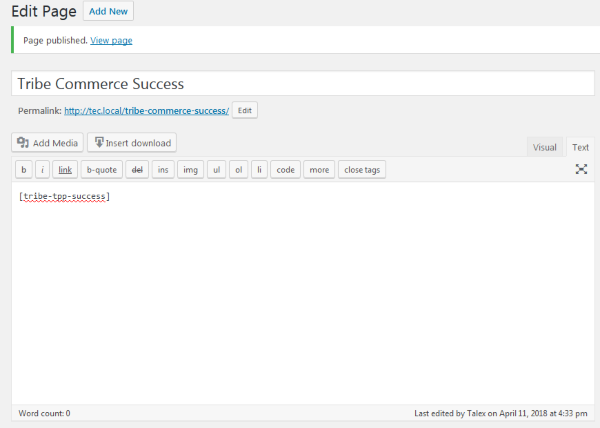
Make sure that you set the editor to ‘text’ mode.
Thanks for all this!
Cheers,
AndrasApril 11, 2018 at 7:58 am in reply to: Paypal=>Things don't appear to be working at the moment. Please try again later. #1504332KeymasterHi post174admin,
Thanks for reaching out and I’m sorry about this issue.
When setting up Tribe Commerce did you go through our configuration guide?
You will need to make sure the following:
- You have a PayPal Business account
- on PayPal you have enabled IPN
- the notification URL in your IPN settings matches your website address (https://www.americanlegionpost174.com)
- You have a Success page set up: a page on your site which contains the required shortcode ([tribe-tpp-success])
Please check and confirm these to me and then we can go further.
Thanks and cheers,
AndrasApril 11, 2018 at 7:47 am in reply to: Capacity limitation not working and tickets sent without payment #1504321KeymasterGrüezi Adrian,
Thanks for reaching out to us!
I’m sorry about the issues with the ticket capacity. Let me try to help you with this.
Do you also have the total shared capacity set up for the event? You can set that up if you click on the “Einstellungen” button on the bottom right of the tickets section.
If you edit the tickets and change the capacity, then change it back, do you still get the same result?
If you delete the 2 tickets and create new ones, do you get the same result?
Do you first save the event and create tickets after, or you created the tickets at the same time like the event?
I just tried setting up 2 tickets with share capacity for an event, and all worked fine. When I open the ticket for editing, then in the description “Optional: Verkaufs auf einen Teil…” shows the full capacity at the end, not only the capacity of that ticket. Like this: https://cloudup.com/cIMsZccwDJj
when we buy a ticket via the woo commerce checkout, the tickets are sent without payment
There is a setting which handles when the tickets should be sent out. You can find this under Events > Settings > Tickets tab and looks like this: https://cloudup.com/cAj42EHqvwY
Looking forward to helping you fix this.
Freundliche Grüsse
AndrasApril 11, 2018 at 7:12 am in reply to: Unsupported get request. Object with ID 'X' does not exist, cannot #1504240KeymasterHi João,
That is likely due to the policy changes of Facebook and its effect on the Facebook API that Event Aggregator uses to import events.
Here is an article we wrote about this. Please read through and let me know if you have any further questions.
Cheers,
AndrasApril 11, 2018 at 3:23 am in reply to: Problems started in January- latest update causing many issues #1504009KeymasterThanks for sharing your system information. Sometimes the checkbox doesn’t work due to some server settings.
No. We’ve always had the map display at the top of the list view. I’ve never not had it. I had no widget I was using.
Okay, this is the map view you are referring to. The map view is part of Events Calendar PRO, which I don’t see in your plugin list. It might be deactivated or not installed at all.
I see you have a license, so you should be able to download the latest version from your account here.
Install and activate the plugin. Then go to Events > Settings > Display tab and make sure that the Map view is enabled. If you would like the map view to be your default view, then you can set that in the setting right below.
The added fields with Events Calendar Pro. Can’t show you any screen snags since those don’t display any longer.
Same as above. This is part of PRO and I don’t see the plugin installed / activated. Once you activate it then all should be back to normal.
Same with Sidebar links to organizers and venues not working.
Please check what’s up with PRO and let me know.
Andras
April 11, 2018 at 3:13 am in reply to: Problems started in January- latest update causing many issues #1503998KeymasterThis reply is private.
April 11, 2018 at 3:10 am in reply to: Failed Orders still showing in attendee list and stock inventory #1503995KeymasterAfter some further investigation it looks like we have a glitch here. I have opened an internal bugticket for this so our developers will take a look at it.
I am going to set the status of this ticket to “pending fix” and we will update it once the fix is released.
If you have any new questions or issues please create a new ticket and we’ll help you out.
I’d still appreciate it if you could share the url to that thread with me.
Thanks and cheers,
AndrasApril 11, 2018 at 2:40 am in reply to: Failed Orders still showing in attendee list and stock inventory #1503985KeymasterThanks Herb,
I need some time to check this thoroughly.
Could you share the URL of that private thread you mentioned? I can take a look at it and check if it’s a similar issue.
Thanks,
AndrasKeymasterHappy to hear that worked out for you! Awesome!
Since this is marked resolved I am going to close this ticket, but if you need anything else related to this topic or another please create a new ticket and we’ll be happy to help.
Cheers,
AndrasPS: We’d be grateful if you would give us feedback on your satisfaction with support. Just click on one of the classy looking emojis below. 🙂 If you can spare a few words, that’s even better. Thanks!
PS2: If you like our plugins, and you didn’t yet do so 🙂 we would also be happy to receive a review in the wordpress.org repository. Much appreciated!
https://wordpress.org/support/view/plugin-reviews/the-events-calendar/
https://wordpress.org/support/view/plugin-reviews/event-tickets/April 11, 2018 at 2:14 am in reply to: Ticket sale price not changing on front-end when sale ends #1503969KeymasterHi Heather,
I’m sorry for the long silence, I was out last week.
So far all my tests returned good results. I haven’t been able to reproduce the same issue.
Could you set up a test site with only the calendar and ticketing plugins and WooCommerce and test if you can reproduce the issue with a clean setup?
- Create an event in the future with a ticket
- go to the WooCommerce product part of the ticket and set up a sale price starting on the next day and ending one day after
- monitor how the price appears on the list view, the top of the single event page and in the ticket purchase section of the single event page
This is basically what I am doing and all works well.
Or is there anything in this process that you do differently?
Andras
KeymasterHi Greg,
Could you send me a database dump of your website? I would like to see if I can find anything in it that is causing this issue.
If the size is too big you could upload it to some cloud service and share the url in a private reply here.
Thanks!
Andras
KeymasterHi Blake,
Thanks for reaching out to us!
To be able to give you a better recommendation I would need a bit more details on how you imagine this.
I gusee you have tickets for several games in the season.
With The Events Calendar you can enter the matches of the season for which you want to sell tickets for.
And with Event Tickets (and a business PayPal account) you can set up tickets for any or all of the matches which you can then sell.
So if this is what you need, then I believe yes, our plugins would be a fit.
If you give me more details or you have more questions, then I can provide further answers.
Cheers,
AndrasApril 10, 2018 at 8:42 am in reply to: Problems started in January- latest update causing many issues #1503050KeymasterHi J Reddick,
I’m right here ready to jump into the trenches with ya.
I apologize for the somewhat longer waiting time, we are experiencing a higher than usual load in our help desk. We are trying to get to all the issues as fast as we can.
So let’s do this.
To be able to give you better support please share an updated system information with me. Here’s an article on how you can do that: https://theeventscalendar.com/knowledgebase/sharing-sys-info/
Calendar at top of list view no longer displayed
At the top of the list view there is usually no calendar grid. It is possible that the theme you are using had a customization like that, or you were using one of the widgets on the page which shows a month grid and the list of events below.
Added fields gone (option not showing either) – had several fields
Sorry to hear this. Do you mean the Additional Fields that come with Events Calendar PRO?
Can you share with me a screenshot where the fields are supposed to be set up and where they should show up on the back-end and on the front-end?
Sidebar links to organizers and venues not working
Can you share a screenshot on where I can see these?
I CANNOT revert to a different theme.
I understand that sometimes it is difficult to change to a different theme on a live site. In these cases there are 2 options:
1) Setting up a test site where you can play around without affecting the live site in any way
2) Try the “Health Check” plugin which provides a troubleshooting mode that aims to ensure your site will continue to operate as normal for regular visitors.
Just noticed (extension I’m sure of the venue and organizer names in right sidebar showing no links or way to get to them) that when I go to edit them, there is no permalink displayed, no option for featured image, etc.
I’m sorry, could you provide a bit more details on this, possibly with some screenshots for better understanding? Thanks!
in the view of an event, the images of the prior and next events at the bottom are not displaying
This is not a feature of our plugin. If you had this before, then it was possibly done via the theme you are using or a template override.
Let me know the above and I’d be happy to help you untangle this further..
Cheers,
AndrasApril 10, 2018 at 8:15 am in reply to: Failed Orders still showing in attendee list and stock inventory #1502985KeymasterHi Herb,
Thanks for reaching out to us and sorry about this issue.
Can you please check if you go to the attendee list of the event, do the failed orders show up as failed there as well?
Meanwhile I will also do some investigation.
Thanks,
AndrasKeymasterHi George,
Thanks for reaching out to us! That is a great question!
At the moment Event Aggregator cannot import events from RSS feeds.
The currently supported sources are:
- Meetup
- Google Calendar
- iCalendar feeds
- .ics file import
- other sites using The Events Calendar and / or provide event information through the REST API
If you would like and you can share me the urls of the websites where you want to import from I can run a quick check if it’s possible.
Let me know.
Cheers,
Andras -
AuthorPosts