

Forum Replies Created
-
AuthorPosts
-
Andras
KeymasterHey Scott,
Thanks for your patience on this. Please give me some time, so I can find an Eventbrite expert on the team who could help you with this.
Thanks and cheers,
AndrasKeymasterHi James,
Thanks for sharing your sysinfo. I see you are keeping the Events Calendar plugins updated. Good job on that!
No, the iCal importer doesn’t use any resources at all, unless it is doing some important importing. Otherwise it just silently and sadly sits their waiting for something to import. When it gets a job, then it’s all happy and commits itself fully to it to give you the results you need. 🙂
Please do let me know when you find that other plugin that’s causing the culprit.
And you are not using too many plugins. The most I’ve come across was 71! 🙂 And they say it’s not the amount of plugins that slows your site down, it is the quality of the plugins. 😉
Cheers,
AndrasKeymasterHey Rion,
Thanks for sending me your system information.
I can assure you we are putting a lot of effort into creating a great plugin and into following WordPress coding standards. Each release goes through rigorous testing, however, due to the horrendous amount of themes out there we cannot test it with every single one. We do get some tickets like yours and lots of times the design errors come from the theme used, but fortunately most of the time it can be fixed with some css magic.
I checked your site to try to see where the problem lies.
The formatting of the big black buttons comes from the theme you are using. Namely from these 2 stylesheets:
/wp-content/themes/oldstory/skins/oldstory/skin.css
/wp-content/themes/oldstory/shortcodes/theme.shortcodes.cssThey do seem to override The Events Calendar styles a lot. You can possibly check in your theme settings if you can change these separately. Otherwise you need to override with custom CSS.
For the button in the back, 3rd image you attached:
Normally it would look something like this with generic The Events Calendar styling:
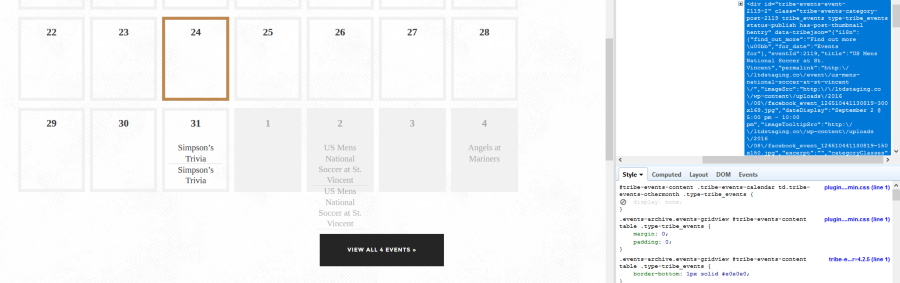
So if you are viewing August, then you still see events in the first days of September, they are just greyed out a bit as it is next month. This is again overridden with a css from your theme (see below) to hide it, but it forgets to hide the ‘View all Events’ button.
/wp-content/themes/oldstory/css/plugin.tribe-events.min.cssYou should be able to hide those with this little CSS snippet, just paste it in your theme’s style.cssfile:
.tribe-events-othermonth .tribe-events-viewmore {

    display: none;

}
As for the text overflowing the box, the size of the box (day) is calculated on the fly based on the length of the content. I don’t exactly know what values are taken into account here. It can be that it is calculated based on The Events Calendar values, but some (e.g. font-size) are overridden later by the theme’s css. I’m not quite sure of that though.
Anyway, to fix this the following addition to your css should have the box size up just right:
#tribe-events-content table.tribe-events-calendar td::before {

    height: unset;

}
If I can make a reco, feel free to send this answer to the theme developers to take a look into the button styling issue, as clearly some theme settings are overriding the link styles in month view.
Let me know if this helps.
Cheers,
AndrasKeymasterHi Kate,
Here’s another piece of info that should elp. You can get the zip with the
tribe_get_zipfunction call.
https://theeventscalendar.com/function/tribe_get_zip/Cheers,
AndrasAugust 24, 2016 at 3:30 pm in reply to: community login redirects to today won't allow login or input #1155565KeymasterHey jskk123,
Thanks for your patience. That is indeed a weird issue, indeed. I have to say I got lucky and found the solution. It works without any major intervention.
When you are sending the folks to log in, send them to this link / address:
http://gorgecurrent.com/events/myevents/add/instead of this:
http://www.gorgecurrent.com/events/myevents/add/So leave out the ‘www’ at the beginnig and it will work.
Check and let me know if that works out for you as well.
Cheers,
AndrasKeymasterHi Kate,
Thanks for getting back to me on that. You are right, it doesn’t show the zip code.
I will definitely forward your suggestion to the development team, so it might be fixed in a future release.
Let me know how far you get.
Cheers,
AndrasKeymasterHello Rion,
Hmmm, interesting.
Can you share with me your system info please. I’ll see what I can do.
Cheers,
AndrasKeymasterHey Scott,
Thanks for reaching out! I’m sorry you are having a problem with the Eventbrite plugin.
No, currently we don’t have any bugs related to publishing to Eventbrite.
Did you follow the steps outlined in this article?
And especially this:
https://theeventscalendar.com/knowledgebase/configuring-eb-tickets/Let me know, I’ll be waiting.
Thanks and cheers,
AndrasKeymasterHello James and welcome to the forums!
Thanks for reaching out and sorry that you are experiencing this issue.
To be able to give you the fullest support, could you please share your system information with me in a private reply?
Here’s a handy guide how you can do that:
https://theeventscalendar.com/knowledgebase/sharing-sys-info/Thanks for the testing and sharing the details. Do I understand correctly that if you disable only iCal Importer, then already everything works fine?
Did you possibly also test the other way around, having only Avada, Fusion Builder and our 4 plugins active and nothing more, whether you still get the error?Thanks for getting back to me with those!
Cheers,
AndrasAugust 23, 2016 at 4:50 pm in reply to: Add The Variables Onto The Woo Commerce Confirmation #1155126KeymasterHi joemac41,
Thanks for reaching out! Let me help you with that.
If I understand correctly, you have an event with a ticket, and that ticket has custom data though the “Request information for each attendee…” option.
If that is the case, then this snippet should help you, just paste it in your functions.php file (Appearance > Editor > choose functions.php on the right side):
https://gist.github.com/PthPndr/943bd38925ccc0e55b5a4f97835ad821#file-add-fieldset-meta-php
Let me know how that works out for you.
Cheers,
AndrasKeymasterHi Heather,
I’m sorry you are experiencing this issue. Let me try to help you out with this.
Could you share with me the link to the thread with the similar error please?
Do you still get this error if you deactivate Powerpress? Or if you deactivate The Events Calendar Plugins and leave Powerpress on? Would be great if you could test this, that could shed some light on things.
I’ll be waiting for the results.
Cheers,
AndrasKeymasterHey Rion,
Welcome to the forums! Let me try to help you with this.
I’m sorry you are having this issue. At first it looks like this is coming from the theme you are using.
Please try switching to a default theme like twentysixteen and check if the issue still exists. If it’s a theme issue.
Also could you please share your system information with me in a private reply? This will help us eliminate any glitches coming from a badly coded plugin.
Here’s a handy guide how you can do that:
https://theeventscalendar.com/knowledgebase/sharing-sys-info/Thanks and cheers,
AndrasAugust 23, 2016 at 2:22 pm in reply to: WordPress database error: [Unknown column 'wp_postmeta.meta_value' in 'field lis #1155032KeymasterHey Marcus,
Thanks for going Pro and welcome to the forums! Let me try to help you out with this.
I tried to run this select on a local db and managed to get the same error. However, when I changed the MIN(wp_postmeta.meta_value) to MIN(tribe_event_end_date.meta_value) (which seems to be the same thing) then it ran without any issue.
I’m not sure how and when this query is generated. Can you shed some light on that?
Also I would recommend you to do a test for conflicting plugins on this? Here’s a nice guide for this:
Let me know the results.
Cheers,
AndrasAugust 23, 2016 at 2:05 pm in reply to: community login redirects to today won't allow login or input #1155018KeymasterHi jskk123,
Thanks for reaching out! I’m sorry you are having an issue, let me try to help here.
Unfortunately, it looks like this is not a bug but simply how the plugins work together. WordPress and the plugins are continuously evolving and sometimes things like this arise.
The issue might come from the fact that the Add community event form / page is actually an admin page shown in the frontend. And it looks like Access Control is blocking that, rightfully so.
At this stage I can recommend 2 things:
1. You could contact the developers of Access Control to look into this and help you solve it.
2. You can use a different plugin to limit access to your backend. I’m not really familiar with plugins like that, but I’m sure there are several ones.
I hope this helps. Let me know if you have any other questions.
Cheers,
AndrasKeymasterHi Jackie,
I was looking around and testing a bit. Here’s what I found.
When I used the Event Ticket Plus setting and bank transfer as gateway, then it didn’t work. That has a reason as if the order is done with bank transfer of check payment then it will not get automatically completed. Obviously, in these cases you didn’t get the money yet, so why would you give out the ticket.
When I used the code which you sent (actually I copied it from here, then the order was marked completed, even when I used bank transfer.
What payment gateway are you using? Does it have a setting where you can set what the order status should be if the payment is successful?
Let me know and we take it from there.
Cheers,
Andras -
AuthorPosts