

Forum Replies Created
-
AuthorPosts
-
Andras
KeymasterHey Nadine,
I’m happy to help you with this further. In order to do that I would need to see the page where this is happening. As I checked it is not on the live site – there I still see the wrong code inserted.
Do you maybe have a link to the page where I can see this? Then I can take a look at the code.
Thanks,
AndrasKeymasterI keep my fingers crossed for you, Frank!
Please let me know how it works out and would be great if you could share the code here. Might help some others with a similar problem.
I will leave this ticket open so you can do that if you want to share.
Have a great weekend!
Cheers,
AndrasKeymasterHi Nadine,
No worries, we’ll work this out. I believe we are almost there.
I took a look at your code and I see it’s implemented, but there’s somehow a glitch.
Please make sure that characters like “<” and “>” are entered like that and not like “<” and “>”
So not like on this screenshot:
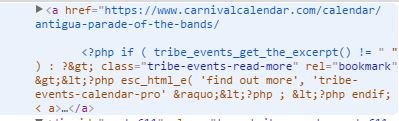
Can you check that and see if it works?
Andras
KeymasterHi Frank,
Unfortunately I don’t have a handy function like that on hand, sorry. The 260 tickets can indeed be time consuming, however, you just need to re-save the tickets in the event, you don’t need to resave the event (unless you change something there as well).
I will ask around in the team if someone has a script for that, but that will take a bit of time.
Cheers,
Andras
KeymasterHey Roger,
I’m happy to hear you managed to fix it! Way to go, man!
I’m going to close this ticket, but if you need any help in the future, feel free to open a new one. We’ll be here to help you out.
Cheers,
AndrasPS: If you like our plugins, we would welcome a review in the wordpress.org repository. Thanks!
KeymasterHey Cliff,
Thanks for reaching out to us! That’s an excellent question you have there.
No, Event Tickets Plus (plus the core plugins) will not be enough for that. You also need an ecommerce solution in order to be able to sell tickets. Event Tickets plus currently works with WooCommerce, Easy Digital Downloads, WP E-Commerce, and Shopp. I believe the basic version of all these are free, and I know for sure that WooCommerce supports PayPal out of the box. Because payment is handled by PayPal you will not need an SSL certificate.
Let me know if this answers your question or if you have anything else you want to ask regarding this topic.
Cheers,
AndrasKeymasterHey Brandon,
Thanks for going Pro and welcome to the forums! Let me try to help you with this one.
If you think this is an idea worth implementing, then please visit our uservoice page and post it there. If it gets enough votes, then it will make it into a future release.
If you would like to have a popup like on the month view, then take a look at the wp-content\plugins\the-events-calendar\src\views\month\tooltip.php file, that could give you some inspiration.
Let me know how far you get.
Cheers,
AndrasKeymasterHi William,
Thanks for reaching out! Let me help you with that one.
You will need to customize some of the template files based on which view you would like to change.
I reco you start with these 2 articles:
https://theeventscalendar.com/knowledgebase/themers-guide/
https://theeventscalendar.com/knowledgebase/template-overview/Let me know how far you get or if you have any more questions.
Cheers,
AndrasKeymasterSalut Frank,
Thanks for reaching out! Let me try to help you with your question.
What you want to achieve can be done with customization, however we are quite limited in providing support for that, but I can point you in the right direction.
Please check this thread and the snippet provided at the end.
What this does is, it copies the category of the event to the WooCommerce ticket, if one is created.
You could adjust this code to your needs to create the ticket SKUs.
I think you will need these functions as well:
https://theeventscalendar.com/function/tribe_get_events_title/
https://theeventscalendar.com/function/tribe_get_start_date/
https://theeventscalendar.com/function/tribe_get_start_time/You can also check WooCommerce documentation how to handle SKU names and where / how they are saved.
Let me know if this helps or if you have any more questions.
Cheers,
AndrasKeymasterHey Roger, welcome to the forums!
I’m sorry you are experiencing this issue. Let me try to help you out with this.
I checked on your motoristes site (/events/esdeveniments/afegir) to send a community event and I succeeded.
Can you point me to a page where you are having this issue and give me a detailed description, possibly with some screenshots?
Also, if you could share with me your system information, that would be great. And then we take it from there.
Thanks and cheers,
AndrasAugust 25, 2016 at 3:24 pm in reply to: Event Ticket Plus, Woocommerce membership restriction #1156087KeymasterSalut Leila,
Je suis trés heureux that you managed to find a solution for that. (Let’s not push my French too far. 🙂 )
As for the translations, congratulations, you have found a bug! 🙂 I have already filed an internal bug ticket for this, so it will be fixed in a coming version.
BUT you don’t have to wait that long, it is an easy fix. Based on your screenshot I take it you know your way around PoEdit.
- Look up the wp-content\plugins\event-tickets\lang\event-tickets.pot file and open it with PoEdit. It will highly likely pop up an error message that you can click away, then simply save the .pot file. (Don’t put any translations in here.)
- Then open your .po file and run an “Update for POT file…” (Should be in the Catalogue menu).
- Do your translations, save the file and done.
I reco that you save the translation files under wp-content/languages/plugins so that you keep your translations even after a plugin update. You can find more info on that in this article:
I hope this helps! Let me know how far you get.
Cheers,
AndrasAugust 25, 2016 at 2:28 pm in reply to: community login redirects to today won't allow login or input #1156077KeymasterI’m super stoked to hear it helped! Yeeeehaaaaa! 🙂 (And thanks for your kind words! I have my moments. :chuckle: And sometimes I have a bit of luck.)
I am going to go ahead and close this ticket, but if you need help on this or something else, don’t hesitate to open a new topic. We’ll be happy to help!
Cheers,
AndrasPS: If you like our plugin, we would be happy to receive a review in the wordpress.org repository. Thanks!
KeymasterHey Nadine,
I’m sorry to hear it didn’t work out. Let’s still try to make that work.
the description that then creates the excerpt…
Erm… can you please explain this? Is this the generic description of the event? It doesn’t really matter whether you use the excerpt field or not. If an excerpt is generated (either from the field or from the description) the code should work.
Which view are you using to list your items where you want to show this? You need to customize the files of that view. My initial take was you are using the map view.
Our themer’s guide and the template overview gives you a good overview of where you can find the files for the different views:
https://theeventscalendar.com/knowledgebase/themers-guide/
https://theeventscalendar.com/knowledgebase/template-overview/Also note, that if you implement this in a view that is part of the core The Events Calendar plugin, then you will need to use ‘tribe-events-calendar’ instead of ‘tribe-events-calendar-pro’ in the code as the text domain.
Let me know if you manage to get further or if you need more help.
Cheers,
AndrasAugust 24, 2016 at 4:45 pm in reply to: Event Ticket Plus, Woocommerce membership restriction #1155590KeymasterBonjour Leila et bienvenu au forum!
I’m sorry you are experiencing that issue. Let me try to help you with that.
I need some more information from you so that I can help.
Could you explain a bit more in detail what you mean when you say “but hone using the member restriction the entire event is blocked”? What are you doing here exactly? What settings are you changing? Screenshots can also be helpful.
In order to restrict the RSVP part you should take a look at this file:
wp-content\plugins\event-tickets\src\views\tickets\rsvp.phpAnd here are two guides to help you with customization:
https://theeventscalendar.com/knowledgebase/themers-guide/
https://theeventscalendar.com/knowledgebase/template-overview/For the translation, please give me some time to look into that.
Thanks and cheers,
AndrasKeymasterUntil I try to find someone, could you run a test for conflicting plugins / theme based on this guide?
Let me know the results, we’ll be waiting for it.
Cheers,
Andras -
AuthorPosts