

Forum Replies Created
-
AuthorPosts
-
Andras
KeymasterHello Pete,
Thanks for reaching out to us! That is a very good question you have there.
Yes, it is possible to import events with our iCal importer plugin from other sites, that including another WordPress site running The Events Calendar. It can be a one-time import or even a recurring one.
So the scenario you describe can be easily executed if all 3 sites have the iCal importer.
Let me know if you have any other questions.
Cheers,
AndrasAugust 22, 2016 at 3:48 pm in reply to: List Widget for Events Calendar Pro Not Styling Correctly #1154594KeymasterHi Alison, welcome to our support forums!
A big thanks for using our plugins and going pro!
I’m sorry you are having an issue. I checked this and so far I haven’t been able to reproduce this.
Could you possibly share a link where I could see this?
Also, can you check if the issue exists when you are using a default theme like twentysixteen?
Thanks and cheers,
AndrasKeymasterHi rtandoh,
Indeed, your Community Events license has expired a very long time ago and usually we don’t give support to products without a license.
I’m sure what you want to achieve can be done with some customization work, but for the most part that is beyond the support we can provide.
I can share with you a list of developers who are not affiliated with us, they might be able to help you with this:
https://theeventscalendar.com/knowledgebase/find-a-customizer/Cheers,
AndrasKeymasterHello Hani,
Thanks for reaching out! I can help you with your issues, however, our current policy is not to accept logins or to log in to customer servers/WordPress installations. Also, we are limited in supporting customization, but I can definitely show you the way in the right direction.
First and foremost I would like to advise you to update all your plugins to the most recent version. I see it from your system information that the Pro version of our plugin and Community Events are older version, while The Events Calendar is fresh. These plugins go hand-in-hand, so to make them work at their best, having the most recent version of them at all times is highly recommended.
Also, before doing any update, I recommend you to do a full backup of your site. There are numerous good, free and pay-for plugins for this purpose, like UpdraftPlus or BackupBuddy.So let’s go one-by-one:
One, I was able to to follow the territorials for adding “Add an Event” on the main front page
I’m not quite sure how you added that button, but good job on it. I recommend you to read our Themer’s Guide, which should help you in putting that button in the right place.
As for formatting, if you add some classes to the code of the button, then it will look more like a button. Check the code and add the bold classes.
<a class=”tribe-add-event-button button button-border accent1 hover-accent1” href=”http://www.norcalcouncil.org/events/community/add”>Add an Event</a>
Two, I was hoping that you can remove the page title for me.
Add this code to your theme’s (preferably a child theme) style.css file, under Appearance > Editor :
.events-gridview .page-header-content {

    display: none;

}

.page-header .page-header-content
As for your third issue with the organizers, if the issue still exists after updating our plugins, please run a test for conflicting plugins and theme based on our guide here: https://theeventscalendar.com/knowledgebase/testing-for-conflicts/
Let me know how these work out. I’ll be waiting.
Cheers,
AndrasKeymasterHello Mark,
Thanks for going Pro and welcome to our support forums!
I’m sorry you are experiencing this issue. Let me try to help you here.
The event names / slugs are unique, however when you click on one or on See all, somehow it takes you to the first event in the series.
Until now I didn’t manage to recreate the issue. First I would like to ask you to run some tests:
Can you go to Settings > Permalinks and hit Save. Please check if the issue persists.
I see that the first date of this event is in the past.
Does this issue occur if you create a new recurring event starting in the past?
What happens if you create a new recurring event which starts in the future?Can you run a test for conflicting plugins and theme? Here’s our handy guide for that:
Let me know the results of these. Thanks!
Cheers,
AndrasKeymasterHallo Christoph-Simon,
Thanks for reaching out! I believe something went wrong when you pasted in the text as it looks like you want to change “:” to “.”, though I doubt that’s what you want.
Could you please post again the issue?
Also, I would recommend reading these articles, maybe they will help you:
https://theeventscalendar.com/knowledgebase-category/languages/
Cheers,
AndrasKeymasterHello victorialove,
Thanks for going Pro and welcome to the forums! I’m sorry you are experiencing an issue, let me try to help you with that.
Thank you for submitting your system information. Based on that I see that you The Events Calendar has an older version than Events Calendar Pro. Please update The Events Calendar and see if the issue still persists.
If you are doing an automatic update, then you can try deactivating the Pro or even both plugins before that. If there is an error with the update, then as a next step log in to your server and delete the the-events-calendar/lang/the-events-calendar-de_DE.mo file, and try the update afterwards.
If you want, you can also do a manual update. Just follow the steps in this knowledgebase article on our site: https://theeventscalendar.com/knowledgebase/manual-updates/
And it is recommended to do a backup before doing any update on the site. There are a number of good free and pay-for plugins for this purpose.
Let me know if you manage to solve this or if you have any other questions.
Cheers,
AndrasKeymasterHi Susanne. You posted in our Pre-Sales forum with an Anonymous user account that doesn’t have any purchases associated with it.
We don’t answer support questions for Events core/free or the PRO add-on in the Pre-Sales forum.
If you made your purchase(s) through a different user account, please login to that account and then post in one of the paid forums.
Thank you for your understanding and thank you for using our plugins.
===
Possibly helpful references:
- Themer’s Guide
- Topics on translation
- Our free support forum (for bug reports and users helping each other — no usage support provided by us)
August 22, 2016 at 1:35 pm in reply to: 3 Events at the same time in week view are not showing up #1154527KeymasterHey Philip,
I’m sorry you are disappointed. There is no generic solution to this yet because until now we didn’t receive any issues / requests with having 3 events at exactly the same time, so nobody reported this missing feature. I will open an internal ticket for this, so hopefully it will make it to a future release and then no special coding will be required.
On your new issue, I’m not quite sure what I’m supposed to see. Here’s a screenshot:
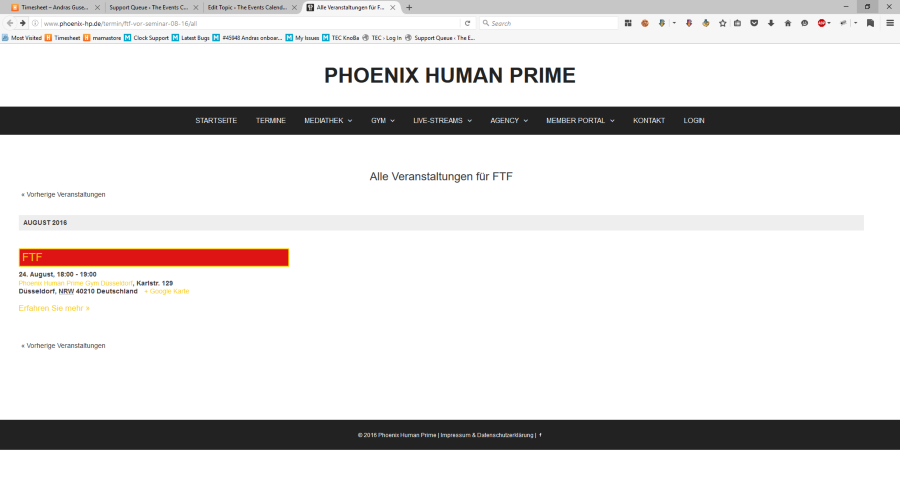
I see one event there, the last FTF event in August which is part of the FTF recurring event with the slug ftf-vor-seminar-08-16.
On the main calendar view I see all 3 events (FTF, FTF yellow, FTF junior) in the calendar next to each other on August 24.
Can you send some more details on the issue?Thanks,
AndrasKeymasterHey Joseph,
Thanks for getting back to me on that. I am glad to hear it was fixed and is working fine.
I am going to go ahead and close this ticket. If you have a similar issue or another in the future, please do not hesitate to create a new one.
Cheers,
AndrasKeymasterHey neuroticartist,
I am glad to see you were able to figure it out. Thanks for posting the solution here! It will surely help others.
Since it’s marked resolved I am going to go ahead and close this ticket. If you have a similar issue or another in the future, please do not hesitate to create a new ticket. We’ll be happy to help.
Cheers,
AndrasKeymasterGreat, I’m super stoked it helped! Woohoooo!!! 🙂
I am going to go ahead and close this ticket, but if you need help on this or something else, don’t hesitate to open a new one, we’ll be here to help you out.
Cheers,
AndrasAugust 19, 2016 at 2:05 pm in reply to: 3 Events at the same time in week view are not showing up #1153848KeymasterHey Philip,
For those 3 events you can use the same code, you just need to extend it with the event IDs (post IDs). So you would need to extend the above code with the following:
/* SET THE WIDTH OF THE THREE EVENTS */

.type-tribe_events.post-8130, .type-tribe_events.post-8627, .type-tribe_events.post-8628,

.type-tribe_events.post-8133, .type-tribe_events.post-8739, .type-tribe_events.post-8738 {

    width: 32% !important;

}

/* LEFT POSITION OF SECOND EVENT*/

.type-tribe_events.post-8627,

.type-tribe_events.post-8739 {

    left: 32%;

}

/* LEFT POSITION OF THIRD EVENT */

.type-tribe_events.post-8628,

.type-tribe_events.post-8738 {

    left: 64% !important;

}
Hope this helps!
Unfortunately there is no generic way to do this, so it needs to be done event by event. It is quite unusual to have 3 events at the same time.Cheers,
AndrasKeymasterHi Joseph,
I’m sorry you are experiencing this. Let me help you with that.
I suppose you are looking at month view on a mobile device and you are tapping on a day that has a dot. In that case the events of that day should show up below the calendar, you just need to scroll down a bit.
If is still doesn’t work, can you confirm you did a plugin and theme conflict test like this?
I see you used different theme. Did you try with a default theme like twentysixteen?
Cheers,
AndrasKeymasterHello Robert and thanks for reaching out to us!
There is no out-of-the-box export to csv solution in our plugins at the moment. You can export to an ICS file, though I don’t know if that would help you.
There are some external plugins that could help you achieve what you want. I recommend you first this thread, which has some recommendations and it seems to have worked.
I believe it also shouldn’t be too difficult to develop a dedicated plugin for this. Though custom developments like this our beyond the scope of our support, I can share with you a list of freelancers, known names in the community, who should be able to help you out, and who have to affiliation with us:
https://theeventscalendar.com/knowledgebase/find-a-customizer/
Please, let me know if this helps you or if you have any other questions.
Cheers,
Andras -
AuthorPosts