

Forum Replies Created
-
AuthorPosts
-
September 14, 2016 at 2:25 pm in reply to: Ticket fieldsets are not send by email to customer #1164246
Andras
KeymasterHey Quentin,
Thanks for sharing that screenshot. Here is one in return. 🙂

You will only see Participants show up on hover if the event has tickets to sell. If there are no tickets for an event, you will not see it.
As for the attendee details, they are automatically added to the Ticket email that is sent to the buyers, see here:
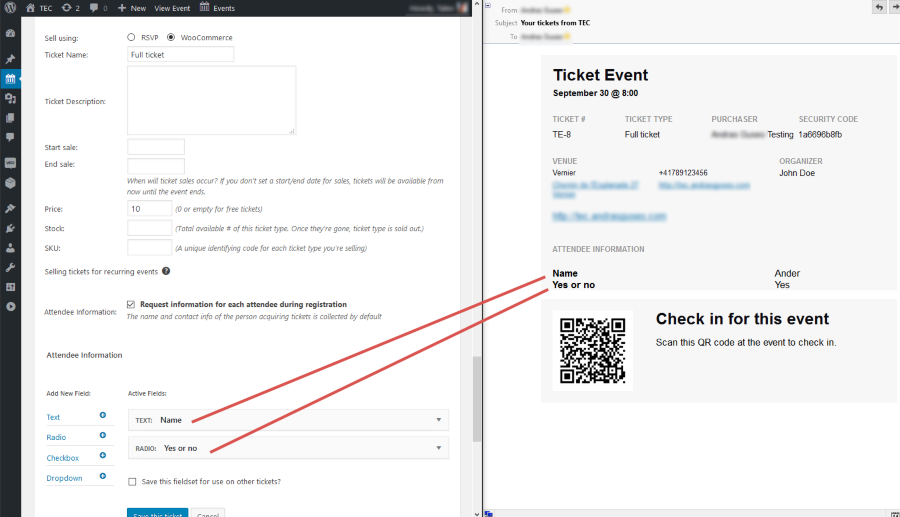
It might be missing in the case if you have some custom code or plugin in place that removes this.
If you run a test for conflicting plugins, that should help you eliminate this issue, or at least find the root of it. Then it will be easier to fix.
Let me know how that test turns out.
Cheers,
Andras
KeymasterI’m afraid at the moment there is no automated solution for this. There are some technical limitations and reasons for this. To better understand this I recommend this article from our blog that give a quite detailed description of the cluprits.
https://theeventscalendar.com/the-trouble-with-excerpts/
However, what you could do is write a snippet or plugin with the functionality, that whenever an event is saved, it takes whatever is in the description and saves it as the excerpt as well. This way you will have your excerpts automatically filled with exactly the same content.
Let me know if you have any other questions.
Cheers,
AndrasSeptember 14, 2016 at 1:52 pm in reply to: Events Calendar PRO not working / not installed properly #1164217KeymasterHey Andrew,
That can be a result of several things.
Does it also happen if you switch over to a default theme like twentysixteen?
Also please try to run a test for conflicting plugins. Here’s a handy guide for that:
Let me know the results and we take it from there.
Andras
KeymasterHi Ian,
The tooltip picking up the excerpt is done with a mix of php and javascript and there unfortunately is no option to change the excerpt to excerpt-with-html.
However, you could fill out the Excerpt box of the event and include html tags. Those would show up in the tooltip.
An easy way to do this is the following:
- When editing the event, change the event description box to text. This will then show you all html tags and everything.
- Copy and paste the content you need to the excerpt box. (If you don’t see the excerpt box, then scroll to the top and in the top right corner open the Screen Options tab and enable Excerpt)
- Publish and check the result.
Let me know if this solution works for you.
Cheers,
AndrasKeymasterHey there leviticus,
Thanks for reporting back on that! I’m super happy to hear it helped and you are one step closer to the perfect website!
I am going to close this ticket, but if you need anything else related to this topic or another please start a new thread in the forum and we’ll help you out.
Cheers,
AndrasPS: We’d be grateful if you could give us feedback on your satisfaction with support. Just click on one of the classy looking emojis below. 🙂 If you can spare a few words, that’s even better. Thanks!
KeymasterCiao Alessandro
I’m sorry that didn’t work out.
I’m really sorry, but based on our terms and conditions:
“All support is provided via our forums; there is no live chat, phone support or email support available.”
Could you check that you switch to a default theme like twentysixteen, place that new single-event.php file in the appropriate folder and check if it works there? This would help us eliminate a conflict with the theme you are using.
With twentysixteen, this is where you need to copy the file:
wp-content\themes\twentysixteen\tribe-events\pro\widgets\modules\single-event.phpYou could also switch off all plugins, except for the Modern Tribe ones. This will help eliminate any conflicting plugins.
Could you please share your system information with me in a private reply?
Here’s a handy guide how you can do that:
https://theeventscalendar.com/knowledgebase/sharing-sys-info/I understand this process can take a while, but let me assure you that I will try to help you fix this to the best of my knowledge.
Cheers,
AndrasSeptember 14, 2016 at 1:07 pm in reply to: Recurring event showing up multiple times in blog loop #1164187KeymasterThis reply is private.
KeymasterThis reply is private.
KeymasterHappy to hear that helped!
I’m going to close this ticket. If you have any other questions or issues, please, don’t hesitate to open a new thread. We’ll be here to help out.
Cheers,
AndrasPS: If you like our plugin, we would be happy to receive a review in the wordpress.org repository. Thanks!
https://wordpress.org/support/view/plugin-reviews/the-events-calendarPS2: We’d be also grateful if you would give us feedback on your satisfaction with support. Just click on one of the classy looking emojis below. 🙂 If you can spare a few words, that’s even better. Doublethanks!
KeymasterHello Abby,
Thanks for reaching out with your question!
Unfortunately at the moment it is not possible to export only attendees of a certain ticket type / ticket name.
If you think that is something you would like as a feature I encourage you to visit our User Voice Page and either upvote an existing request or make a new request there.
Once you export the whole list, and open it with a spreadsheet software, it should be quite easy to filter your list the way you want it.
If you copy the exported table to Google Sheets, then select the whole table, including the top row with the headers. Click on the little funnel icon (marked with red on the below screenshot). That will switch on the filtering option. Afterwards you can filter your list by clicking on the little down arrow in the Ticket Type cell.
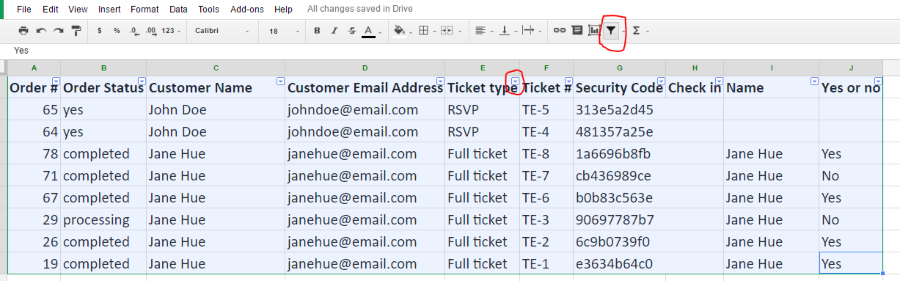
Let me know if this helps or if you have any other questions.
Cheers,
AndrasKeymasterHello Ian,
Thanks for reaching out!
I’m afraid what you are asking is not possible out of the box at the moment. It might be doable with some customization, however, we are quite limited in supporting that.
If you think that is something you would like as a feature I encourage you to visit our User Voice Page and either upvote an existing request or make a new request there.
Or a developer from the following list might be able to help you out. They are well known names in the community and are not affiliated with us:
https://theeventscalendar.com/knowledgebase/find-a-customizer/
Let me know if I can help you with anything else.
Cheers,
AndrasKeymasterHello daviddweb,
Thanks for reaching out!
At the moment the date field is not available in the additional fields. The only field types available are text, radio button, checkbox and dropdown list.
If you think that is something you would like as a feature I encourage you to visit our User Voice Page and either upvote an existing request or make a new request there.
It might be possible to do this but would require customization work, which we are limited to support. Here is a list of developers though, who might be able to help you out with this. They are well known names in the community and are not affiliated with us.
https://theeventscalendar.com/knowledgebase/find-a-customizer/
Let me know if this answers your question or if you have another one.
Thanks and cheers,
Andras
KeymasterHey Greg, thanks for the info!
I’m still having trouble recreating the issue at hand.
I have couple ideas that we can try. These things happen a lot of times due to timezone settings / issues. Until now however we didn’t manage to nail it down.
But first: Did you try it also with creating a new event after all the times / timezones have been updated?
Did you manage to try my suggestion: change Events > Settings > General tab > Timezone Settings?
Also try changing the WordPress Timezone (Settings > General) to UTC time format (and not city). And leave the event on New York. I had 1-2 cases where that worked.
If you are open to experimentation, you can try the different timezone combinations for 1) site and events; and 2) UTC and city-based. That basically gives you 4 options, 2 of which you tested until now, if you do the above reco.
Please give these a try and let me know. Thanks for your endurance!
Andras
KeymasterHello Alessandro,
Non disperate! Sono qui per aiutare. 🙂
I have created the custom single-event.php file for you. You can download / copy it from here:
https://gist.github.com/andrasguseo/f01490135bb50b2de8eb4ac3923fc2bbPlace the file in this folder:
wp-content\themes\{your-child-theme}\tribe-events\pro\widgets\modules\single-event.php
Let me know if this helps, I’ll be here waiting.
Ciao,
AndrasKeymasterHi Nicolaas,
Since this is marked resolved I am going to close this ticket, but if you need anything else related to this topic or another please post a new topic on the forum and we can help you out.
Thanks and cheers,
Andras -
AuthorPosts