

Forum Replies Created
-
AuthorPosts
-
September 13, 2016 at 1:52 am in reply to: Recurring events are all importing from Google Calendar as the start date #1163272
Andras
KeymasterThis reply is private.
KeymasterHey Greg,
Thanks for checking an dgetting back to me on that. I’ll keep testing to see if I can reproduce.
Meanwhile if you get some feedback from your provider, let me know.
Cheers,
AndrasKeymasterHi Sam,
Thanks for sharing that video. I will take a look and do some investigation. Please allow me some time for that. I’ll get back to you asap.
Cheers,
AndrasKeymasterHello Anders,
Thanks for getting back to me on this. I keep my fingers crossed, it would also help us – and I’m sure a lot of other people – if Google would enhance that functionality.
I will close this topic now. In case you have any other questions or issues coming up, don’t hesitate to open a new thread. We’ll be here to help out.
Cheers,
AndrasSeptember 13, 2016 at 12:21 am in reply to: Recurring event showing up multiple times in blog loop #1163238KeymasterThis reply is private.
KeymasterHi Alessandro,
Thanks for reaching out!
Interestingly the venue for the widget is in the code but it doesn’t show. I will discuss this internally.
You still have 2 options though.
Option #1: you can user the Event List widget in which you can choose what details you want to show to the visitors, including the venue.
Option #2: you will need to do a bit of customization. Here’s what you need to do:
Take this file: wp-content\plugins\events-calendar-pro\src\views\pro\widgets\modules\single-event.php
Make a copy here: wp-content\themes\{your-child-theme}\tribe-events\pro\widgets\modules\single-event.php
Open it for editing.
From around line 64 you will see a whole bunch of these kind of lines:
<?php if ( isset( $venue ) && $venue && tribe_get_venue() != '' ): ?>You will need to remove the first 2 items from the statement like this:
<?php if ( tribe_get_venue() != '' ): ?>Do this for all the details that you want to show in your calendar widget.
Let me know if this helps.
Cheers,
AndrasSeptember 12, 2016 at 3:04 pm in reply to: Next/previous month navigation below month view of calendar #1163032KeymasterHello Marsha,
Thanks for going pro and welcome to the forums!
By default the navigation to the previous / next day / week / month shows up both at the top and the bottom of the page. You can check that with the latest versions of our plugins and if you switch to a default theme like twentyfourteen or twentysixteen.
If it is not showing up, then that could be a customization of the theme you are using.
I might be able to point you in the right direction, if I could take a look at the site (tried but password protected) and if you could share your system information with me in a private reply. Here’s a handy guide how you can do that:
https://theeventscalendar.com/knowledgebase/sharing-sys-info/Thanks and cheers,
AndrasKeymasterHello phal1078,
Thanks for reaching out! I’m sorry you are having that issue, let me try to help you with that.
To be able to support you, could you please share your system information with me in a private reply?
Here’s a handy guide how you can do that:
https://theeventscalendar.com/knowledgebase/sharing-sys-info/Also, does the problem exist when you switch off all plugins except the Modern Tribe ones (and maybe the one handling the shortcode?) and switch to a default theme like twentysixteen? Please check and let me know.
Have you tried the built-in shortcodes that come with EC Pro? Here’s a writeup on those:
https://theeventscalendar.com/knowledgebase/pro-widget-shortcodes/Waiting to hear from you.
Cheers,
AndrasKeymasterHey Nicolaas,
Welcome to the forums!
Indeed, the link Brian shared is the one you should look at. (Thanks a lot Brian for chiming in!)
Let me know if that solves it for you.
Cheers,
AndrasSeptember 12, 2016 at 2:46 pm in reply to: Recurring event showing up multiple times in blog loop #1163018KeymasterThis reply is private.
KeymasterHello Robert,
Thanks for reaching out! That is a great question!
There is a page for all recurring events listing all dates. The url is usually something like this: http://mydomain.com/event/{event-slug}/all/
The result you want to achieve is possible with some customization. We are limited in supporting customizations but I can show you the way:
You would need to customize this file: wp-content\plugins\the-events-calendar\src\views\list\loop.php
In that loop you will need to make a if-else tree using this function: https://theeventscalendar.com/function/tribe_is_recurring_event/
You can find some more detailed information on these links:
https://theeventscalendar.com/knowledgebase/themers-guide/
https://theeventscalendar.com/knowledgebase/template-overview/
https://theeventscalendar.com/functions/
This should get you started. Let me know if you need any more help
Cheers,
AndrasKeymasterHello again The MET,
Great, glad it helped! I am going to go ahead and close this ticket, but if you need help on this or something else, don’t hesitate to open a new topic.
Cheers,
AndrasSeptember 12, 2016 at 1:56 am in reply to: Ticket fieldsets are not send by email to customer #1162692KeymasterSalut Quentin et bienvenue au forum !
I’m sorry you are having this issue, let me try to help you out here.
To be able to give you full support, could you please share with me your system information in a private reply? Here’s a guide how you can do that:
https://theeventscalendar.com/knowledgebase/sharing-sys-info/
To get you started, the collected information should show up when you go to your list of Events. Hover over the event, and click on Attendees.
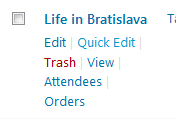
Once there you will see the purchased tickets and RSVPs. Click on the View details under the ticket type:
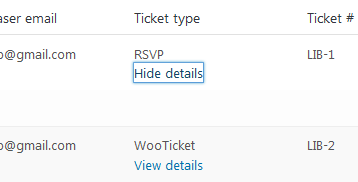
As for the collected information to be added to the email, that requires a bit of customization. I’ll check around if we already have something like that in place. I ask for your patience.
Please check if the above helps meanwhile.
Cheers,
AndrasKeymasterThis reply is private.
KeymasterHello Greg,
Thanks for reaching out and I’m sorry you are having this issue. Based on your system information I see that the timezone of the server where the site is running is set to UTC. That could be a source of the issue.
Nonetheless, could you please share me screenshots of the following settings to be able to look into that in more detail:
- Settings > General > Timezone
- Events > Settings > General tab > Timezone Settings
Thanks!
What you can try is set the latter to the other option and see if that helps.
I’ll be waiting for the screenshots and we’ll take it from there.
Cheers,
Andras -
AuthorPosts