

Forum Replies Created
-
AuthorPosts
-
October 18, 2016 at 8:36 am in reply to: New customer order email missing quantities and prices #1178340
Andras
KeymasterHey Simon,
Thanks for using our plugins and for reaching out!
In the original order emails (not the ticket email) the quantity and price are included. What happens if you remove the customization? Do you then get the missing info in the email(s)?
Cheers,
AndrasOctober 18, 2016 at 8:26 am in reply to: "The ticket with ID XXXXXX has already been checked in." #1178331KeymasterHey Joe,
There is a setting under Events > Settings > Tickets tab which can try to automatically set ticket purchases to completed:
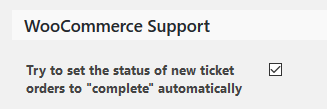
Maybe that is switched on on the other site.
If the order is automatically marked completed, then I believe you should be able to go to the attendee list and see the Check in button. Clicking it will check in the person. I tested again on a local install and worked for me. Can you please check and confirm:
- when the order status is set to complete automatically
- the order <span style=”text-decoration: underline;”>does</span> automatically get completed (we have experienced glitches)
- go to attendee list and you see the check in button
- when clicking the button the user gets checked in
Thanks! I’ll be waiting for the results.
Andras
KeymasterSalut Monique,
No worries about the button, it didn’t close the thread and I undid it.
Definitely hiding the hole category section is the easiest. Paste this snippet into your child theme’s functions.php file:
add_filter( 'tribe_get_event_categories', function( $html ) { return; } );
Let me know how this works out.Cheers,
AndrasKeymasterHey Larissa,
Thanks for getting back to me on that with more details.
I see that you are using mismatching versions of The Events Calendar and Events Calendar Pro. Also last week we have released version 4.3 of all our plugins. Could you please update your plugins to the latest version and check if the issue still exists?
I also see that you are using an older version of Divi as well.
I have tested on a local installation the newest versions of our plugins and newest Divi, and search worked.
Please check the above and let me know the results, and we’ll go further from there if needed.
Cheers,
AndrasOctober 18, 2016 at 7:09 am in reply to: Link to get list of events of specific category in shortcode-view #1178272KeymasterSince the correct answer is marked I am going to close this ticket, but if you need anything else related to this topic or another please post a new topic on the forum and we can help you out.
Thanks,
Andras
KeymasterHi Jerry Lee,
Ooops, apologies, indeed I left it out. I’m really sorry.
Here’s the link to the snippet:
Let me know.
Cheers,
Andras
KeymasterHello again Math,
You could add a checkbox with the Events Calendar Pro plugin. EC Pro lets you create additional fields which will then show up on the Community form.
More info on this is here:
If you want to add a link as well, they you will need to do some customization. Here are two articles that can get you started on that.
https://theeventscalendar.com/knowledgebase/themers-guide/
https://theeventscalendar.com/knowledgebase/template-overview/
Let me know if I can help you any further.
Cheers,
AndrasOctober 17, 2016 at 3:58 pm in reply to: List view: event get missed when navigating between pages, and another bug #1178000KeymasterHey Tim,
Thanks for going Pro and welcome to the forums! And thanks for reaching out with your question!
I’m sorry for having an issue with this, but the solution is quite easy. It comes from the Divi theme.
Go to your Divi > Theme Options and change Number of Posts displayed on Archive pages (5, I believe) to the number that you have under Events > Settings > General tab > Number of events shown per page (10, I believe 😉 )
This should fix it. Let me know how this works out!
Cheers,
AndrasKeymasterHey Chunfung,
Thanks for going Pro and welcome to the forums! No need to be sorry, with your license comes 1 year of pro customer support and we are more than happy to help you with your questions and issues to the best of our knowledge. 🙂
Let’s tackle your questions one-by-one.
1. is it all visitor can add the events or need login
There is a setting for this under Events > Settings > Community > Allow anonymous submissions, check the screenshot here:
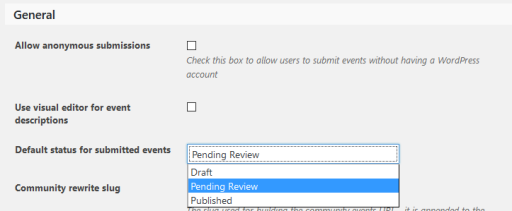
If the box in unchecked, then anybody can submit events.
If the box is checked, then only users who register can submit events.
2. add events will show on the Calendar or only show on the list?
If the events are published, then they will show up in all calendars, not only on the list.
3. can they add event , Status be Pending Review.
Yes, there is a setting for this too, just a bit below the previous setting. Events > Settings > Community > Default status for submitted events
I hope this helps! Let me know if you have any more questions.
Cheers,
AndrasKeymasterHello wouldpreferemailsupport,
Thanks for using our plugins and for reaching out to us with your questions. Let me help you with them.
If you purchase Events Calendar Pro, then you will be entitled for plugin updates and support in our pro forums for 1 year. After your license runs out you will not be eligible for either of them. Also note, that usually we offer discounted rates for license renewals.
You can read more details here:
Based on your description, my first hunch is that this will be a theme issue / conflict. We can and will try to help you solve it, but we are limited in supporting customization.
Let me know if you have any further questions.
Cheers,
AndrasOctober 17, 2016 at 3:19 pm in reply to: Directly approve community submitted event via link in email #1177981KeymasterHello grantdayjames,
Thanks for reaching out! What a great question! Actually that would be cool. However a solution for that doesn’t exist (yet). This might be doable with customization, however we are limited in supporting that.
Thinking about how comment handling is done, when the site admin receives an email that a new comment needs approval, then he also gets links in the email. But those links also don’t approve / decline automatically, but take the admin to a page in the WP admin, where he can approve or decline the comment.
If such a solution would be ok fro you, then you can get the links to the events from your Admin > Events page, and they typically look like this:
When you click on the link like this you will be required to log in first, if you are not logged in already.
If you want to hire a developer here is a list of well known names from the community who might be able to help you out.
https://theeventscalendar.com/knowledgebase/find-a-customizer/
Let me know if this answers your question.
Cheers,
AndrasKeymasterHey Monique,
Thanks for going Pro and welcome to the forums!
Let me help you out with your questions.
To be able to give you full support on this, could you please share your system information with me? Here’s a handy guide how you can do that:
https://theeventscalendar.com/knowledgebase/sharing-sys-info/As a second, could you share with me what you me with “do all that about the slugs” ? 🙂
Thanks! I’ll be waiting for your answer.
Cheers,
AndrasOctober 17, 2016 at 2:54 pm in reply to: "The ticket with ID XXXXXX has already been checked in." #1177967KeymasterHey Joe,
Thanks for reaching our and for the super kind words!!! 🙂
I’m sorry you are having an issue here with the community tickets. I did some testing, this is what I found.
First, I registered as a user and set up a new community event with a ticket.
Then in a different browser I purchased a ticket for the event as a guest / new user.
Then I checked the WooCommerce orders and this order was marked as Processing.
As the admin of the site I went to the event attendees and indeed, as you said, I cannot check in the person, only view the order.

Went to the Event Organizers attendee list and there I can check in / out the buyer.

I believe this reproduces your issue until now.
However, when you mark the WooCommerce order completed, you will be able to check in and out the buyer as an admin as well.
Does this help / answer your question?
Let me know.
Cheers,
AndrasKeymaster🙂
October 17, 2016 at 1:40 pm in reply to: The Events Calendar Filterbar – Override the "flattened_term_list" function #1177931KeymasterThis reply is private.
-
AuthorPosts