

Forum Replies Created
-
AuthorPosts
-
Andras
KeymasterHello btcreative,
Thanks for reaching out and I’m really sorry about this issue with the photo view.
Based on your system information I can see that your EC Pro is an older version. I’d like to ask you to update it to the latest version because this bug might have been already fixed since.
Let me know if the update helps.
If you are still having the issue after the update, then please try switching to a default theme like twentysixteen or twentyseventeen and check if you are still experiencing the same problem.
Thanks and cheers,
AndrasKeymasterHello mshane,
Thanks for getting in touch! Let me try to help you with your question.
With our Event Tickets Plus plugins (and an eCommerce solution like WooCommerce, Easy Digital Downloads, Shopp, or WP eCommerce) you can have the functionality of online registration, ticket purchase / payments.
However, for the different student roles and restrictions, and for viewing their schedule, you will need some custom development as these are currently not covered by our plugins.
Unfortunately we cannot take on small customization projects like that, but I can share with you a list of developers who are well known in our community. They are not affiliated with us in any way and they should be able to help you out with this:
<span class=”paragraph”>list of freelancers</span>
I hope this help, and please, do let me know if you have any more questions. I’d be happy to help.
Cheers,
AndrasKeymasterHello Brett,
Thanks for reaching out and I’m sorry you are having this issue.
As a first please run a test for conflicts based on this guide to see if any of the plugins or your theme is influencing that. Let me know what you find.
If the issue persists even with all plugins deactivated (except the calendar one) and with a default theme like twentysixteen, then:
- check if you have a page set up with the slug “events”, possibly with news as parent
- if you have the menu set up under Appearance > Menus then check if by chance events is a submenu of anything
- please send me a screenshot of the following: Dashboard > Settings > Reading page
Thanks and cheers,
AndrasKeymasterHello Charles,
Thanks for using our plugins and an even bigger than you for your honesty, feedback and your patience! I’d be happy to provide you with some answers to your questions.
Regarding the red exclamation marks: this is an issue we know about and was mostly addressed in version 4.4.2.
Also our finding is: “we’ve had a similar issue with sites that have many (5+) scheduled imports: only 5 can run in parallel at a given time and the other would be marked as “failed” when what happens is that those are being rescheduled for later.”
In other words, the imports with the red exclamation marks didn’t fail, they just couldn’t run, so they are rescheduled to run later.
Also, just a question and please don’t take this the wrong way, if you have a page that takes customer suggestions. Then can one of those be to simply go back to the old Facebook tool?
We are collecting user suggestions on our UserVoice page. If one gets enough votes then it will most likely become a feature of the plugin.
If the legacy Facebook importer works for you better, then you can absolutely use that. Please note however that our legacy importers are not being further developed, only critical fixes are done for them.
it has been months for me having issues
I’m really sorry about that. Yes, there are issues and bugs and we’re working hard to get them fixed. You’ll be happy to hear that our next maintenance release if putting more focus on Event Aggregator related issues. If all goes according to plan it will be released by the end of this month.
In case you have specific issues I would kindly ask you to open a separate thread so we can give it dedicated attention. We’ll be happy to help.
We are planning a big upgrade within the community. Which by the way, I had some questions about from you and was begging to talk with someone. I was rather dismissed and told to refer to the pre-sales forum. Kind of off putting if I am considering a large license purchase.
I’m sorry to hear that you got the feeling you are being put off. That is certainly not our intention.
Based on our policy we provide support for our premium plugins and pre-sales questions here in the forums. Unfortunately we do not provide support over other channels at the moment.
If you let me know your questions I’ll be happy to answer them to you.
You do have the best interface, look, options and overall calendar plugin…..However, if it doesn’t work, then all that becomes irrelevant.
Thanks for the appraisal, and you are right, if something looks good but doesn’t work, then …
We are putting a lot of effort into the development and testing of our plugins before every release. However, due to the multitude of environments, setups and use cases it is impossible to test every possible scenario. This is where we have to rely on our users like yourself, and their valuable feedback, so we can fix and improve on our plugins. All help is much appreciated.
I hope I managed to answer at least some of your questions and concerns. Please do let me know if there is anything else I can help you with.
Cheers,
AndrasKeymasterHello Steve,
Thanks for using our plugins and welcome to the forums! Great questions you have there, let me try to help you out with this.
it’s not clear from a single event’s detail page that they are purchasing admission to a single 5-day event.
If I understand correctly then the 1 ticket they purchase will give attendance to the 5 days, is that right?
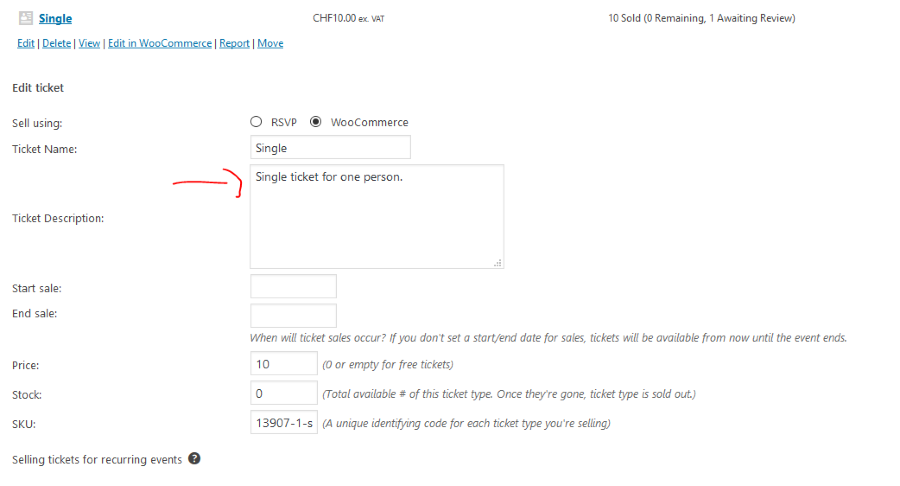
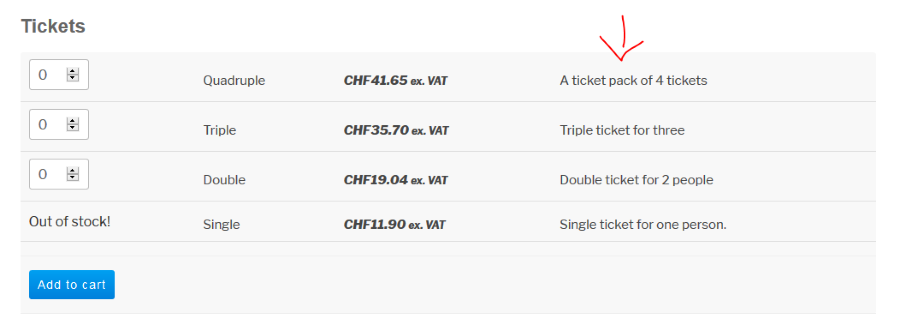
When you are creating a ticket you can add a description to every ticket. You could specify there that the ticket is for the full week. (Or according to your needs.)
Backend:
Frontend:
Is there a way to include the date of the first and last events in the “series” within the event title?
I believe the easiest would be to just add it manually to the event title.
If you would like that to be automatic then you will need to do some customization and template override. Here are some articles to get you started on that:
https://theeventscalendar.com/knowledgebase/themers-guide/
https://theeventscalendar.com/knowledgebase/template-overview/
https://theeventscalendar.com/functions/Alternatively, is there a simple way to include a list of all events in the series on the detail page for each event in the series?
Again, the easiest might be just adding it manually to the event description.
Alternatively a customization like above.I hope this can get you started. Let me know if you need further guidance.
Cheers,
AndrasMarch 15, 2017 at 3:25 am in reply to: Paypal Weiterleitung und Bestätigung der Zahlung funktioniert nicht #1254321KeymasterHallo nochmal,
Olaf, could you please check the same with a regular WooCommerce product and not an Event / Ticket, please? That will help us confirm whether it is a generic WooCommerce / PayPal issue or it is an issue with our plugins.
Thanks!
Wenn es einfacher ist kannst du ruhig auf Deutsch schreiben.
Grüsse
Andras
March 15, 2017 at 3:21 am in reply to: How to preserve custom fields during a scheduled import #1254320KeymasterYou’re welcome! 🙂
March 15, 2017 at 3:18 am in reply to: How would I wrap List View events after month separator in a div? #1254318KeymasterHi Tristan,
I’m sorry, I cannot quite imagine what you are trying to achieve here. Can you send a screenshot / mockup with the result that you want to get? I might be able to better help you with this then.
Cheers,
AndrasKeymasterHello MAD_for_Swing,
Thanks for chiming in here.
I have checked the issue with the “all” sting that you sent a screenshot of. This is what I did.
- Originally language set to English. Check a recurring event if “Show all” works. Confirmed it works.
- Set site language to a different one, German in my case. Check German .po file if “all” string pointed out in your screenshot is translated. Confirmed it is translated to “alle”.
- Go to front-end and open an instance of a recurring event. Hover over the “Show All / Alle anzeigen” link and check URL. Confirmed URL is proper, it show the translated slug “/alle” at the end.
- Click on the url, and I got a 404 page.
- Refresh permalinks: go to Back-end > Settings > Permalinks > Save
- (Recommended to empty cache as well.)
- Go to front-end and open an instance of a recurring event. Hover over the “Show All / Alle anzeigen” link and check URL. Confirmed URL is proper, it show the translated slug “/alle” at the end.
- Click on the url and confirmed that the page loads and the slug is proper in the address bar.
After translating the slug in the .po file, go and refresh your permalinks and empty your cache. Then check if it works properly.
Note that if you want your translations to stay after a plugin update, then put your .po / .mo files in this directory: wp-content/languages/plugins
Let me know how that works out. If you have a different issue that you would like to talk about, then please open a new thread so we can keep the forums clean. Thanks.
Cheers,
AndrasKeymasterCiao Tomi,
Hab’s nochmal angeguckt, der Code wird die pre-set Kategorien nicht importieren wenn du eine neue Kategorie beim importieren einstellst.
Wenn du das nicht möchtest dann versuch es so:
            // if we are setting all events to a category specified in saved import
if ( ! empty( $this->meta['category'] ) ) {
$terms[] = (int) $this->meta['category'];
}
$terms = array();
Die Modifikation von vorher ist weg, also Zeile 1215 geht zur Originalversion zurück und du musst die letzte “array()” Zeile einfügen.
Dieser Code wird alle Kategorien (importierende oder eingestellte) auslassen.
Probiers so.
Beachte bitte, dass die Modifikationen mit einer Plugin-Aktualisierung verschwinden.
Andras
KeymasterAlso in next MR. 🙂
Grüsse
AndrasKeymasterHello Børge,
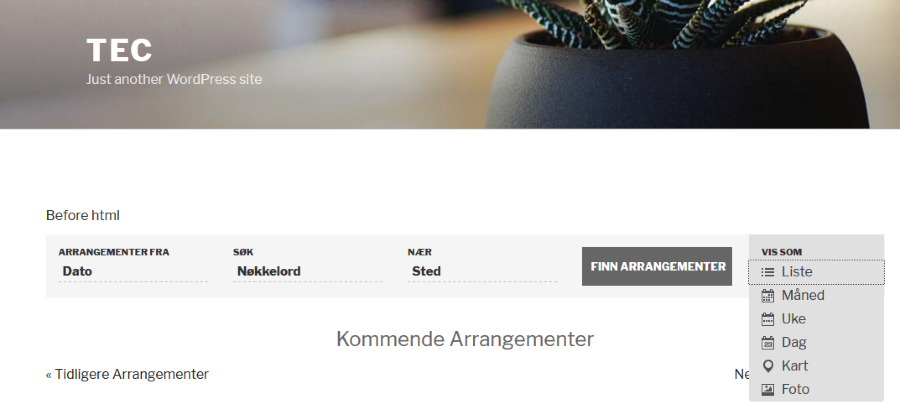
I have checked the translation files you have sent and all of the strings are properly translated to Norwegian with the twentyseventeen theme. Here’s a screenshot:
Note that if you want to preserve the translations even after a plugin update, then the best place to put them is the wp-content/languages/plugins folder, as Barry already pointed out. This is where I placed the translation files you sent. Try copying them there and check.
In case you have translations in other locations other that the lang folder of the plugins and the above folder, make sure to remove them – at least for the calendar plugins.
Also check if you have the latest versions of our plugins, just in case.
Let us know what you find.
Cheers,
AndrasMarch 14, 2017 at 4:50 pm in reply to: Missing Translation Possibilities for several strings #1254138KeymasterHello Brian,
Just submitted the changes, so this should be fixed in the next MR. Thanks for your patience!
Cheers,
AndrasKeymasterGrüss dich Brian,
Thanks for hanging in there and thanks for your persistence regarding these issues. Your help is much appreciated!
The first string “Location” was a tricky one, but I found it and is already pending merge into our next release, so that will be translatable within a couple of weeks.
The second string “Additional Veranstaltung Fields” can actually be translated, only the .po files for Events Calendar Pro need to be update from the .pot.
- open the tribe-events-calendar-pro.pot file and check if the string “Additional %s Fields” exists. If not, then run an “Update from sources” in PoEdit. Then save and close.
- Open tribe-events-calendar-pro-de_DE.po and run an “Update from POT file …”. Now the string should be added to the .po and you can translate it. Save and upload to wp-content/languages/plugins and you should be set.
Please check this last one and let us know if this helps.
Freundliche Grüsse
AndrasKeymasterHallo,
Hmmm… I’m not sure.
I suppose this is the template file in The Events Calendar and <span style=”text-decoration: underline;”>not</span> in Events Calendar Pro. In this case the text domain is correct as the-events-calendar.
So the issue is most probably with the translation files. The .po / .mo might be for a different version and it is not getting translated. So try to check that. I just looked at a single event page with 4.4.4 and it does get properly translated to Alle Veranstalltungen.
Andras
-
AuthorPosts