
Home › Forums › Calendar Products › Events Calendar PRO › Translating problems
- This topic has 16 replies, 3 voices, and was last updated 9 years, 6 months ago by
Børge.
-
AuthorPosts
-
February 20, 2017 at 1:35 pm #1242418
Børge
ParticipantHi,
I have tried to translate some strings to my language Norwegian, but i am unable to do so.
How can I translate these strings?
I have uploaded the norwegian language file from wordpress translations.
February 21, 2017 at 12:23 pm #1243259Barry
MemberHi Børge,
Thanks for contacting us!
Those strings are translatable, but may not yet have been translated into Norwegian. We depend on community contributors to help with this effort as we are unable to translate the plugin ourselves – for more on this, please see the following articles:
With regards to the Month, List and Day buttons in your screenshot: those are not generated by The Events Calendar or else that area has been customized quite extensively (perhaps by your theme). I’d like to think this would be done in a way that respects existing translations, but can’t guarantee it unfortunately.
Does that help at all? Let me know if you have any further questions.
February 23, 2017 at 12:32 pm #1244801ParticipantThank you for your reply.
I have checked the translated version on wordpress.org, some of the words I need to translate is already translated in wordpress.org, but the effect is not on my site.
for example:
http://prntscr.com/eckdwo
http://prntscr.com/eckfe8Any idea how to fix this?
February 23, 2017 at 3:25 pm #1244885MemberHi again, Børge!
So I have a theory (though I’m not familiar with Norwegian so could easily be off track here). If you select Norsk Nynorsk in the WordPress settings, you will receive a set of translations in that particular form of the Norwegian language (nn_NO).
Our plugin, on the other hand, ships with what I understand to be a slightly different form – Bokmål (nb_NO). That does contain translations for the various pieces of text you highlighted, but due to the different language code will not be used by WordPress when Norsk Nynorsk is enabled.
Added to this, my understanding is that – at least currently – wordpress.org will not release partial translations. So, even if the translation hosted by translate.wordpress.org contains the translations you are interested in, you cannot necessarily take advantage of them automatically. Some sort of manual intervention would be required (which might be as simple as downloading what translations do exist, and adding them manually.
Does that help at all, or provide any insights that are of use to you?
February 24, 2017 at 1:38 am #1245087ParticipantThank you for your reply!
My wordpress settings is Norsk Bokmål, and it need to be nb_NO since other plugins is translated to that form of “norsk”.
I could easily translate all strings manually if I could get the .POT file and information about where I should place the translated files in my installation. Do I have to disable wordpress auto translation then, so it will not override my manual translation?
Kreg,
BørgeFebruary 24, 2017 at 3:50 am #1245107MemberMy wordpress settings is Norsk Bokmål
Great!
Though, that’s a little strange since we ship translations for many of the strings you highlighted. I’m not sure why they would not work in that case.
I could easily translate all strings manually if I could get the .POT file
You can find the .POT file in plugins/the-events-calendar/lang (and all our plugins basically follow the same pattern).
Do I have to disable wordpress auto translation then, so it will not override my manual translation?
My assumption is if an nb_NO translation (pulled in automatically from wordpress.org) does not already exist in wp-content/languages/plugins then your custom translation could live there.
At some future point once the WordPress-hosted nb_NO is mostly complete, it would hopefully not be a problem if it is downloaded and overwrites your custom version.
Does that help at all?
March 3, 2017 at 12:12 am #1248796ParticipantThis reply is private.
March 3, 2017 at 7:14 am #1248951MemberI don’t think there’s any reason to suspect this is theme-related, so the theme developer is probably correct there.
I am still not able to translate the strings.
Can you clarify if you are trying to do this using a tool such as PoEdit? If so, when exactly are things going wrong – are you completely unable to create, edit and update translations, or is the problem that once you’ve made your manual translations you are unable to use them?
March 3, 2017 at 1:13 pm #1249244ParticipantThis reply is private.
March 5, 2017 at 7:41 am #1249624MemberOK, so just to summarize where we’re at:
- You wish to use Bokmål (nb_NO) which isn’t a translation we ship with our plugins
- You are trying to create a Bokmål (nb_NO) translation for The Events Calendar, but for some reason PoEdit will not let you edit any strings
Is that basically correct and is there anything else you can tell me about the problems you are facing within PoEdit (specific errors or warnings, or anything of that nature)?
Do you find the process works smoothly for other plugins?
I already linked to the above resources, but just wanted to highlight them again in case you had not yet had an opportunity to review.
Thanks for your patience as we look into this!
March 13, 2017 at 4:12 pm #1253577ParticipantHello,
I am using Loco translate, this is a WP plugin that works great to translate from WP Admin.
But for some reason I am not able to translate these strings:
I have tried with poedit also, to download the language file from wordpress, but it did not help.
Could you please take a look at my intallation to see what I have to do to change these strings?
This is the only thing left before I can lunch this site.
Kind regards,
BørgeMarch 14, 2017 at 3:02 pm #1254099MemberHi again Børge,
Sorry for the continued difficulties.
I’m unsure as to why you would be able to find those strings — the only one I’d have thought might be tricky is Hendelser in (“Events in”) which is listed as %s in.
Using POEdit, I am able to locate all of the strings you highlighted. I do note however that the views are presented differently from the default in your screenshot (and I assume this is due either to a customization you built or that your theme ships with).
I’d like to think they simply reuse our translations, but it’s possible they do not – so confirming if this is an issue with a default theme may be worthwhile, too.
Are you able to share the .po file you’ve been editing so I can take a look at it?
March 14, 2017 at 3:14 pm #1254102ParticipantThank you assisting me!
Attacked you will find the language files that are on this location:
/public_html/wp-content/plugins/the-events-calendar/langCould it be that this is the wrong location or some other trouble since I also have the event-calender-pro folder?
March 14, 2017 at 3:16 pm #1254104ParticipantAnd I have also tried to edit files in this location:
/public_html/wp-content/plugins/events-calendar-pro/langAttached files.
March 14, 2017 at 5:14 pm #1254151Andras
KeymasterHello Børge,
I have checked the translation files you have sent and all of the strings are properly translated to Norwegian with the twentyseventeen theme. Here’s a screenshot:
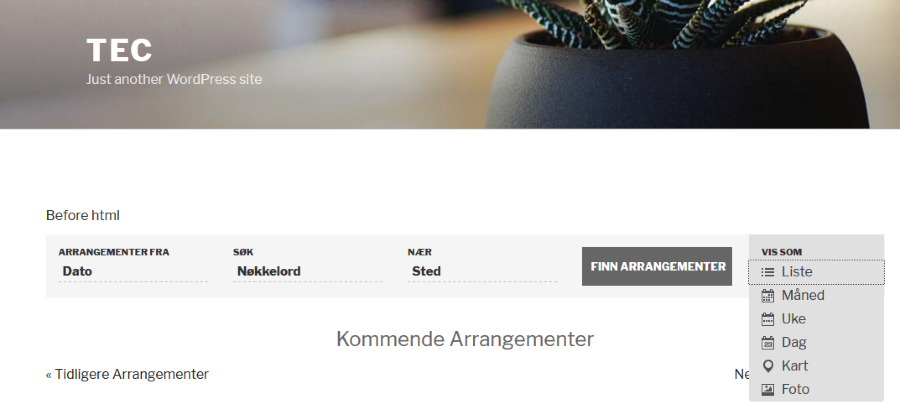
Note that if you want to preserve the translations even after a plugin update, then the best place to put them is the wp-content/languages/plugins folder, as Barry already pointed out. This is where I placed the translation files you sent. Try copying them there and check.
In case you have translations in other locations other that the lang folder of the plugins and the above folder, make sure to remove them – at least for the calendar plugins.
Also check if you have the latest versions of our plugins, just in case.
Let us know what you find.
Cheers,
Andras -
AuthorPosts
- The topic ‘Translating problems’ is closed to new replies.