

Forum Replies Created
-
AuthorPosts
-
Andras
KeymasterHello Niko,
Thanks for giving me more details on the issue. I did some further investigation with the translations and Loco Translate and here is the case.
Likely your .po/.mo translation files are not yet updated to the latest version even though your plugins are. That usually happens when your translation files are in the wp-content/languages/plugins folder. Note: it is best to keep them here, so your translations will not get lost when the plugin gets updated.
In Loco when you look at your languages for a plugin it looks like this:
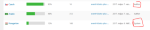
Author: the author of the plugin so this file is in the plugin folder like wp-content/plugins/event-tickets-plus/lang/event-tickets-plus-fi.po
System: that is your translation file that usually resides in wp-content/languages/plugins.
If you don’t have your translation files in the languages/plugins folder yet, then you can easily copy them. Just click on ‘Copy’ below the language name, then use these settings.
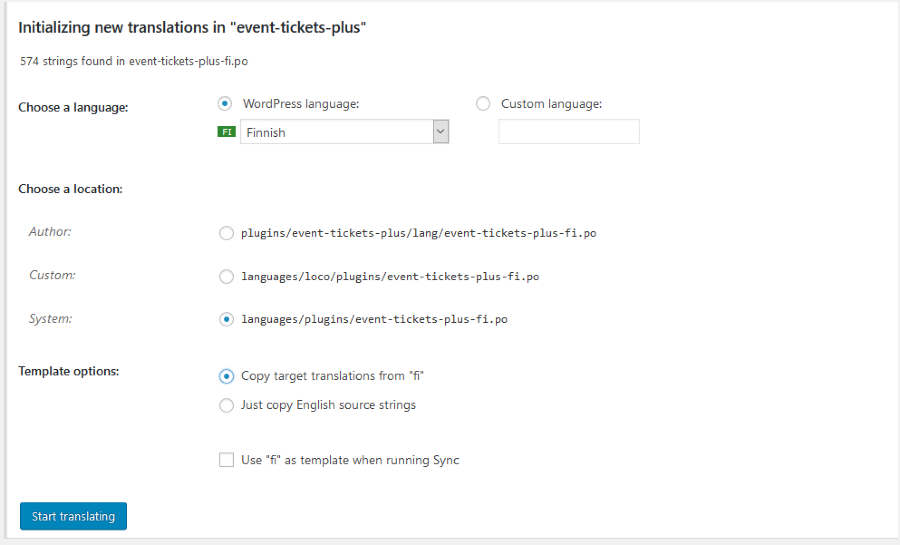
Afterwards check if the Template file is set up for the plugins. In Loco go the the plugin, then choose the Advanced tab and check if the template file is filled out like this: https://cloudup.com/cqHfVyBZMCa
And the same for all other calendar plugins. It should always be
<em>lang/plugin-name.pot</em>Next step is the update of your local language file with the new / modified strings. To do that open your language file (where the Folder column says ‘System’), and then hit the ‘Sync’ button.
If all goes well you will receive a success message similar to this at the top of the page.
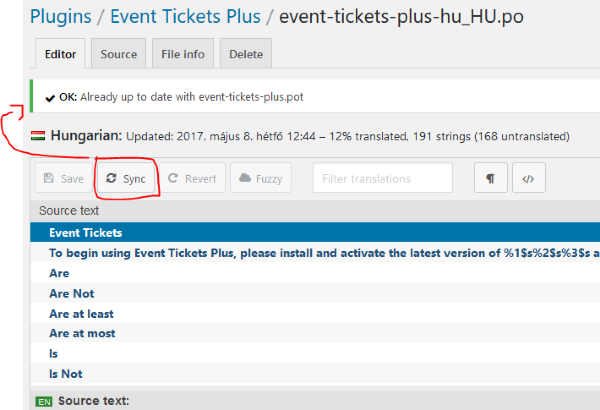
Afterwards you should be able to find the missing strings in the plugin language files.
I just did this earlier today for a website for exactly the above strings (export events, search, keyword, month, list).
I hope you can follow my explanation. 🙂 Let me know if it’s clear and how this works out.
Cheers,
AndrasMay 8, 2017 at 8:26 am in reply to: Translation "One event on [single_date] at [start_time]" is incomplete in German #1280270KeymasterSure thing Saloni, happy to help.
If you come across anything like this, please let us know so we can fix it!
Since this is resolved I am going to close this ticket, but if you need anything else related to this topic or another please post a new one in the forum and we will be happy to help you out.
Cheers,
AndrasPS: If you like our plugins, and you didn’t yet do so 🙂 we would be happy to receive a review in the wordpress.org repository. Thanks!
https://wordpress.org/support/plugin/the-events-calendar/reviews/PS2: We’d be also grateful if you would give us feedback on your satisfaction with support. Just click on one of the classy looking emojis below. 🙂 If you can spare a few words, that’s even better. Doublethanks!
KeymasterHello and a wonderful Monday to you,
I would need to check if there is any difference if you import it through your profile or though the event page / url itself, but I believe there shouldn’t be, because it should import the organizer of the event. If you share the url that you use for importing I can run some test and I’ll also ask around the team about this.
What was your EUA setting before and what is it now?
Thanks,
Andras
May 8, 2017 at 4:59 am in reply to: Translation files of Events Calendar Plugin stored twice #1280176KeymasterGrüss dich Oliver,
That is an excellent question you posted there, thank you for it. I’ll try to set this straight for you to clear away the confusion and make your work easier and less frustrating in the future.
wp-content/plugins/the-events-calendar/lang
This is where our plugins contain the original language files. Whenever you update The Events Calendar, the newest translation files will be downloaded here, and thus the old ones will be overwritten. So if you made any modifications in the .po/.mo files in this folder, those modifications will be lost after an update.
wp-content/languages/plugins
This is where you can store you own language files that override the ones in the wp-content/plugins/the-events-calendar/lang folder. So if you have a .po/.mo here, then the one in the folder of the plugin itself will not be used.
Thus, if you have custom translations it is recommended to keep them in wp-content/languages/plugins, because this way 1) that will be the one that is used; 2) it will not get overwritten with a plugin update.
Now, what happens / what can you do when the plugin receives new strings or some strings are modified with a plugin update?
You can update the .po/.mo files in the wp-content/languages/plugins folder from the .pot file that is in the lang folder of the plugin.
Since you use PoEdit I guess you know how this works, but for other’s here is the process.
Updating .po/.mo language files with PoEdit:
- Download the .po file to your computer and open it with PoEdit
- From the menu choose Catalog > Update from POT file …
- The new strings will be added, unused strings will be removed, modified strings will be updated
- Save your .po file
- Upload your .po and .mo file to wp-content/languages/plugins
Updating .po/.mo language files with Loco Translate
- Log in to your Dashboard and go to Loco Translate
- Click on the appropriate plugin
- Click on the appropriate language
- Click on the “Sync” button
- If all goes well you should see a success message: “OK: Already up to date with plugin-name.pot”
This is it.
For some further info on translation I recommend these readings:
Translating The Events Calendar
Translating the premium plugins
I hope this clarifies. Let me know if you have any more questions regarding this, I’m happy to help.
Cheers,
AndrasKeymasterHello OngKar,
Thanks for reaching out to us again!
Could you please specify which bug(s) you are exactly referring to?
I found this thread of yours with the incorrect sort order. That bug has been fixed. Only few users running on IIS servers are experiencing the issue.
If you are not running on IIS, then it should be safe to run an update on your plugins after a full site and database backup.
Let me know how this works out.
Cheers,
AndrasKeymasterHello Rens,
Thanks for reaching out with your question.
By default, the tickets of events do not show up on the shop page, thus you will not be able to filter them.
With some custom coding it could be done that they show up, and if the name or the description of the ticket (not the event!) contains the date, then you could possible do a freetext search / filter on them.
Otherwise, if you use <span class=”paragraph”>The Events Calendar</span> plugin as well, not only <span class=”paragraph”>Event Tickets</span> / <span class=”paragraph”>Event Tickets Plus</span>, you get different calendar views like month view or week view, where you can see the different events.
I hope this helps. Please, let me know if you have more questions.
Cheers,
AndrasKeymasterHello Giulia,
Thanks for using our plugins and welcome to the forums!
I’m sorry you are experiencing an issue with CSV import. Let me help you with that.
Would it be possible to share with me the csv file you are trying to import? I would like to test it. How big is the file?
If the file is too large, then you can use a cloud service like dropbox for sharing it.
Also please note that since version 4.4.4 we have released updates to our plugins. The current versions are:
The Events Calendar 4.5.1
Events Calendar Pro 4.4.7(Events Calendar Shortcode 1.5.2 – note, this is a third-party plugin and is not maintained by us.)
I would recommend you to update the plugins after making a full backup of your site and database. (Just in case.)
After the backup try the upload again.
Let me know what the result is.
Cheers,
AndrasMay 5, 2017 at 2:31 pm in reply to: Translation "One event on [single_date] at [start_time]" is incomplete in German #1279618KeymasterHallo Saloni,
Thanks for reaching out and submitting that. I made that correction (and some others) in the German translation files for PRO. You can access the translation files here:
http://translations.theeventscalendar.com/projects
If you find anything else, please let me know.
Is there anything else I can help you with?
Grüsse
AndrasKeymasterHello Niko,
Thanks for using our plugins and for reaching out with your question!
I see you are running all the latest versions of our plugins, that’s great.
Although I don’t see the version number of your translation files, but the source of the issue could be that sometimes there are changes to the translatable strings – and so the .pot – files coming with the releases, and your .po / .mo translation files were not updated based on the last .pot.
And recently there has been more work on the translatable strings.
So you need to update / sync your translation files.
I recommend that you make a backup of them first, just in case.
Then when you go to Loco Translate and open a translation file, hit the Sync button. That should update the source strings in the file from the .pot.
Let me know if this helps.
Cheers,
AndrasKeymasterBrian, thanks for checking and reporting that. I’m really sorry this slipped through again. We will need to look at our process why the .pot update is missed sometimes.
Andras
KeymasterThis reply is private.
KeymasterThanks for checking and confirming.
It looks like that the datepicker fix has not been merged into the pre-release version yet, so I’ll open a ticket for that and will set this pending fix. You know the rest. 🙂
Cheers and thanks a lot for your contributions,
Andras
KeymasterExcellent and thanks!
I will close this topic then.
Bis später
AndrasPS: We’d be grateful if you would give us feedback on your satisfaction with support. Just click on one of the classy looking emojis below. 🙂 If you can spare a few words, that’s even better. Dankevielmals!
KeymasterHey Simon,
That indeed can be the source of the difference. Also note, that you don’t need an Event Aggregator license to import CSV files, that is part of the core. You only need a license if you want to import from other sources like Facebook, Meetup etc.
I used the venue csv file from this page:
https://theeventscalendar.com/knowledgebase/csv-files-options-and-examples/And this article might be useful as well, just in case:
I’d say give the Event Aggregator csv import a try, that might be the solution.
Let me know how you end up.
Cheers,
AndrasMay 5, 2017 at 1:28 pm in reply to: Change registration form for different event categories #1279570KeymasterHello,
Let’s try to get down to the bottom of this.
Can you share with me your current system information, please?
What is your setting under Events > Settings > Tickets tab > Login requirements section?
Can you please send me a screenshot of how the event and its field is set up?
Can you confirm that you get the same behavior when you deactivate all plugins except for the calendar ones and use a default theme like twentysixteen? (If you didn’t do so, it would be great if you could test this and do a <span class=”paragraph”>testing for conflicts</span>.)
Thanks,
Andras
-
AuthorPosts