

Forum Replies Created
-
AuthorPosts
-
May 9, 2017 at 5:10 am in reply to: Change registration form for different event categories #1280745
Andras
KeymasterHello,
This is indeed confusing. If the user doesn’t need to log in for purchasing a ticket then the field should appear regardless of being logged in or not.
Would it be possible for you to spin up a staging / testing site with a copy of the current to do some testing?
Andras
KeymasterHello Yves,
It looks like you are using the latest The Events Calendar, but an older Events Calendar PRO.
As a start I would ask you to update the PRO plugin as well to the latest. Then you’ll see the buttons I shared in my screenshot.
On your screenshot in the dropdown you would need to choose ‘Personnalisé’ if my French doesn’t fool me. 🙂
And the ‘Ajouter une nouvelle règle’ button label has changed to ‘add more events’.
But first run the update, that will fix some bugs since PRO 4.3.4 and will give you the new interface for recurring events. Also it will work better together with the recent TEC plugin.
Let me know how that works out.
Cheers,
AndrasMay 9, 2017 at 4:52 am in reply to: Translation files of Events Calendar Plugin stored twice #1280739KeymasterHmmm… thanks Oliver, that is interesting.
Let me do some investigation on this and I’ll let you know.
Andras
KeymasterHello Chris,
Thanks for reaching out to us with your question! That’s a great one.
I believe if Facebook would change the way it makes event data available, then we would likely adapt Event Aggregator to be able to handle that. So if at all, then there would be only a temporary holdup in service.
However, usually when big changes like this happen there is usually a testing / interim period – depending on the developer – so likely we would be able to do at least part if not all of the necessary adaptations before the big change goes live, thus reducing or even totally eliminating the time of switchover.
I hope this helps. Let me know if you have any further questions.
Cheers,
AndrasKeymasterHello npappagiorgio,
Thanks for using our plugins and welcome to the forums!
Do I need all three plugins on and working?
It totally depends on what you would like to achieve.
In terms of dependability: you don’t need The Events Calendar to run Event Tickets, and you need Event Tickets to be able to run Event Tickets Plus.
If you run Event Tickets (and maybe ET+), then you can add tickets to posts and pages. You can set that up under Events > Settings > Tickets.
Event Tickets Plus is an extension of or an add-on to Event Tickets.
With Event tickets you can add registration functionality to events, pages, posts so you can collect RSPVs, but you cannot sell tickets.
If you want to sell tickets, you will need the Event Tickets Plus plugin. Also note, that for selling tickets you will also need an eCommerce plugin like WooCommerce or Easy Digital Downloads.
I hope this clarifies. Please do let me know if you have any more questions, I’d be happy to answer them for you.
On your concern about large / high run time, could you please explain in a bit more detail what exactly you mean?
Thanks and cheers,
AndrasMay 8, 2017 at 2:08 pm in reply to: Same Description for different events in week view – help #1280472KeymasterHello Leo,
Thanks for reaching out to us! I’m sorry about this issue, it is quite curious.
I tested it on my local site with Avada 5.0.6 and with that I wasn’t able to reproduce it.
If you switch to a default theme like twentyseventeen, do you still get this?
Also, last week we have released a new version of our plugins, please also try to update them (after a full site and database backup) and re-check if the issue still exists.
Meanwhile I will try to check with a fresher version of Avada.
Cheers,
AndrasKeymasterThis reply is private.
KeymasterThis reply is private.
KeymasterThis reply is private.
KeymasterHallo Richard
Thanks for using our plugins and welcome to the forums!
I’m sorry you are having an issue here, let me try to help you with this.
I checked the system information you shared. In that I see that you have a fresh version of The Events Calendar, but the other the calendar plugins seem outdated. So as a first step it would be great if you could update at least your calendar plugins to the latest versions. (Using older and newer versions together can cause glitches and errors.)
It is also recommended to make a full backup of your site and your database before doing any major updates, just in case something goes wrong.
Could you share with me more details about what is happening? Does it still happen after you updated the plugins? Can You reproduce the issue? Which event / ticket is the user buying? What is the result?
The more info, details, screenshots you can give me, the better.
Thanks and I’m looking forward to helping you with this.
Cheers,
AndrasKeymasterHello Albert,
Thanks for reaching out to us and I’m sorry about the issue with the datepicker formatting.
I tried to check your site but that part was password protected.
Could you please give me some more details on the issue, so I can check into it?
- What do you see
- What do you expect to see
- can you share a screenshot of the issue
Do you also have the issue when you switch to a different theme like twentyseventeen?
Thanks and I’m looking forward to helping you out on this one!
Cheers,
AndrasKeymasterHello Dirk,
Thanks for reporting that! I will make sure the development team knows about it!
I am going to close this ticket, but if you need anything else related to this topic or another please post a new one in the forum and we will be happy to help you out.
Cheers,
AndrasKeymasterHello again Saloni,
Thanks for reaching out to us and I’m sorry you are having this issue.
I was trying to check and reproduce this with the twentyseventeen theme, but couldn’t really see a difference.
Could you share with me your system information and a url to where the problem is visible? That would be most helpful.
Thanks and cheers,
AndrasKeymasterSalut Yves,
Thanks for going Pro and thanks for your inquiry!
I am happy to help you with that question! I hope it will be a good explanation on how you can set up recurring events in funky ways.
I take it those are separate events, so here’s a screenshot of the first event’s settings set in January 2017:
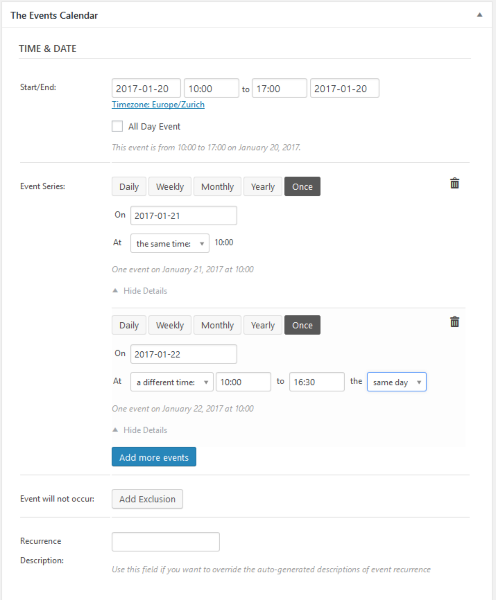
So basically you set up an event for Jan 20, 2017 from 10 to 5pm.
Then click the blue “Add more events” button.
Select the “Once” option, set the date (Jan 21) and leave “at the same time” the way it is.
Then click the blue “Add more events” button again.
Select the “Once” option, set the date (Jan 22) and set it to “a different time” and enter the required timings.
For the November event:
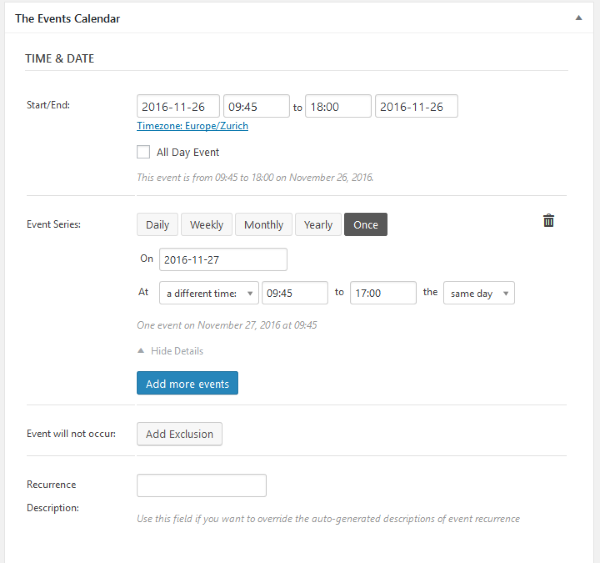
The case is the same. Set up the event for the first date. Then “Add more events”, set date.
Set “at a different time” and set the timing.
Boom! Done. 🙂
I hope that helps.
A small note, when you are setting up recurring events it is always best to set up the event with the earliest date in time, and set up the recurrences which are in the future from that date.
I hope this helps! Let me know if you have any more questions, I’d be happy to help!
Cheerio,
AndrasMay 8, 2017 at 9:39 am in reply to: Change registration form for different event categories #1280315KeymasterHi Christopher,
Thanks for sharing all that.
So far I haven’t been able to reproduce the issue.
On your site it looks like that the hmtl markup for the extra attendee meta section is not in the code at all, that’s why it doesn’t show up.
That could happen if you are using template overrides.
I also see that you use some custom code to limit the number of tickets. Did you try with disabling the custom codes as well?
Please let me know the above while I’m still trying to investigate the issue.
Thanks,
Andras -
AuthorPosts