
Home › Forums › Calendar Products › Events Calendar PRO › Finnish translations are not functioning?
- This topic has 6 replies, 3 voices, and was last updated 9 years, 5 months ago by
Niko.
-
AuthorPosts
-
May 4, 2017 at 11:39 pm #1279026
Niko
ParticipantHi,
I have a question about the translation process. Before I used to have Woocommerce + WooTickets + Events Calendar and the translations we’re fine.
Now the setup is running Woocommerce + Events Calendar + Events Calendar Pro and the translations are only partly done. There are some parts that are non translated to finnish language and this has never been an issue before.
Currently I’m using Loco translate for the translations and all of the translations should be done but there is still some parts missing for reasons uknown. It seems very strange because when looking translation status from Loco translate it shows percentage of 100%.
Please see attached for the missing translations.
Thank you in advance!
Niko
May 5, 2017 at 2:18 pm #1279609Andras
KeymasterHello Niko,
Thanks for using our plugins and for reaching out with your question!
I see you are running all the latest versions of our plugins, that’s great.
Although I don’t see the version number of your translation files, but the source of the issue could be that sometimes there are changes to the translatable strings – and so the .pot – files coming with the releases, and your .po / .mo translation files were not updated based on the last .pot.
And recently there has been more work on the translatable strings.
So you need to update / sync your translation files.
I recommend that you make a backup of them first, just in case.
Then when you go to Loco Translate and open a translation file, hit the Sync button. That should update the source strings in the file from the .pot.
Let me know if this helps.
Cheers,
AndrasMay 8, 2017 at 1:44 am #1280139ParticipantThis reply is private.
May 8, 2017 at 9:10 am #1280295KeymasterHello Niko,
Thanks for giving me more details on the issue. I did some further investigation with the translations and Loco Translate and here is the case.
Likely your .po/.mo translation files are not yet updated to the latest version even though your plugins are. That usually happens when your translation files are in the wp-content/languages/plugins folder. Note: it is best to keep them here, so your translations will not get lost when the plugin gets updated.
In Loco when you look at your languages for a plugin it looks like this:
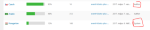
Author: the author of the plugin so this file is in the plugin folder like wp-content/plugins/event-tickets-plus/lang/event-tickets-plus-fi.po
System: that is your translation file that usually resides in wp-content/languages/plugins.
If you don’t have your translation files in the languages/plugins folder yet, then you can easily copy them. Just click on ‘Copy’ below the language name, then use these settings.
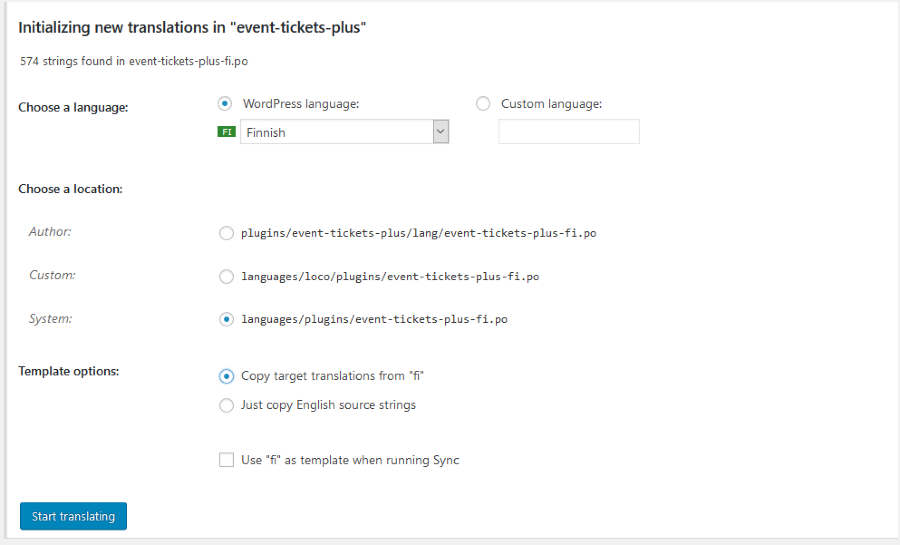
Afterwards check if the Template file is set up for the plugins. In Loco go the the plugin, then choose the Advanced tab and check if the template file is filled out like this: https://cloudup.com/cqHfVyBZMCa
And the same for all other calendar plugins. It should always be
<em>lang/plugin-name.pot</em>Next step is the update of your local language file with the new / modified strings. To do that open your language file (where the Folder column says ‘System’), and then hit the ‘Sync’ button.
If all goes well you will receive a success message similar to this at the top of the page.
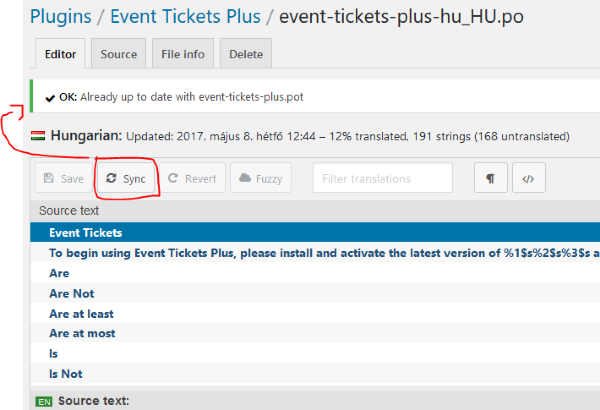
Afterwards you should be able to find the missing strings in the plugin language files.
I just did this earlier today for a website for exactly the above strings (export events, search, keyword, month, list).
I hope you can follow my explanation. 🙂 Let me know if it’s clear and how this works out.
Cheers,
AndrasMay 9, 2017 at 10:45 pm #1281448ParticipantHi Andras,
Fully working now with your instructions.
Thanks a lot for your help!
Cheers,
Niko
May 10, 2017 at 2:14 am #1281506KeymasterYou are very welcome Niko! Happy to hear all works fine!
Since this is marked resolved I am going to close this ticket, but if you need anything else related to this topic or another please post a new one in the forum and we will be happy to help you out.
Cheers,
AndrasPS: If you like our plugins, and you didn’t yet do so 🙂 we would be happy to receive a review in the wordpress.org repository. Thanks!
https://wordpress.org/support/plugin/the-events-calendar/reviews/
https://wordpress.org/support/plugin/event-tickets/reviews/PS2: We’d be also grateful if you would give us feedback on your satisfaction with support. Just click on one of the classy looking emojis below. 🙂 If you can spare a few words, that’s even better. Doublethanks!
-
AuthorPosts
- The topic ‘Finnish translations are not functioning?’ is closed to new replies.