

Forum Replies Created
-
AuthorPosts
-
Andras
KeymasterHello Laura,
Thank you for reaching out and for evaluating our plugins! I’d be happy to answer your questions.
1. Whoa, that looks like a bug. I got it working once, and second time I didn’t. Anyway, yes, it definitely should update. Here’s a screencast I did now on how it is supposed to work.
2. I’m not aware of any solution like that. But if I understand your need correctly you could simply use the day view which work already without the PRO.
In the day view you need to select the date in the search bar. I’m quite sure that with a bit of customization you could have that _picker_ visible all the time.
3. There absolutely is a way to do that. You can find this setting under Events > Settings > Display tab and looks like this.
I do hope these answer your questions adequately, and if you have any more, let them come. 🙂
Cheers,
AndrasMay 11, 2017 at 1:25 pm in reply to: Limit Search to only titles – or don’t search categories #1282551KeymasterHello again,
So it looks like that the _issue_ is not with the event categories, but the event descriptions. 🙂 By default the search is done on the title AND the description of the event.
One of my teammates was kind enough to whip together a little snippet that should exclude the event description from the search. Paste this snippet into your child theme’s functions.php file and see if it works:
https://gist.github.com/andrasguseo/4ee91e9daad840e23ef1f0b4c946b147
Let me know if that does the trick.
Cheers,
AndrasKeymasterHello John,
Thanks for getting in touch! Let me help you with your questions here.
For the refund, please visit this page where you should be able to submit a refund request.
For the settings migration, the first time when you activate Event Aggregator then you should see a message like this at the top of the Events > Import screen.
If you don’t see that, then don’t worry, just go to the Events > Settings > Imports page and you can set / change your settings there.
how do I invite people so that their iCalendars can be used to view and update events from their phones?
I’m not quite sure I fully understand this question.
What you can do is the following:
- The peoples calendars on their phone need to be linked with their google calendar and they need to sync it whenever there is a change
- Ask for the url of the calendar feed of the people. This can be found in the google calendar settings here
- Add those feeds as a scheduled import into your calendar with Event Aggregator under Events > Import > New import like this
If all goes to according to plan, then the calendar on the website should show the peoples events.
Is this how you imagine it?
Cheers,
AndrasKeymasterHello again Steve,
Thanks for reaching out!
I didn’t find any function that would directly give you the url of the next event in the recurring series, but I believe this function should help you with your question:
tribe_get_upcoming_recurring_event_id_from_urlLet me know.
Cheers,
AndrasKeymasterHello there,
Thanks for getting in touch with us! I would love to help you with your questions.
the Events Aggregator has replaced the iCal importer
Yes, that is true. We have launched Event Aggregator at the end of last year and has the same functionality as iCal importer and more.
I also believe that the Aggregator comes with EC Pro now, is that correct?
Unfortunately this is not correct. If you would like to use Event Aggregator you will need to purchase a separate license for that. Just like it was the case with the iCal importer.
I need to confirm that some issues we were having using the plugins have been resolved.
Indeed, there have been similar, but most of those have been fixed already. I have checked our current log of bugs that need to be fixed and I didn’t find any issue of similar nature.
In case you would encounter a bug like that and you report it to us here in the forums, then we will log it internally and our developers will get on to it.
If you can give me the website url or the expired license number, then I should be able to look up the previous threads and see to which bug they are connected to. Then I can check if those specific bugs were fixed or not.
I hope this answers your questions. Please let me know if there is anything I can help you with.
Cheers,
AndrasMay 11, 2017 at 12:27 pm in reply to: Limit Search to only titles – or don’t search categories #1282522KeymasterHello and welcome to the forums!
Thanks for reaching out with your question, it is a great one.
That is unfortunately not a functionality that comes out of the box. Please note the normally we don’t support customizations, but give me some time and I’ll check if there is a quick and / or easy solution for that, or something to get you started.
Hang in there, I’ll get back to you soon.
Cheers,
AndrasKeymasterI checked this on my local install with the latest versions of our plugins and Divi:
- TEC 4.5.1
- EC PRO 4.4.7
- ET 4.4.7
- ET+ 4.4.7
- Divi 3.0.45
With the below settings under Events > Settings > Display you should not see any sidebar on the events pages: neither the main views (month, week, list etc.) neither the single events.
- Stylesheet: Full Styles
- Template: Default Events Template
Here‘s a screenshot of that.
Does this solve your issue? Let me know.
Cheers,
AndrasKeymasterHey Rob,
Welcome back!
Sorry about this issue with Divi. While I investigate that issue for you please run an update on your plugins so you have the latest version of at least our calendar plugins.
Thanks and I’ll be in touch soon.
Andras
KeymasterHallo Oliver
Thanks for using our plugins and welcome to the forums! I’m sorry you are having issues with our plugins. I would love to help you solve them so you can have your site working as you want it.
It looks like you are having more issues. Let’s go one by one.
Participants are not entered.
Where exactly are they not entered? Where is the data missing? How are the events and the tickets set up? What is the process of purchase? The more details you give me the better.
In the woocommerce is not visible which course was booked.
The actual products are the tickets themselves, and not the events. So you will always see the tickets in the WooCommerce reports.
However you can go to your event on the backend and check the attendee list for a specific event or the orders via clicking on the action links below the event title. Here‘s a screenshot to show you.
Ticket sales for recurring events. The customer displays incorrect date on the ticket.
At this time setting up tickets for recurring events (in a way that you have a separate ticket for every recurrence) is not possible, that is not a functionality of the plugin.
If you set up a ticket for a recurring event, then the same ticket will be available for all recurrences, and when someone purchases the ticket, they will see the date of the starting event.
A workaround for this would be setting up an attendee information field where you ask the customer to specify the date. Here‘s an example.
I hope this helps. Let me know how I can help you further.
Freundliche Grüsse 😉
Andras
May 11, 2017 at 8:47 am in reply to: .ui-widget in datepicker.min.css is changing font size’s in Gravity Forms admin #1282319KeymasterYou are so welcome.
I am going to close this ticket, but if you need anything else related to this topic or another please post a new one in the forum and we will be happy to help you out.
Cheers,
AndrasKeymasterHello Janet,
I took a look at your demo site and found 2 things.
Our calendar uses the slug “events” for the main calendar page, so you can look at it at http://yourdomain.com/events/
I have found that you also have a page with the slug “events” which causes a conflict. You can see a red notice of this at the top of the admin area.
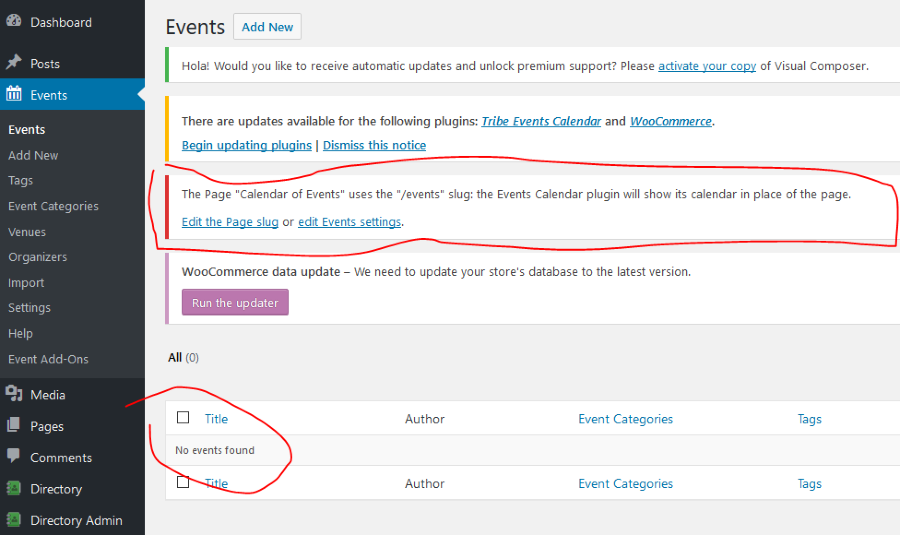
The solution to this is either changing the slug of your Calendar of Events page or from The Events Calendar. You can do this latter under Events > Settings > General tab > Events URL slug.
The other thing I found is that there are no events to be shown. See on the screen shot above as well.
I would also recommend you to update The Events Calendar plugin, we have released a new version last week.
Once you fix the slug and put in some events, you should be able to see them on your website.
Let me know how far you get and how it plays out.
Cheers,
AndrasKeymasterHey Janet, thanks for hanging in there. I’m just about to check.
A.
KeymasterThanks for letting me know. I’ll update the ticket when the fix is released for the issue.
Cheers,
AndrasKeymasterHey J,
I believe when you edit and re-save it, then the _old version_ will be deleted and it will be saved as a new scheduled import. Likely that is why you don’t see it on the History page. You will need to follow it up and check if the import successfully happens later.
How does the preview hang? Does is just keep rolling? If the feed has lots of events that can take a while. What feed are you having a trouble with? I can test it if you can share it with me.
Cheers,
AndrasMay 11, 2017 at 8:24 am in reply to: Assigning an existing event to a new user (Event Contributor) #1282300KeymasterThis post might also be helpful, Cas.
Let me know how far you get.
Cheers,
Andras -
AuthorPosts