
Home › Forums › Calendar Products › Event Aggregator › Scheduled Imports not posting to the calendar
- This topic has 13 replies, 2 voices, and was last updated 9 years, 4 months ago by
Roger.
-
AuthorPosts
-
May 1, 2017 at 7:40 pm #1277037
Roger
ParticipantI have set up my google calendar and scheduled the import but the events are not showing on the frontend of the calendar.
May 3, 2017 at 7:28 am #1277974Andras
KeymasterHello Janet,
Thanks for getting in touch with your issue! I’m sorry this is happening, let me try to help you solve that.
To be able to give you better support, could you please share your system information with me?
Here’s a handy guide how you can do that: https://theeventscalendar.com/knowledgebase/sharing-sys-info/Thanks!
Could you possibly share with me some more details and screenshots on how you set up the import?
- Go to Events > Import > Scheduled imports and edit the import that you have set up.
- The Events > Import > History tab
- A screenshot of Event > Settings > Imports page, most importantly the Event Update Authority section and the Google Calendar Import Settings section
- The bottom of the Events > Help page where you have the Event Aggregator System Status
Also if you could share with me the link to the feed that you are trying to import, that would be helpful as well.
Thanks and looking forward to solving this with you.
Cheers,
AndrasMay 9, 2017 at 5:43 am #1280757ParticipantGood Morning,
https://bmwmoc.org/events/
I have included all of the information requested.
I would like to get his resolved as soon as possible, the site is live an the calendar information is missing.Provided link to the calendar feeds.
https://calendar.google.com/calendar/ical/bmwmoc196%40gmail.com/private-c01e55999aba35776157e9e77f3ab645/basic.icsThank you for your help.
JanetMay 9, 2017 at 7:08 am #1280824KeymasterHello Janet,
Thanks for sharing the details with me!
I did a test import of the first url so far and it worked fine, the events show on the front.
When you import the events what status do you give them? Published, Draft, Pending review or Private. If ‘Published’ then they will be immediately visible after import. If ‘Draft’ then you will need to manually set them to ‘published’. If ‘pending review’, then you need to approve them.
When you go to the list of events in your dashboard (simply clicking on Events in the left menu) do you see your events listed? Do you see anything written next to the event titles? (Like this for example.)
Let me know and meanwhile I will check your other links.
Cheers,
AndrasMay 9, 2017 at 9:54 am #1281046ParticipantHello András,
Yes, of course I have them set to publish.
I tried to send a couple more screenshots but the site would not allow me to.
No, I do not see any events listed.
I have attached more screenshots.Thanks
JanetMay 10, 2017 at 2:06 am #1281497KeymasterThis reply is private.
May 10, 2017 at 5:43 am #1281560ParticipantThis reply is private.
May 11, 2017 at 6:05 am #1282241ParticipantHi Andras,
Any luck with this?
I really need to get this resolved.Thanks
JanetMay 11, 2017 at 8:33 am #1282307KeymasterHey Janet, thanks for hanging in there. I’m just about to check.
A.
May 11, 2017 at 8:44 am #1282318KeymasterHello Janet,
I took a look at your demo site and found 2 things.
Our calendar uses the slug “events” for the main calendar page, so you can look at it at http://yourdomain.com/events/
I have found that you also have a page with the slug “events” which causes a conflict. You can see a red notice of this at the top of the admin area.
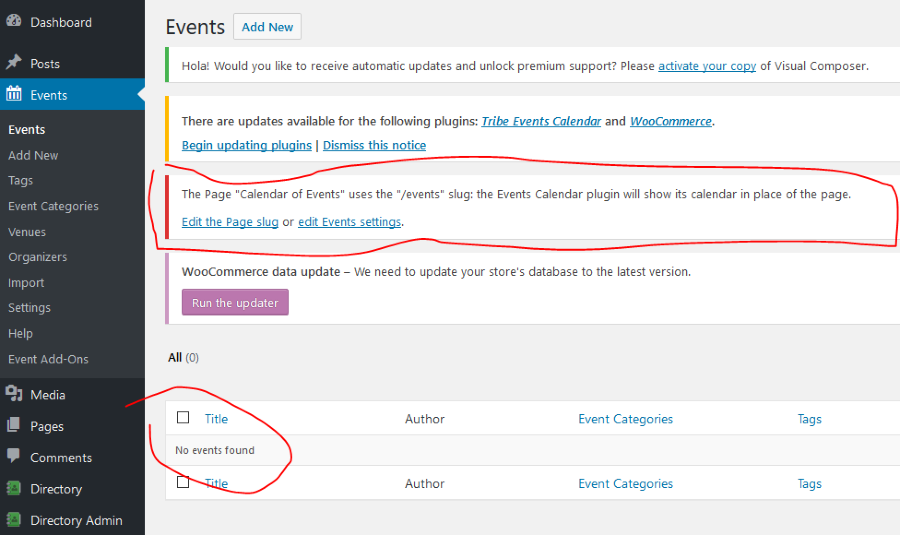
The solution to this is either changing the slug of your Calendar of Events page or from The Events Calendar. You can do this latter under Events > Settings > General tab > Events URL slug.
The other thing I found is that there are no events to be shown. See on the screen shot above as well.
I would also recommend you to update The Events Calendar plugin, we have released a new version last week.
Once you fix the slug and put in some events, you should be able to see them on your website.
Let me know how far you get and how it plays out.
Cheers,
AndrasMay 11, 2017 at 9:18 am #1282339May 12, 2017 at 7:09 am #1282945KeymasterThis reply is private.
June 3, 2017 at 9:35 am #1292870Support Droid
KeymasterHey there! This thread has been pretty quiet for the last three weeks, so we’re going to go ahead and close it to avoid confusion with other topics. If you’re still looking for help with this, please do open a new thread, reference this one and we’d be more than happy to continue the conversation over there.
Thanks so much!
The Events Calendar Support Team -
AuthorPosts
- The topic ‘Scheduled Imports not posting to the calendar’ is closed to new replies.