Forum Replies Created
-
AuthorPosts
-
Victor
MemberHi Fernando!
Thanks for coming back with that info.
I could not reproduce the issue with the [tribe_this_week] shortcode. This can be a theme or plugin conflict, so you should test for conflicts to see what you find.
I see you marked the following:
- Deactivated all other plugins? Yes
Did you find any difference when deactivating all other plugins? What happens if you switch to a default theme like twenty seventeen? Do you see any difference?
If you switch to a default theme and have only our plugins activated at the same time, does it change anything?
I’d recommend you make all this tests in a dev/staging site so you don’t disrupt your live site. Also, we encourage to make a full backup of your site, both database and files so in case something breaks you can always restore your site.
Let me know how that goes.
Thanks,
VictorMemberHi Scott!
Sure thing! Let me know how that goes and if you have other questions.
Best,
VictorMemberThis reply is private.
MemberThis reply is private.
MemberHola Antonio:
Eso es extraño. Tal vez hay algún otro conflicto entre los templates.
Primero, ¿podrías verificar que el template single-event.php sea exactamente el mismo que te compartí?
Si estás utilizando el plugin Jetpack como habías comentado antes, intenta desactivarlo para ver si hay alguna diferencia. No he podido replicar esto, así que tal vez haya algún conflicto con otro plugin.
¿Que sucede si desactivas los comentarios desde las opciones de Divi? ¿Notas alguna diferencia?
Gracias,
VictorSeptember 15, 2017 at 4:55 pm in reply to: Duplicate events being created from google import #1350047MemberYou’re welcome Ryan!
MemberHi Luke,
I’m sorry for the delay in getting back to you.
I just wanted to check-in here to let you know that we haven’t been able to have a look at this yet, but we’ll probably have more time and resources next week.
I’ll keep you posted about it.
Best,
VictorMemberHi Scott!
Thanks for reaching out to us!
First, let me apologise for the delay in our response. It seems your thread went out of our radar somehow.
Let me help you with that issue.
Having a closer inspection to your site I found some conflicting styles probably coming from your theme or another plugin. So, to narrow the problem down, please go through the steps in our testing for conflicts guide and see what you find in the process > https://theeventscalendar.com/knowledgebase/testing-for-conflicts/
Let me note, that we unfortunately cannot accept login credentials as stated in our terms, but let us know how that goes an I’d be happy to help as much possible.
Thanks,
VictorMemberHi Thomas!
Thank you for reaching out to us! Let me help you with this topic.
If you assigned custom taxonomies and custom fields to the tribe_events post type, they won’t show up by default in the community add form. You can achieve that, but will involve custom coding.
We have a great article about customizing our templates you should know about > https://theeventscalendar.com/knowledgebase/themers-guide/
You will find the templates for the Community Events add form at /wp-content/plugins/the-events-calendar-community-events/src/views/community/
I hope that helps! Is there anything else I can help you with? Let me know about it.
Best,
VictorSeptember 15, 2017 at 4:13 pm in reply to: transfer my license from my demo server to live server #1350039MemberHi Sarah!
Thanks for reaching out to us! Let me help you with that.
Once you unlink your license from your site, you should be available to activate it in any site you’d like by logging in to your WordPress site and going to wp-admin > Events > Licenses and pasting your license in the field and click Save.
I hope that helps! Let me know how it goes and if you have other questions.
Best,
VictorSeptember 15, 2017 at 4:04 pm in reply to: how to hide remaining ticket stock number from buyer #1350036MemberHi Meg!
Thanks for getting in touch with us! Let me help you with this topic.
There is no built in option to hide the number of tickets available. However, you can hide the stock available by using the CSS snippet Geoff shared in this thread > https://theeventscalendar.com/support/forums/topic/hide-stock-on-tickets/#dl_post-1127538
I hope it helps! Let me know if you have other questions.
Best,
VictorMemberHola Fernando!
Thanks for reaching out to us! Let me help you with that issue.
First, please try flushing your permalinks by going to your wp-admin > Settings > Permalinks and click Save Changes. Does it work after that?
This could be a theme conflict, so could you please switch to a default theme like twenty seventeen and see if any difference?
Are you using a shortcode to display the calendar in the homepage? If so, please let us know which one.
Thanks,
VictorSeptember 15, 2017 at 3:00 pm in reply to: MOBILE calendar shows wrong dates. Desktop version is okay. #1350022MemberHi Anne-Marie!
I’m sorry you are experiencing that issue. Let me help you troubleshoot that.
First, could you please provide us with a link to your site so we can have a look at the issue?
This can also be a plugin or theme conflict so to narrow the problem down, please test for conflicts by following this guide > https://theeventscalendar.com/knowledgebase/testing-for-conflicts/ and see what you find in the process.
Also, please share with us your system information by following this guide > https://theeventscalendar.com/knowledgebase/sharing-sys-info/ We’ll try to spot any error from there too.
Thanks,
VictorMemberHi Richard!
Thanks for reaching out to us!
Unfortunately, there is no built in way to achieve what you are looking for. I can surely see the use of having such functionality, so I encourage you to post it as a new idea in our user voice > https://tribe.uservoice.com/forums/195723-feature-ideas so other users can vote for it and we’ll take it into account when planning our future feature releases of our plugins.
If you need help elaborating this idea further, just let me know and I’d be happy to help you.
Best,
VictorSeptember 15, 2017 at 2:12 pm in reply to: Customising the header row in the month and week views #1349993MemberHi Geordie!
Thanks for following up with this and for clearing that out.
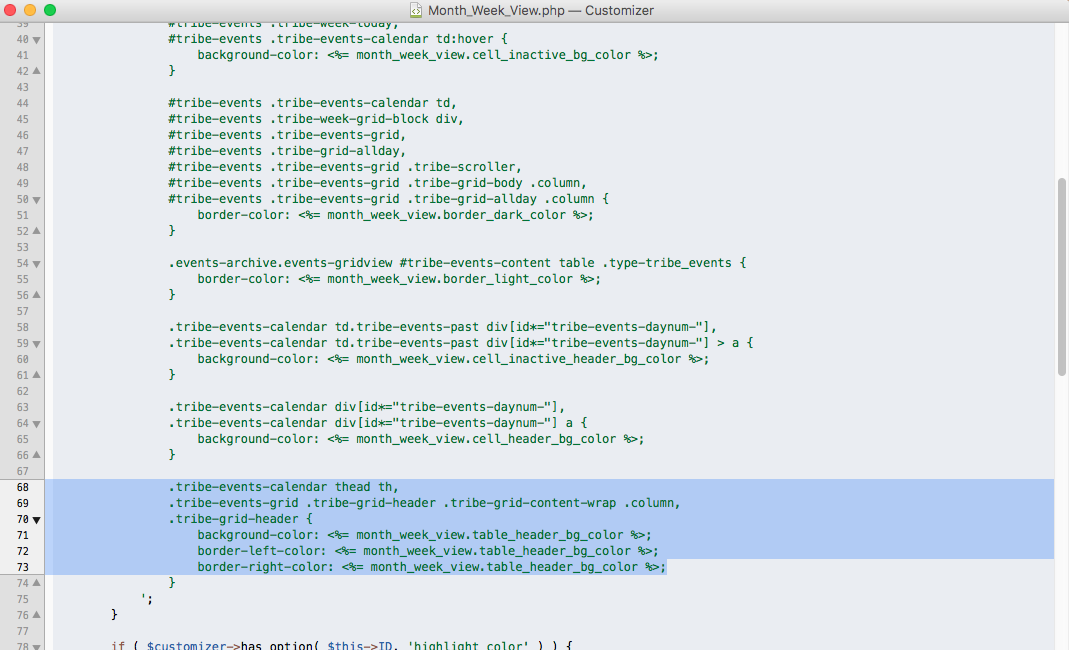
I can now understand the issue you are having. The thing is that if you select a color for the “Calendar Table Color” in the WordPress customizer, it will also apply the styles you mention to the the elements you highlight in this image using the create_ghost_settings() function declared in Month_Week_View.php file.
Specifically, that function will assign a 70% darker color to the one selected for “Calendar Table Color”.
If you want to assign different colors for the week and month view, then the way to do it would be to remove any color assigned to the “Calendar Table Color” and then use the following CSS snippet:
/* Month view header */

.tribe-events-calendar thead th {

background-color: #ff0000;

}

/* Week view header */

.tribe-events-grid .tribe-grid-header .tribe-grid-content-wrap .column, .tribe-grid-header {

background-color: #00ff00;

}
Let me know if that works for you.
Best,
Victor -
AuthorPosts