
Home › Forums › Calendar Products › Events Calendar PRO › Customising the header row in the month and week views
- This topic has 8 replies, 2 voices, and was last updated 8 years, 11 months ago by
Geordie.
-
AuthorPosts
-
September 10, 2017 at 7:26 pm #1347343
Geordie
ParticipantHi
I have followed various articles about customising the month and week view header colours but found that the customisations were always being overridden (I could see that they were there when I inspected the element but they were a lower priority to the styles defined in the index page).
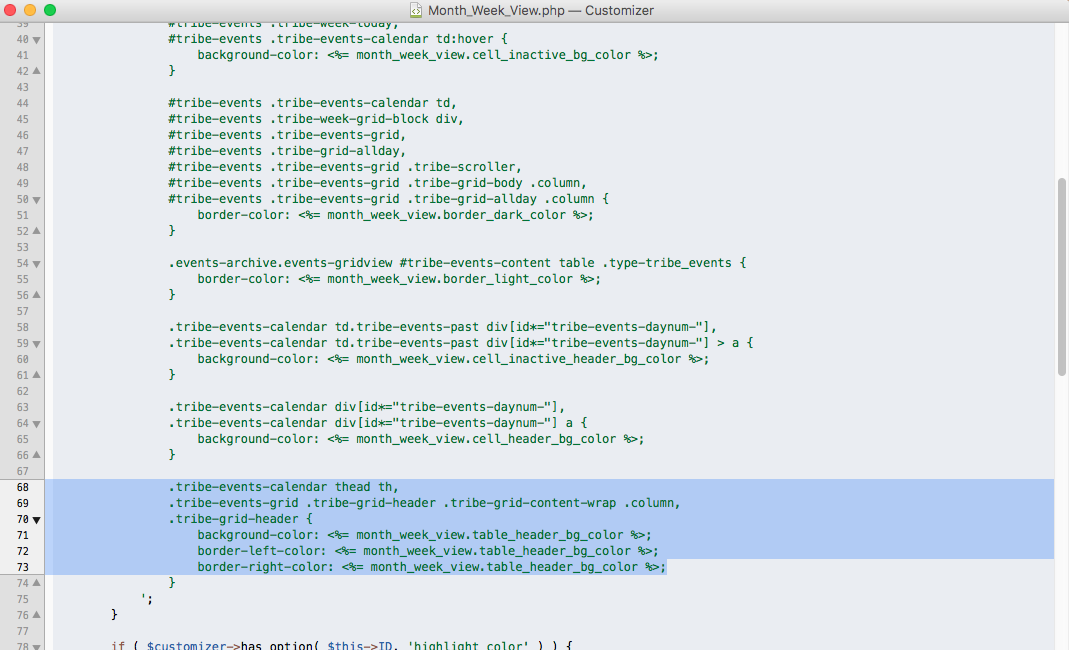
I eventually found that the priority was being given to customisations made using WordPress Customizer. The get_css_template function in the Month_Week_View.php file sets the “tribe-events-calendar thead th, .tribe-events-grid .tribe-grid-header .tribe-grid-content-wrap .column, tribe-grid-header” background-color: to <%= month_week_view.table_header_bg_color %>.
I cannot see any place in the WordPress Customizer to change the table header background colours so I have no idea where it is getting the colour from.
I don’t want to use the !important statement in the child-theme style because this then overrides the “.tribe-week-today” style in the week view.
I have tested the functionality by deleting the code from the “tribe-events-calendar thead th, .tribe-events-grid .tribe-grid-header .tribe-grid-content-wrap .column, tribe-grid-header” from the Month_Week_View.php file and this works well.
Can you please let me know how I could achieve the same result without deleting the code from the Month_Week_View.php file .
Thanks
September 11, 2017 at 5:31 pm #1347792Victor
MemberHi Geordie!
Thanks for reaching out to us! Let me help you with this topic.
We have a great article about customizing our templates that you might want to have a look at > https://theeventscalendar.com/knowledgebase/themers-guide/
If you want to customize the month and week views, you should take a look at the templates located at /wp-content/plugins/the-events-calendar/src/views/month/ and /wp-content/plugins/events-calendar-pro/src/views/pro/week/
Depending on what you want to achieve, you can do a template override or make use of one of the available actions and filters inside it.
We are limited in how much support we can give for custom development questions, but we always like helping out and at least point our users into the right direction as best possible.
That said, feel free to ask any other questions and I’d be happy to help.
Best,
VictorSeptember 12, 2017 at 2:01 am #1347892ParticipantHi Victor
Thanks for responding.
I have used the custom templates and these work well.
The issue is that the function in Month_Week_View.php in /src/Tribe/Customizer overrides any style that is set for ““tribe-events-calendar thead th” but there is no place in the Events Calendar section of the Word Press Customizer to set a colour for the table heading.
I suppose that I am saying that there appears to be a bug in the code. This section either needs to be removed from Month_Week_View.php OR it needs to be added to the front end Customizer.
I hope this makes sense?
The bottom line is that I would like to know if there is a way to set the background colour for tribe-events-calendar .thead th without affecting .tribe-week-today.
As per my original post, I have achieved this by deleting the lines in /src/Tribe/Customizer/Month_Week_View.php but this will obviously be overwritten when the next upgrade comes through.
September 12, 2017 at 10:48 pm #1348408MemberHi Geordie!
Thanks for clearing that out.
The code you are talking about is part of the options available in the WordPress customizer. Like you say, if you assign a Calendar Table Color under Month View, then the “.tribe-events-calendar thead th” selector gets assigned a darker color based on the color you select.
There is no built in option to manually change the color of that header, so if you wanted to assign a specific color to it, you would need to customize it by adding custom CSS.
If you were to customize the calendar header in a way that has a different color for the month and week view, then you can either user the following selectors:
.tribe-events-calendar thead th
.tribe-events-grid .tribe-grid-header .tribe-grid-content-wrap .column
.tribe-grid-headerand assign them different colors, but bear in mind that designating a color for Calendar Table Color in the customizer will apply some styles to them so you will have to use the !important statement.
Does it help with what you are trying to achieve? Let me know about it.
Best,
VictorSeptember 15, 2017 at 2:29 am #1349614ParticipantHi Victor
I have added the various
.tribe-events-calendar thead th
.tribe-events-grid .tribe-grid-header .tribe-grid-content-wrap .column
.tribe-grid-headerto the stylesheet but I think it easier to explain the issue through screen shots.
Month Week normal.png is a screen shot of changing the Calendar Table Color. You will see that this does not affect the day names. It only affects the day number header and the day itself.
Month Header with style (no important) – Day names background changed in the style sheet. You will see that the standard background colour takes preference and the style.css is ignored.Week Header with style (important) – !important added to the style.css style (fixed the month day name problem) but this now overrides the .tribe-week-today.
Month Week PHP Code – This is the section of the code that causes the issue.
Hope this helps clarify things
September 15, 2017 at 2:12 pm #1349993MemberHi Geordie!
Thanks for following up with this and for clearing that out.
I can now understand the issue you are having. The thing is that if you select a color for the “Calendar Table Color” in the WordPress customizer, it will also apply the styles you mention to the the elements you highlight in this image using the create_ghost_settings() function declared in Month_Week_View.php file.
Specifically, that function will assign a 70% darker color to the one selected for “Calendar Table Color”.
If you want to assign different colors for the week and month view, then the way to do it would be to remove any color assigned to the “Calendar Table Color” and then use the following CSS snippet:
/* Month view header */

.tribe-events-calendar thead th {

background-color: #ff0000;

}

/* Week view header */

.tribe-events-grid .tribe-grid-header .tribe-grid-content-wrap .column, .tribe-grid-header {

background-color: #00ff00;

}
Let me know if that works for you.
Best,
VictorSeptember 22, 2017 at 8:15 am #1353445Participanthi Victor
Sorry for the delay in replying – was in the process of taking the site live.
This worked – THANKS!
The only confusing thing was that you cannot actually “remove any color assigned to the Calendar Table Color”. If you delete the color, it automatically inserts the default color hex code. I wasn’t sure that this would work because of the default color but thankfully it did.
Thanks again.
September 25, 2017 at 4:19 pm #1354608MemberHi Geordie!
Glad to know it’s now working for you! Thanks for letting me know about it.
I agree with you about it being a bit confusing. I will flag this to the team so they can take it into account when working on the customizer in the future.
It seems you got everything working nice, so I’ll close this thread now, but feel free to open a new topic if anything comes up and we’d be happy to assist.
Good luck with your project,
Victor -
AuthorPosts
- The topic ‘Customising the header row in the month and week views’ is closed to new replies.