

Forum Replies Created
-
AuthorPosts
-
March 30, 2018 at 5:49 am in reply to: Incorrect comparision start and end date of selling tickets #1492623
Victor
MemberHi Dmitry!
Thanks for coming back with the screenshots. Don’t worry about their order.
I have been able to reproduce the error you are having and it seems to only happen with the datepicker formate set to DD.MM.YYYY.
I have logged a bug report for this so it can be addressed in one of our next maintenance releases of our plugins.
I will set this thread’s status as pending fix and link it to the report. This way, we will notify you once a fix is released.
In the meantime, the workaround is to use a different datepicker format like DD-MM-YYYY.
We apologise for the inconvenience and we appreciate your patience while we work on this.
Best,
VictorMemberHi Hannes!
You are right. Try also adding the following styles:
.tribe-event-tickets-plus-meta-attendee:last-child {

clear: both;

}
Let me know if it works for you.
Best,
VictorMemberHi Hannes!
Yes, that’s totally possible. You can make a template override of the email.php template file and use the following one to add the ticket description:
https://gist.github.com/vicskf/766700809bc3eb452977784d379bb2b4
Does it help? 🙂
Best,
VictorMemberThis reply is private.
MemberHi Bob!
Thanks for getting in touch with us!
Replacing the attendee fields with ones from the Woocommerce Gravity Forms Plugin is not something we state to support. It may be possible with some custom coding, but if you decide to give that a try, please note we are fairly limited in <u>how much support we can give</u> for custom implementations like that.
Regarding the event notifications, we don’t have that functionality right out of the box. But, it surely is possible with some custom implementation too. We are planing on building a similar functionality. You can add your vote to this idea if you want > https://tribe.uservoice.com/forums/195723-feature-ideas/suggestions/6264920-email-function-if-event-is-changed-or-cancelled
I hope that helps. Is there anything else I can help you with? Let me know 🙂
Best,
VictorMemberHi Liia!
Thanks for reaching out to us! I’d be happy to help you with this topic.
By default, the ticket email is only sent to the user. However, we have a snippet to also send a copy of the email to the event organizers.
You can place the following snippet into your functions.php file to accomplish that:
https://gist.github.com/vicskf/c807167bd0a89a13af7f9ad8d351d184
Do make sure you don’t paste the opening php tag
<?phpI hope that helps. Let me know if any follow up questions 🙂
Best,
VictorMarch 29, 2018 at 11:46 am in reply to: Photo View not displayed bottom Previous & Next navigation #1492095MemberHi Michael!
Thanks for reaching out to us! Let me help you with that.
I had a closer inspection and it seems the navigation links are being rendered, but there are some styles coming from your theme that are hiding them.
You can see how disabling those styles show them again in the following screenshot:
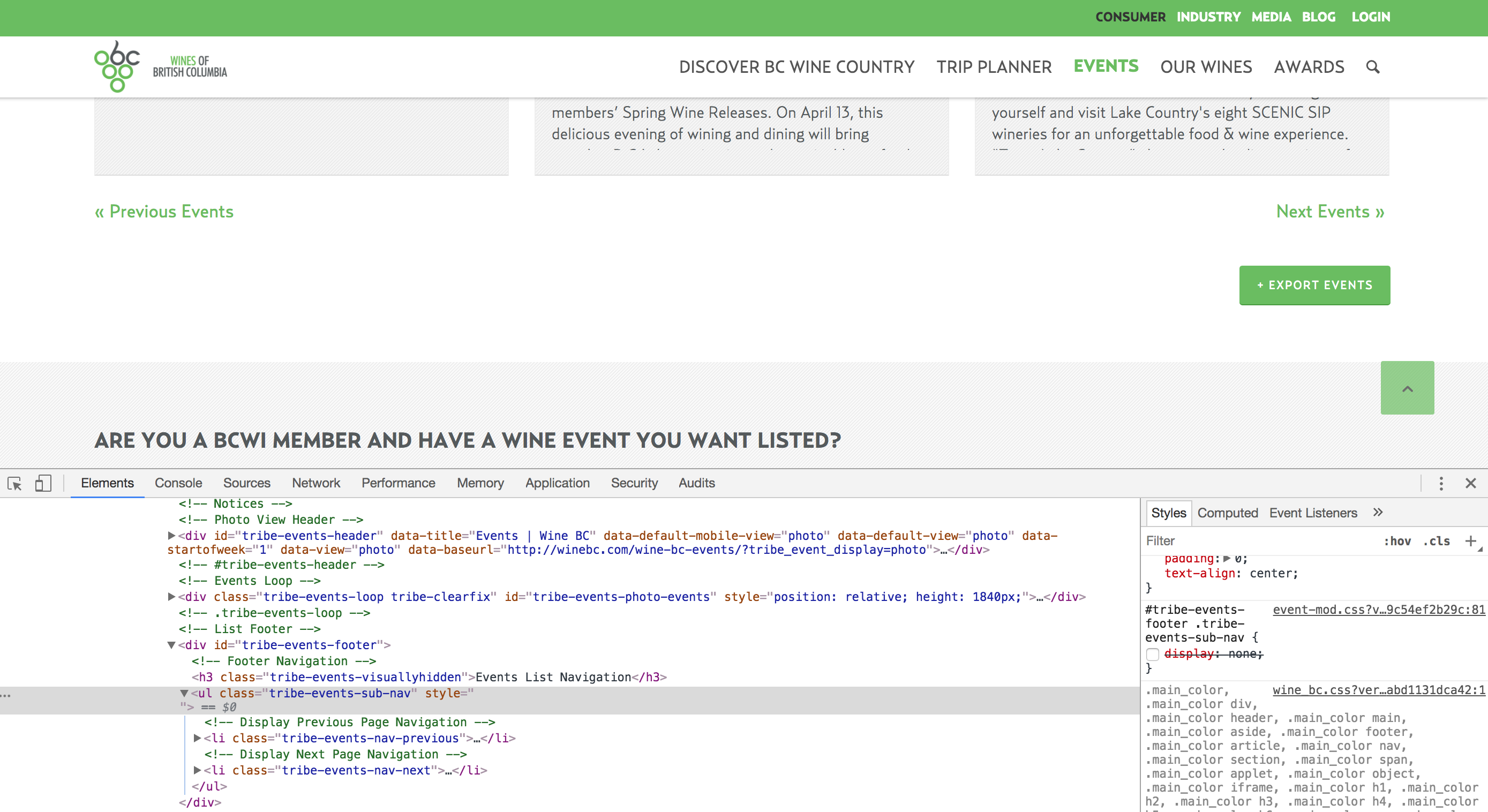
I hope that helps 🙂 Let me know if any follow up questions.
Best,
VictorMemberHi Sven!
Thanks for getting in touch with us!
If you already have Event Tickets Plus installed and activated, the Attendees information options should show up automatically.
Could you please make sure you have Event Tickets Plus activated?
Also, please make sure you are using the latest versions of our plugins. Remember you can always download our plugins from your downloads page > https://theeventscalendar.com/my-account/downloads/
When coming back, please share with us your system information by following this guide > https://theeventscalendar.com/knowledgebase/sharing-sys-info/. We’ll see if there is anything strange that would indicate an error from there.
Let us know how that goes.
Thanks,
VictorMemberHi Jessy!
Thanks for reaching out to us!
You can use the WordPress embed feature to embed single events > https://theeventscalendar.com/knowledgebase/inserting-calendar-content-posts-pages/
With Events Calendar PRO you can also use the tribe_event_inline shortcode to do that https://theeventscalendar.com/knowledgebase/embedding-single-events-tribe_event_inline-shortcode/
I’m not really familiar with Elementor, but you can customize our templates using one of the methods described in our themer’s guide > https://theeventscalendar.com/knowledgebase/themers-guide/
Hope that helps 🙂
Best,
VictorMarch 29, 2018 at 11:20 am in reply to: Incorrect comparision start and end date of selling tickets #1492043MemberHi Dmitry!
Thanks again for reporting this issues.
The Week Start Day issue for the date picker is already logged and attached in your previous topic.
As for the date format error, I’m not able to reproduce on my end. First, could you please share with us your system information by following this guide > https://theeventscalendar.com/knowledgebase/sharing-sys-info/ ? We’ll see if there is anything strange that would indicate an error from there.
Also, could you please let me know more about how you are getting that error?
Thanks,
VictorMemberHi Dmitry!
Thanks for taking your time to report this.
Unfortunately, that is a bug on our end that we are already aware of.
I will set this thread’s status to “Pending fix” and link it to the report. This way, we will notify you once a fix is released in one of our next maintenance releases of our plugins.
We apologise for the inconvenience and we appreciate your patience while we work on this.
Best,
VictorMemberHi Davide!
Thanks for getting in touch again and for your interest in our plugins.
Let me help you with each of those questions:
1. Setting a default start/end sale dates is not a built-in functionality. However, you can import your events and RSVPs using our Event Aggregator CSV import tool. You can learn more about this > https://theeventscalendar.com/knowledgebase/csv-files-options-and-examples/
2. There is no setting to modify the tribe-user-event-confirmations shortcode, but with some custom coding you could create your own shortcode to accomplish what you are looking for.
I hope that helps 🙂
Best,
VictorMarch 29, 2018 at 7:21 am in reply to: How to change the word "events" to "calendar" on the menu #1491641MemberHi Brandon!
Thanks for reaching out to us! Let me help you with this topic.
I’m not exactly sure where you need to modify that. Could you please share with us a screenshot of it?
The following extension may be of help too > https://theeventscalendar.com/extensions/change-labels-events-venues-organizers/
Please let me know.
Thanks,
VictorMemberHi Jenny!
Thanks for reaching out to us!
Let me help you with that issue.
First, could you please enable WP_DEBUG (https://codex.wordpress.org/Debugging_in_WordPress) and WP_DEBUG_LOG (https://codex.wordpress.org/Debugging_in_WordPress#WP_DEBUG_LOG) ? This will create a debug.log file inside the /wp-content directory.
After that, try reproducing the issue a few times, so that in case there is an error, it will be saved into the debug.log file. Please share that log file with us so we can see if any problem from there.
Additioanally, this can be related to a theme or plugin conflict, so to narrow the problem down please go through the steps provided in the testing for conflicts guide > https://theeventscalendar.com/knowledgebase/testing-for-conflicts/ and let us know what you find in the process.
Thanks,
VictorMemberHi Holly!
Thanks for reaching out to us!
That sounds a strange issue. Let me help you with the troubleshooting.
This could be related to a theme or plugin conflict, so as a first step to narrow the problem down please go through the steps provided in the testing for conflicts guide > https://theeventscalendar.com/knowledgebase/testing-for-conflicts/ and let us know what you find in the process.
Please let us know how that goes.
Thanks,
Victor -
AuthorPosts