

Forum Replies Created
-
AuthorPosts
-
Sky
KeymasterJames,
Thank you for providing that link. I can see the time displayed change on the instances starting after DST kicks in.
Could you also upload screenshots of both your global WP timezone setting and the “date and time” section of this event?
Thanks,
SkyMarch 14, 2018 at 9:26 am in reply to: shortcode: remove the duplicate link « Previous Events + wrong french transl. #1479060KeymasterSylviane,
I no longer see the previous next links on your site. Did you get this figured out?
Thanks,
SkyKeymasterMargit,
Thank you for those screenshots. Could you also check in Events > Settings > General and tell me what you have set for the “End of day cutoff” setting? Just to see if it makes a difference, can you set this ahead a few hours?
Thanks,
SkyKeymasterAwesome! Glad that worked.
Let us know if you have any questions or issues in the future.
Take care,
SkyKeymasterHi there!
We generally don’t provide plugin support here in the pre-sales forum. If you have a license for one of our premium plugins, you can log in under the email associated with that license and post your question in the forum for that product. Otherwise, please post your questions in the WordPress.org support forums: https://wordpress.org/support/plugin/the-events-calendar
Thanks!
SkyKeymasterHi there!
I’m sorry to hear that you are having issues with the ticket form. I will try to help you figure out the problem.
On the ticket that is not showing on the front end, can you show me a screenshot of what you have set in the Ticket Settings > Advanced? For example:
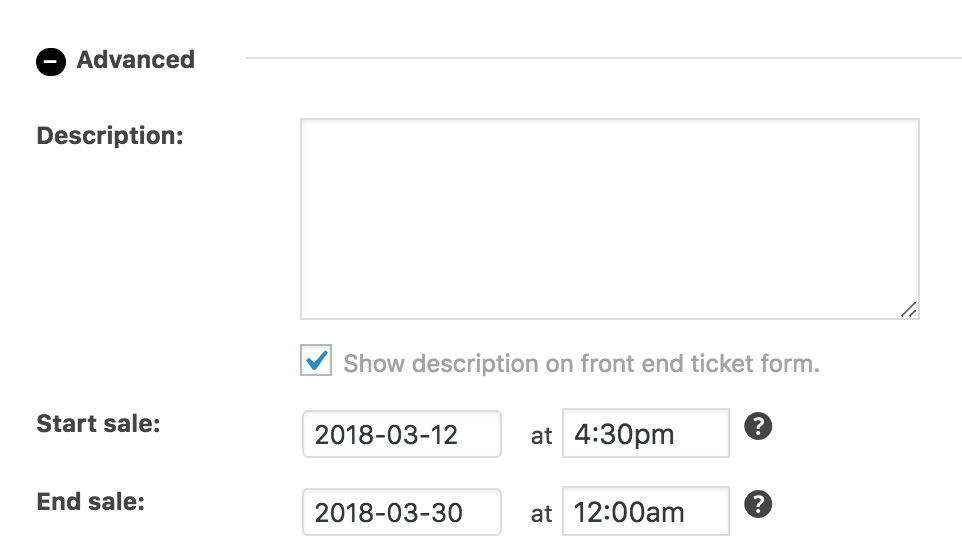
Thanks,
SkyKeymasterHi James,
I’m sorry to hear about your frustration with this issue. I will try to help get it sorted.
It sounds like you’ve gone through all the normally suggested steps for troubleshooting DST issues. Thanks for the detailed description of what you’ve tried. As you mentioned, other users are having similar issues as well. The development team has been working hard at tracking down the problem, but have been unable to reproduce the issue.
If you haven’t seen this already, check out this article explaining how the settings will affect the expected output: https://theeventscalendar.com/knowledgebase/daylight-saving-time/.
Can you provide me with a link to a specific event that is having this issue? I’d like to see if I can isolate the factor that would make it behave differently in different circumstances.
Thanks,
SkyMarch 13, 2018 at 8:21 am in reply to: shortcode: remove the duplicate link « Previous Events + wrong french transl. #1477572KeymasterHi Sylviane,
I would be happy to help you get this figured out!
1) The top links are actually hidden by default, and require a CSS snippet in order to show. Have you added this CSS somewhere in your code? You just need to remove this, and the top links should be hidden again. Here is the knowledgebase article that describes how to enable them, so you know what you are looking for: https://theeventscalendar.com/knowledgebase/adding-navigation-links-above-the-calendar-in-month-view/
2) You can override the official translations if you would rather word things differently. Please see this knowledgebase article for more information: https://theeventscalendar.com/knowledgebase/how-to-override-plugin-language-files/
If you believe the phrase in question is actually mis-translated, you can suggest a correction by following the steps outlined here: https://theeventscalendar.com/knowledgebase/adding-or-updating-a-translation/
Let me know if that helps!
Thanks,
SkyMarch 13, 2018 at 7:52 am in reply to: Recurring events showing incorrect time after Daylight Savings Time ends #1477533KeymasterJoakim,
We haven’t heard back from you in awhile. I am going to closed this thread. If you have any questions or issues in the future, please create a new post to let us know.
Thanks,
SkyMarch 13, 2018 at 7:48 am in reply to: Tribe-bar-views-list does not exist only for tribe_events shortcode #1477532KeymasterJohn,
Great! I’m glad that fixed things for you.
Let us know if you have any other issues or questions in the future.
Thanks,
SkyMarch 12, 2018 at 11:42 am in reply to: Navigation links at bottom of Month View don’t work after update #1476738KeymasterTommy,
This has been fixed in the latest releases of The Events Calendar Pro and the Filterbar.
Thanks for your patience!
Sky
KeymasterHi Kim!
The screenshot you posted looks quite different than what I see in my test install. Can you tell me where exactly that view is located so I can make sure I am comparing to the correct template? If your view is being altered or styled by your theme or a plugin, it’s possible that any CSS I suggest may not work.
Thanks,
SkyKeymasterHi Thomas!
Thanks for reaching out to us. I will try to answer your questions.
You can create multiple tickets for any given event. So, you could create separate tickets that have the various add-ons, and assign different prices to each ticket.
For multi-day tickets, Events Tickets Plus does not yet support “recurring events.” So while you cannot sell tickets for specific individual days in that series, you could create a ticket that is good for the entire series and another for a single day. The problem to workaround is that this will show these ticket options on every instance of that event, and no way to track who is going to each individual event.
Hope this helps! Let me know if you have any other questions.
Thanks,
SkyKeymasterHi Nacho!
We generally don’t provide premium support here on the pre-sales forum. In the future, please log in using the account connected to your license when seeking support for Events Tickets Plus.
Any custom fields you created for tickets can be viewed in either the Attendees information admin page, or a csv export of that information.
You can read more about collecting custom attendee information on this knowledgebase article.
Hope that helps.
Thanks,
SkyMarch 12, 2018 at 10:10 am in reply to: Tribe-bar-views-list does not exist only for tribe_events shortcode #1476665KeymasterHi John!
Thanks for reaching out to us. This was related to a bug that was recently patched. If you update to the latest versions of the Events Calendar Pro and the Filterbar, the issue should be resolved.
Just a note: I was not seeing these updates available yet in my test install, and had to manually download them from my TEC account. The versions you need are v4.4.24.1 of Pro, and v4.5.4 of the Filterbar.
Let me know if that helps.
Thanks,
Sky -
AuthorPosts