

Forum Replies Created
-
AuthorPosts
-
February 24, 2016 at 6:07 pm in reply to: Additional field added (photo credits) should show under image upload #1081811
Hunter
ModeratorHello and thank you for posting to our forums 🙂
First off, I want to thank you for your in-depth and respectful, constructive criticism in regards to our products. You are correct when you said “you are probably working on it…” – we are always looking for easier methods and procedures to deliver to our users.
With that said, the way you would approach altering the event submission form would be to do a template override using the information outlined in our Themer’s Guide.
I know it’s not the most ideal way of achieving the customizations you seek, but once you’ve done it once or twice, it becomes a fairly simple procedure. One added bonus of doing template overrides (in addition to our extensive Knowledgebase and Technical Docs) is it gives you a chance to really learn the potential of our plugins.
Again, thank you for the input and for choosing PRO – we look forward to “wowing” you with our future releases. Let me know if you have any follow-up questions or comments 🙂
February 24, 2016 at 9:45 am in reply to: On List view – post_content not displaying, using Avada Theme #1081552ModeratorHey Bill,
Unfortunately, theme support extends beyond the scope of support we’re able to provide through the forums; however I’d love to see if I can point you in the right direction.
First off, have you tried different settings found under Events > Settings > Display? (see screenshot below)
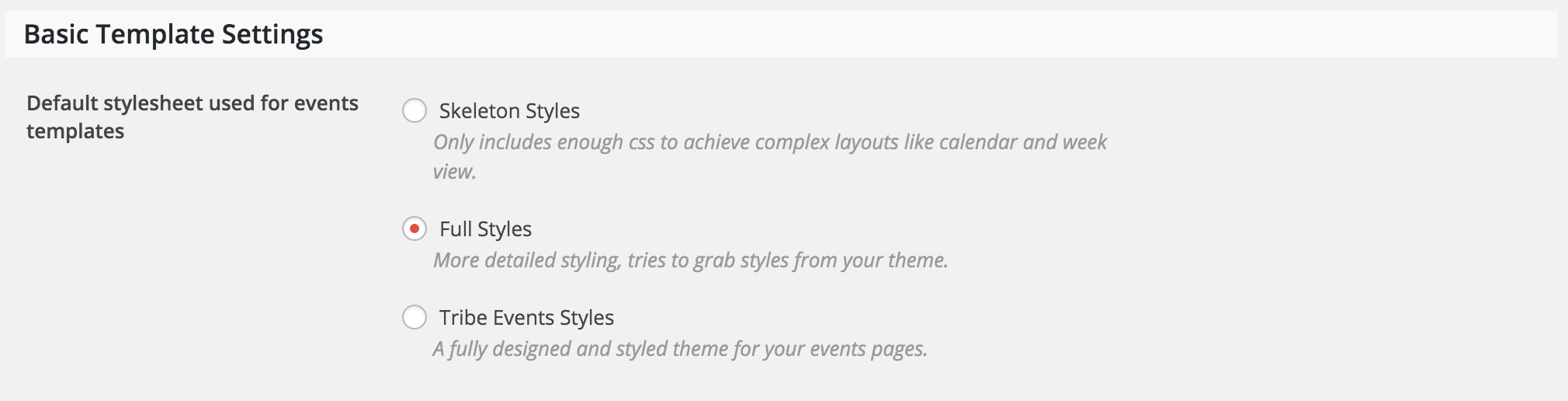
A few more questions:
- Does the problem still occur when you revert back to the default WP theme?
- Have you read through our Themer’s Guide? We provide information on how to successfully overwrite templates.
- Do you have any template overrides in your theme folder? Does the text appear if you delete the tribe-events folder (back it up before doing this) in your theme folder?
- Additionally, have you tried contacting the theme author about the issue?
Keep me posted on the status of your issue and have a great week!
ModeratorHey Daryll,
Sorry to hear about the troubles. Can you provide the “print ticket” link you’re provided in the confirmation email as a private reply?
Thanks for choosing PRO and I look forward to resolving this issue. Have a great day 🙂
February 24, 2016 at 9:03 am in reply to: Change Upcoming Events to Upcoming Activities and Back to Events to Statewide Li #1081530ModeratorWelcome back Sue,
You are correct – the snippet provided goes in your theme’s functions.php file. You shouldn’t need any CSS customizations 🙂
Let me know if this helps answer your question. Have a great day!
ModeratorHerman,
Theme customizations are unfortunately outside the scope of support we are able to provide, but I can try my best to point you in the right direction 🙂
First, visit Events > Settings > Display and try different options to see if you’re able to get it working as desired. (see screenshot below)
One other recommendation would be to contact your theme author. I imagine they have a quick fix to the issue. Thanks for choosing PRO and have a great week!
ModeratorWelcome back Casey,
I visited the link provided and noticed some display issues. Does the problem occur when reverting back to the default WP theme? Additionally, have you tried altering your settings found under Events > Settings > Display? (see screenshot below)
Theme conflicts/customizations are unfortunately beyond the scope of support we are able to provide, but I was able to find one article that might help. I noticed you’re using the Jupiter theme; have you tried contacting your author to see if they have any insight on a possible solution?
Keep me posted on your progress and have a great week 🙂
February 24, 2016 at 8:02 am in reply to: Organizer info in the Community Events form not appearing on the backend #1081446ModeratorHey Nathan,
Thanks for the patience.
Would you please share your System Information with me as a private reply? Also, is Events Calendar PRO activated when the problem occurs?
Thanks again for the patience while we work to resolve the issue. Have a great week!
ModeratorHey Joe,
Sorry to hear about the duplicating events. We strive to deliver a functional product and I apologize things aren’t working out for you at this time.
To expedite the process, would you mind sharing a zip file of your entire site with me? You can upload the file to a Google Drive or Dropbox folder and share a link with me as a private reply. Please include include the ical files as well.
Thanks for being so patient and understanding while we work to resolve the issue and I look forward to hearing back from you. Have a good day 🙂
February 23, 2016 at 10:18 am in reply to: event-submission-form: already uploaded image disappears if one of required fields is empty #1080871ModeratorHi Marion,
Thanks for sharing the information.
Just to be clear – the image upload issue does not occur when you remove or uncomment the required field code you’ve added to your theme’s functions.php file, correct?
February 23, 2016 at 10:16 am in reply to: iCal exported file seems to have the same number of lines no matter what #1080869ModeratorHey David,
Thanks for the updates. I’m going to do some testing on my local environment and consult with a few other team members on the matter and will get back to you with my findings as soon as possible.
Thank you for holding tight and have a good week 🙂
ModeratorHi Anne 🙂
Sorry to hear about the display troubles. Theme customizations are typically outside the scope we are able to provide through our support forums, but take a look at this article. It might help with the mini calendar responsiveness.
One other idea I have would be to open “Inspect” by right-clicking on your mouse when viewing your homepage. Try identifying the CSS class your theme is using. You can test CSS right there in your browser. Lastly, you could try contacting your theme author to see if they can provide any assistance.
I hope this information helps and best of luck with the customizations. Thanks for choosing PRO and have a great week 🙂
February 23, 2016 at 9:50 am in reply to: Change Upcoming Events to Upcoming Activities and Back to Events to Statewide Li #1080856ModeratorHello Susan,
Thank you for posting.
PHP snippets are placed in your theme’s functions.php file. CSS snippets are typically placed in your theme’s style.css file.
I hope this information is helpful. Have a great week and thanks for choosing PRO!
ModeratorHello Herman,
Do you experience the issue when reverting to the default WP theme? Try running through the Testing for conflicts article to see if it’s a theme conflict.
If so, my next recommendation would be to go over our Themer’s Guide. We give in-depth information on how to successfully overwrite templates.
I hope this information helps and thanks for choosing PRO! Have a good week 🙂
ModeratorHi Casey,
I attempted to access the link provided but was unable to do so. Try providing another link – you may want to confirm you’re able to access the image in a private browsing window before sending over the link.
Also, please provide as much information as possible in regards to the issue you’re experiencing. It will help expedite your request.
Thanks for choosing PRO and have a great week!
ModeratorHello 🙂
Sorry to hear about the troubles. I visited the link provided and experienced the issue described. You are more than likely experiencing a theme conflict. Please read through our Themer’s Guide on how to successfully overwrite your single-event.php template.
One tip I can provide off the bat would be to open “Inspect” by right-clicking your mouse when viewing an event page and see if you can track down the repeating code.
I hope this information helps and best of luck with the template override. Have a great week!
-
AuthorPosts