

Forum Replies Created
-
AuthorPosts
-
February 28, 2016 at 2:47 pm in reply to: Submission form duplicating content for top of the page… Still not fixed #1083116
Hunter
ModeratorHey Brent,
Thanks for the update. If you’re able to acquire the login credentials with permission from said developer, feel free to open a new thread in the paid support forums.
I’ll go ahead and close this thread out and keep my eye out for your thread in the queue. Thanks for understanding and have a great rest of your Sunday 🙂
February 27, 2016 at 10:29 am in reply to: display organizers on venue page upcoming events list? #1082940ModeratorHello and welcome back 🙂
I took a look at the links provided and reviewed the code you’ve shared. After talking to some other team members, we came up with an example solution, but please note that this is just a basic example and we unfortunately won’t be able to help with further customizations: https://gist.githubusercontent.com/ggwicz/c7d1593c9e472ba50d08/raw/2e02c6909f7ddcef8b7f60b3db127a03258ee9fd/loop.php
You can modify the event list output for single-venue events by modifying src/views/tribe-events/list/loop.php in The Events Calendar.
I hope this helps and best of luck with the customizations. Have a great rest of your weekend and thanks for choosing PRO!
ModeratorHey Chris,
Sorry to hear about the troubles. #nofun
Have you checked to make sure your license keys are present found under Events > Settings > Licenses?
Also, does the problem occur when deactivating all other plugins except for ours and reverting back to the default WP theme? Try running through our Testing for conflicts article to see if you’re experiencing a potential theme and/or plugin conflict.
Thanks for reaching out and I look forward to getting this resolved. Have a great weekend 🙂
February 26, 2016 at 11:19 am in reply to: Can't show image on Total Theme (Visual Composer) #1082640ModeratorHello, Santiago 🙂
Welcome to the forums and thank you for choosing PRO!
I believe you’re referring to the Photo view option. It appears you don’t have that enabled for your website. (see screenshot below)

You can add the Photo view option to display by visiting Events > Settings > Display in your WP admin. (see screenshot below)
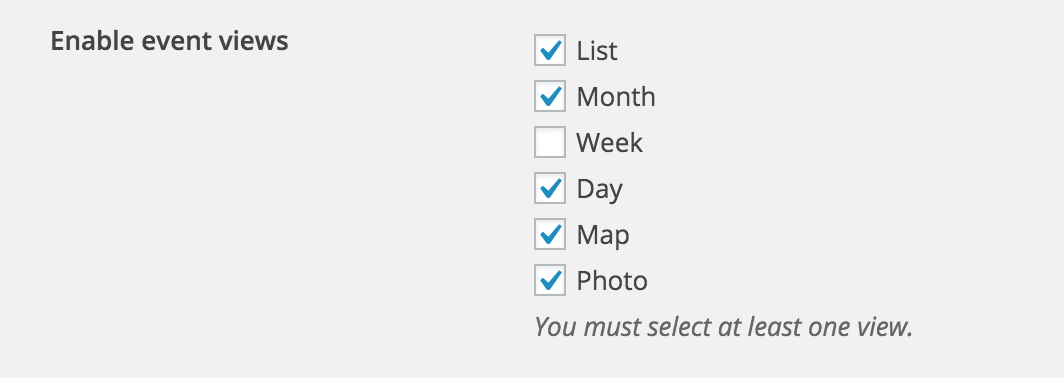
Try enabling the Photo view, then visit your events page and click the “TO SEE HOW” dropdown and select the Photo view.
Let me know if this information is useful and again, welcome to the forums!
February 26, 2016 at 11:12 am in reply to: Submission form duplicating content for top of the page… Still not fixed #1082636ModeratorHi Brent 🙂
Would you mind opening up this thread under our paid support forums rather than our Pre-Sales channel? We try and keep this open to questions about our plugin capabilities and features rather than support.
Thanks for understanding and I’ll keep an eye open on the paid support forums. Have a great week!
ModeratorHello Kandace and Janet 🙂
I just tried replicating the issue on my local test environment but was unfortunately able to do so. I created an event for today (2/26/16) and set the event start time to 5:00pm. My end-of-day cutoff setting is set to 5:00am and my WP timezone setting is set to Los Angeles. (see screenshot below)
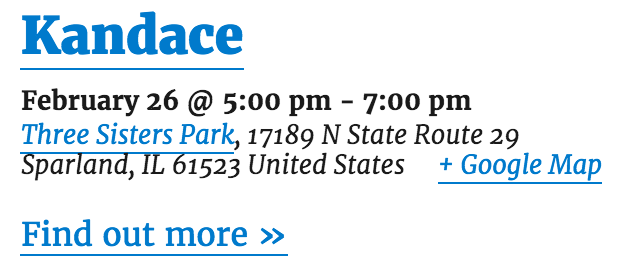
Just to confirm, you are still experiencing the issue when reverting back to the default WP theme and deactivating all plugins except for The Events Calendar and Events Calendar Pro, correct? I’m also going to bring this topic up to some other team members to see if they have any ideas.
To Janet: would you mind opening a new thread in regards to the issue you’re experiencing? Even though you appear to be having similar troubles, there could be different causes. Splitting up the threads helps expedite the process all around.
Thank you to the both of you for your informative posts and for keeping me updated. Have a good weekend 🙂
ModeratorGlad to hear you’ve got it resolved 🙂
One more recommendation I have for learning how to create template overrides would be to visit YouTube and check out a few examples. LevelUp Tuts has really helped me over the years.
I’ll close this thread out but please open a new one if you have any more questions. Have a good weekend!
February 26, 2016 at 7:52 am in reply to: Change Upcoming Events to Upcoming Activities and Back to Events to Statewide Li #1082423ModeratorHi Sue,
You are spot on!
You can learn more about child themes on the WordPress.org site. About halfway down, the article goes into detail about the style.css and functions.php files. If you’re a visual learner, head on over to YouTube and check out some examples of creating child themes; LevelUp Tuts is one of my personal favorites 🙂
I hope this helps – have a great weekend!
February 26, 2016 at 7:37 am in reply to: Organizer info in the Community Events form not appearing on the backend #1082414ModeratorHey Nathan,
Thanks for your patience while I did some more testing and for also sharing the information with me. It looks like you’re experiencing a bug which we currently have logged, so I’ve gone ahead and included this forum thread in the bug ticket. Stay tuned to your WP admin and theeventscalendar.com/blog for a possible fix.
Again, thanks for the patience on your end while I did a little more investigating. Have a good weekend 🙂
February 25, 2016 at 9:45 pm in reply to: event-submission-form: already uploaded image disappears if one of required fields is empty #1082319ModeratorHey Marion,
Thanks for keeping me updated and for the in-depth responses. Hold tight while I do a bit of testing and speak with some of the other team members to see if we can come up with a solution. I’ll be sure and get back to you within the next 24 hours.
Thanks again for the info and I look forward to getting this all taken care of. Have a great weekend 🙂
ModeratorHey Leia,
Welcome back 🙂
My next recommendation would be to read through our Themer’s Guide. We provide insight on how to create custom template overrides in a easy-to-learn fashion.
Also, to hide the Google Calendar button, try the following CSS:
.single-tribe_events .tribe-events-cal-links {

    margin-bottom: 1.75em;

    display: none;

}
One way you can easily locate CSS elements is by right-clicking your mouse and opening “Inspect” when viewing a page you want to make changes on.
Let me know if this information helps and have a great weekend!
ModeratorHey Daryll,
I believe we’ve got a bug currently logged similar to the issue you’re experiencing, so I’ve gone ahead and added this forum thread to the ticket. Stay tuned to your WP admin and theeventscalendar.com/blog for a potential fix.
Thanks for your patience and understanding while we work on a solution. Have a great weekend and thank you for choosing PRO 🙂
February 25, 2016 at 7:16 pm in reply to: Using map view cause page meta title to change to "undefined" #1082302ModeratorHey Mimi 🙂
Thanks for your patience while I’ve worked on a solution. Please try adding the following snippet to the bottom of your theme’s functions.php file:
function my_title( $title ) {
    return 'Something else';
}

add_filter( 'wp_title', 'my_title', 100 );
Let me know if this helps resolve the SEO title issue. Have a great weekend and thanks for choosing PRO!
ModeratorHey Troy 🙂
Glad to hear the issue has been resolved! I’ll close this thread out but please open a new one if you have any more questions.
Have a great week and thank you for choosing PRO!
February 24, 2016 at 6:15 pm in reply to: The next and previous event links looks too long at iPhone view #1081813ModeratorHello and welcome back,
I visited your site and experienced the issue you described. I opened up “Inspect” by right-clicking on my mouse and noticed the following CSS:
.tribe-events-sub-nav li a {
    display: block;
    padding: 10px 20px 1000px;
    color: #fff;
    white-space: normal;
    position: relative;
    margin-bottom: -990px;
    background: #666;
}
The CSS padding has 1000px in it, so this may have something to do with the issue. Let me know if this information helps and have a great week!
-
AuthorPosts