
Home › Forums › Calendar Products › Events Calendar PRO › Organizer info in the Community Events form not appearing on the backend
- This topic has 13 replies, 4 voices, and was last updated 10 years, 6 months ago by
Geoff.
-
AuthorPosts
-
February 15, 2016 at 4:41 pm #1073480
Nathan
ParticipantHi! For some reason, when someone fills out the Community Events form, the event organizer fields are being left blank on the backend, and no confirmation email is being sent to the organizer who submitted the event. Any ideas on how to fix this issue? It’s really hard to contact people about further instructions or to inquire of specifics when their info does not appear on our end. I’ve tried reinstalling the Community Events add-on but it didn’t change anything.
February 17, 2016 at 9:26 am #1074558ParticipantDoes anyone have a fix for this?
February 17, 2016 at 3:43 pm #1074693Hunter
ModeratorHey Nathan,
Welcome back to the forums 🙂
I did a few tests and some research based on what you’ve told me, so I’ve got a few questions for you.
In regards to the event organizer issue:
- Are the users who are attempting to add new events logged in, or anonymous?
- Are the users attempting to add a new organizer, or use an existing organizer?
When you say, “no confirmation email is being submitted to the organizer who submitted the event…”
Do you have the “Send an email alert when a new event is submitted” box checked under Events > Settings > Community (see screenshot below) and their (the promoter’s) email address included in the “Alerts” email field?
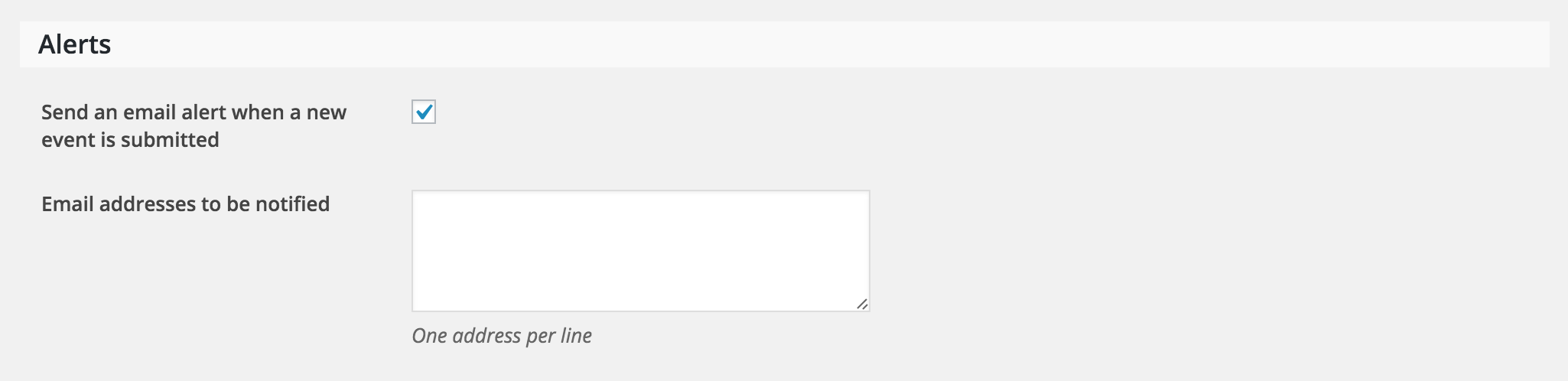
Thanks for the patience while we work to resolve the issue in question and I look forward to getting it taken care of. Have a good one!
February 18, 2016 at 7:42 am #1075101ParticipantThanks for the reply!
1. Are the users who are attempting to add new events logged in, or anonymous?
They are not logged in or have an account with the website. That didn’t use to be an issue as far as I know. People could anonymously submit an event and input their own information in the Event Organizer area of the form. Correct me if I’m wrong on this one.2. Are the users attempting to add a new organizer, or use an existing organizer?
They are attempting to add themselves as a new organizer. Using an existing organizer works without an issue. But if they are adding themselves, nothing appears in the email we receive or on the backend view of the event.I also just updated the plugins and am still having the issue. Another thing to note, while making the Organizer fields required, if someone tries to add themselves as a new organizer, the form will not submit and the error appears. It says that the fields have to be filled out. The thing is that they were filled out. So it’s not registering those fields as completed in the form upon submission.
February 22, 2016 at 2:15 pm #1080196ParticipantAny news?
February 24, 2016 at 8:02 am #1081446ModeratorHey Nathan,
Thanks for the patience.
Would you please share your System Information with me as a private reply? Also, is Events Calendar PRO activated when the problem occurs?
Thanks again for the patience while we work to resolve the issue. Have a great week!
February 24, 2016 at 8:41 am #1081508ParticipantThis reply is private.
-
This reply was modified 10 years, 8 months ago by
February 24, 2016 at 8:45 am #1081514ParticipantThis reply is private.
February 26, 2016 at 7:37 am #1082414ModeratorHey Nathan,
Thanks for your patience while I did some more testing and for also sharing the information with me. It looks like you’re experiencing a bug which we currently have logged, so I’ve gone ahead and included this forum thread in the bug ticket. Stay tuned to your WP admin and theeventscalendar.com/blog for a possible fix.
Again, thanks for the patience on your end while I did a little more investigating. Have a good weekend 🙂
March 7, 2016 at 8:53 am #1085882ParticipantHi,
I just update the plugin to it’s latest version and I’m still having issues not seeing the Event Organizer information in the email and on the backend. This is what is received.
Test Event
March 16 @ 8:00 am – March 16 @ 5:00 pm
Event Organizer
Event Venue
Where it’s located.
Description
This is another test to see if the update cured the issue.
Review Event-
This reply was modified 10 years, 7 months ago by
March 10, 2016 at 10:38 am #1087325ModeratorHi Nathan,
I just tested for both issues described and the Organizer has been saved in the back-end and also sent successfully via new event submission email.
I tested with the latest versions of our plugins and the default WP theme. Try reviewing the Testing for conflicts guide again to see if you can narrow down a conflict.
Thanks for the update and good luck with everything.
March 14, 2016 at 1:42 pm #1088706Leah
MemberHello,
Thank you for reporting this issue. We weren’t able to get a fix for it into our upcoming release (4.1). However, please know that the problem is still on our radar and is ticketed within our system to be addressed in a future maintenance release. We’ll do our best to keep you posted when we are able to get a solution in place. Thank you for your patience while we improve and expand our plugins.
Best,
LeahMarch 29, 2016 at 8:13 am #1095394ParticipantI figured out what the issue was! Something about the older version of community events add-on with custom modified templates wasn’t cooperating with the latest updates. I’m not sure if there were some coding updates that y’all did to the add-on, but I copied the latest version of the plugin’s template pages and re-customized the look to fit my theme as I did before. Now everything works fine!
So I guess it might be important to double-check custom templates when there’s an update to the plugin, especially if something goes wrong. 🙂
March 31, 2016 at 1:13 pm #1096612MemberHeck yeah and nice work, Nathan!
I just wanted to pop in and let you know that we were able to ship version 4.1.1 out last night and that it did include a fix for this issue. Please do update when you get the chance and careful with those customizations when you do. 🙂
Let us know if you continue to spot an issues from there in a new thread and we’d be happy to help.
Cheers!
Geoff -
AuthorPosts
- The topic ‘Organizer info in the Community Events form not appearing on the backend’ is closed to new replies.