

Forum Replies Created
-
AuthorPosts
-
February 22, 2016 at 10:02 pm in reply to: event-submission-form: already uploaded image disappears if one of required fields is empty #1080469
Hunter
ModeratorHey Marion,
Before I get to testing on my local environment, would you please share your System Information with me as a private reply?
Thanks for posting to our support forums and I look forward to resolving this issue! Have a great week 🙂
February 22, 2016 at 9:48 pm in reply to: Events calendar plugin disabling my Menu function #1080460ModeratorHey Jen,
Sorry to hear about the troubles. The outdated versions may be playing a big role in your issue. Updating to the latest versions would be ideal. Are you able to do so?
Thanks for reaching out via our forums and I look forward to hearing back. Have a great week!
ModeratorLee,
Sounds good – keep an eye out for potential fixes 🙂
ModeratorThanks for the update 🙂
I’ll close this thread out but please open a new one if you have any more questions. Thanks again and have a good week!
ModeratorHey Luke,
Thanks for the update and for sharing the fix with us! I’m sure other users experiencing the issue will find it beneficial. I’ll go ahead and close this thread out, but please feel free to open a new one should you have any more questions.
Have a great week and again, thanks for the update 🙂
ModeratorWelcome back,
I’m sorry to hear you’re still having troubles. As previously stated, this type of support extends beyond the reach we are able to provide. You may want to try a freelancer site for a data transfer expert.
My method is by exporting via phpMyAdmin – I start with tribe venues, organizers, then events. Next, I export my postmeta. Lastly, I import the venues, organizers, events, then the postmeta into the new site and everything should be transferred.
Again, I wish I could provide more support or options. Good luck with the transfer.
ModeratorHey Kandace,
It could most certainly be a plugin conflict, so go ahead and run through the article previously mentioned and let me know if you’re still having issues with the events.
Thanks for the update and keep me posted! Have a good one.
ModeratorHey Martha,
You nailed it on the head. Those who submit events are not automatically notified. Only emails found under Alerts in your Events > Settings > Community options (see screenshot below).
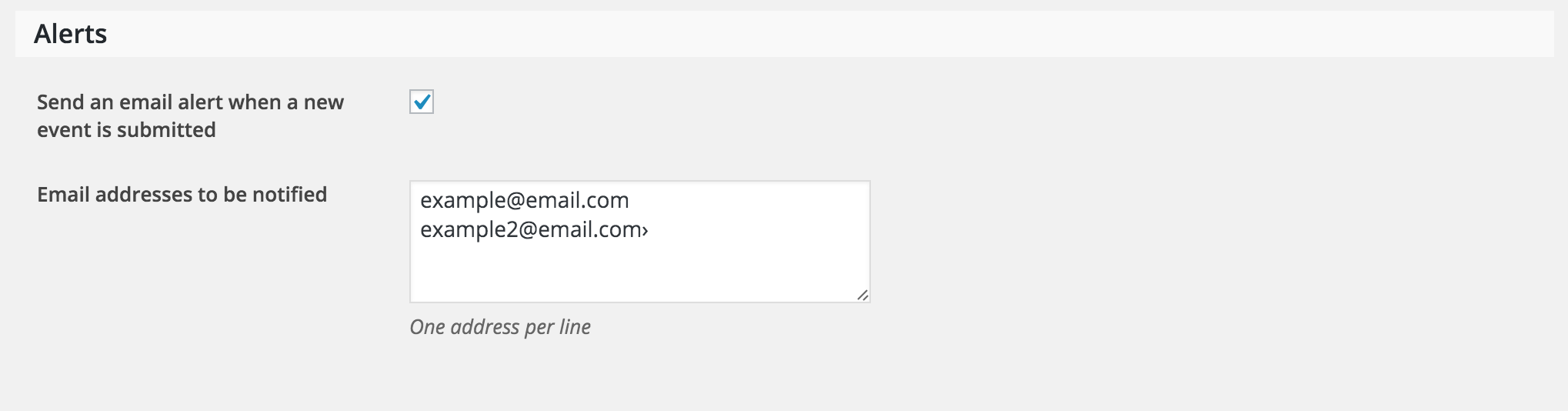
I hope this information helps and thank you for reaching out through our support forums. Have a great weekend 🙂
ModeratorHey Lee,
Welcome back!
I went and looked through your site for a bit and didn’t come across any 404s, but I am experiencing similar issues on my test environment when using the “-” character in the Events URL slug and Single event URL slug found under Events > Settings > General (example: upcoming-shows and upcoming-show).
I’ve gone ahead and created another ticket in regards to the issue. Stay tuned to theeventscalendar.com/blog and your WP-admin for potential fixes. Sorry again about the issues and I look forward to getting this resolved once and for all!
Have a good weekend 🙂
ModeratorHey Sean,
Welcome back to the forums 🙂
Sorry to hear about the troubles! As always, please run through our Testing for conflicts article to make sure there are no conflicts in play.
I went ahead and tested the issue you described on my test environment and indeed saw the spinning wheel and no ticket was saved. I’ve gone ahead and created a ticket in regards to the subject. Again, I’m sorry to hear about the troubles and stay posted to theeventscalendar.com/blog and your WP-admin for updates.
Take care and have a good weekend.
ModeratorHey Mark,
Thanks for providing the screenshot. The text you highlighted doesn’t appear to come from our plugins. My best guess is it’s a theme feature, so you might want to try contacting your theme author. One other idea I have would be to right-click on your mouse and open up “Inspect” – you can identify the CSS classes this way.
I hope this information helps and best of luck with the customizations. Have a great day!
ModeratorHey Audrey,
Can you share your System Information with me as a private reply too? Thanks 🙂
February 18, 2016 at 3:54 pm in reply to: Week customization not working after event calendar update #1077588ModeratorGlad to hear you got it working properly 🙂
And to answer your follow-up question, there is unfortunately no way to do that out-of-the-box, but we’re always adding new features and functionality from our UserVoice Feature Ideas page. You can add and upvote already submitted feature requests there.
I’m going to close this thread but please open a new one if you have any more questions. Thanks again for keeping me posted and have a great week!
ModeratorHey Mark,
We unfortunately don’t offer any type of video or phone support. Is there any possibility you can put the site on a live site temporarily so I can see what’s going on? Or are you able to share screenshots?
Thanks for the response and have a great day 🙂
ModeratorHello and welcome back to the forums 🙂
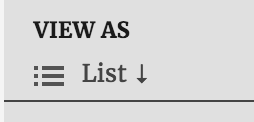
One simple option would be to add a dropdown icon arrow with this CSS code (example in screenshot below):
.tribe-bar-views-list li:first-child a span::after {

content: '\2193';

}
Another option would be to do a template override using the instructions found in our Themer’s Guide. You may need to adjust the Basic Template Settings found under Events > Settings > Display.
If you decide to go with the template override, the following CSS will help:
#tribe-bar-views [name="tribe-bar-view"] {

display: inline-block;

}
#tribe-bar-views .tribe-bar-views-list {
display: none;
}Sorry there isn’t an easier solution, but I wish you the best of luck with the customization and thanks for choosing PRO!
-
AuthorPosts