

Forum Replies Created
-
AuthorPosts
-
Hunter
ModeratorHey Neil 🙂
Welcome to our Pre-sales channel and thanks for reaching out! To answer your question… yes! When you have the Eventbrite plugin installed on your WP site, you have the option to essentially copy the events from your WP site to Eventbrite. Take a look at the first screenshot from our Eventbrite product page. Notice towards the bottom it says, “Publish this post to create the event with Eventbrite.com”
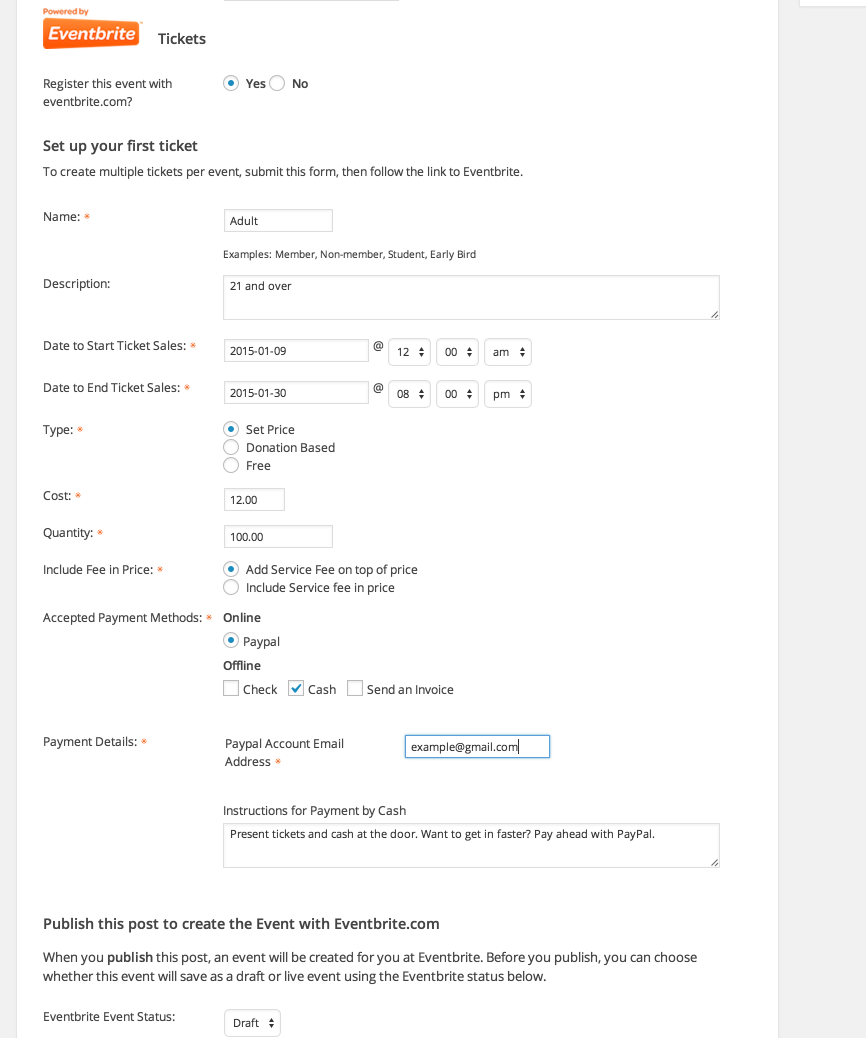
I hope this sufficiently answers your question and if you’ve got any follow-up responses for me, feel free to fire away! Thanks again for the inquiry and I hope to see you around in our Premium support forums. Have a great week!
March 22, 2016 at 9:37 pm in reply to: Editing tickets with discounts causes the discount to be rendered as the price #1092719ModeratorHey Jacob,
I’d be glad to help you out with this. Can you please confirm you’ve reviewed our Testing for conflicts to ensure you’re not experiencing a theme and/or plugin conflict?
Let me know and we’ll go from there. Thanks for posting and have a good rest of your week 🙂
ModeratorHey Graham 🙂
Check the /src/views/pro/photo.php for the grid view template. Let me know if you’re able to locate it.
Thanks for the update and enjoy your day!
ModeratorHello and sorry to hear about the issue,
I visited your site and experienced issues with the mini calendar widget. I then tested to see if I could reproduce the issue and was unable to. Next, I checked our logged bugs to see if anything has been reported but again, no luck :-/
With that said, I would probably start by right-clicking on your mouse and opening “Inspect” – from here you can identify issues and with that information, hopefully start to address those conflicts. Caching plugins are often times responsible for these types of issues.
Thanks for creating a thread and I wish you the best of luck. Thanks for choosing TEC!
March 21, 2016 at 8:54 pm in reply to: Purchased Events Calendar Pro and I really needed the Community Event calendar #1092182ModeratorHi Julia,
I’d be glad to help you out with this. To request a refund for Events Calendar PRO, simply visit our Contact page and follow the instructions to applying for a refund. So long as your purchase is within the last 30 days, we are more than happy to honor the refund 🙂
To expedite the process, include your receipts with the initial refund request. I hope I’ve answered your question and thanks for reaching out. Have a good week!
ModeratorHey Chris 🙂
Thank you for reaching out.
While I wish I was able to provide a solid answer, there unfortunately (in my experience) isn’t one. The reason I say this is because with all the different development environments, from hosting to themes and plugins, the opportunity for conflict is always going to be possible. One relative resource I’ve got is this Knowledgebase article pertaining to compatible themes written by Jen (we love her) that can hopefully give you some more concrete information.
We here at Modern Tribe are always looking to exceed the expectations of our customers, so depending on the workload and what we have going on, our support team members are always taking the initiative when posed with certain questions, whether they’re in the scope of support we’re able to provide or not.
With that said, I hope I’ve addressed your question and thanks again for reaching out. If you’ve got any follow up questions, feel free to ask. Have a good week!
March 21, 2016 at 8:31 pm in reply to: Remove tags in filter bat that do not have events tied to them. #1092171ModeratorHey Cory,
While I completely agree with your logic, unfortunately we don’t have a built-in option for you to exclude tags from the Filter Bar if they’re not attached to upcoming events. This is definitely an idea worth mentioning via our UserVoice Feature Ideas if it hasn’t already.
I wish I had a more solid answer for you but unfortunately, my hands are a bit tied. Using hooks and filters should do the trick though. Best of luck and have a good week!
ModeratorHello <3
Sorry to hear about the issues! Can you confirm if you’ve reverted back to the default WP theme and deactivated your other plugins as outlined in our Testing for conflicts?
Respond back and we’ll go from there. Rest assured, if it’s a bug… we’ll find it!
Enjoy your week 🙂
March 21, 2016 at 7:42 pm in reply to: User with 'Author' role permissions is able to view ALL events #1092156ModeratorHey Ben,
Welcome back:-)
An immediate response I have for you is the Admin roles and permissions KB article. Let me know if you’re able to get everything going as desired. In the mean time, I’ll investigate a bit more to see if it is in fact a bug and if so, I’ll log it and update this thread with more information.
Keep me updated on your progress and have a good rest of your week!
ModeratorHey Joel 🙂
Thanks for helping us out on this one! We’ll give @Gary a few days to respond on this one – but I believe we’ll most likely be closing this thread out per recommendation to Gary to create a new ticket in the appropriate support forum.
Joel: thanks again and best of luck with a final resolution on the thread you mentioned. Cheers!
March 21, 2016 at 10:05 am in reply to: Still getting 404 messages after yesterdays update fail #1091876ModeratorHey Martine,
Thank you for keeping me updated and I’m glad Mr. Nico’s wonderful advice helped resolve the issue! Additionally, please refrain from sending over login credentials as we are strictly forbidden to log into customer sites. @Chris, if you’re still experiencing troubles, please create a separate ticket as it helps expedite resolutions.
Thanks to the both of you for the input and I’ll go ahead and close this thread out. Take care and thanks again for everything 🙂
ModeratorWelcome back Dan,
Unfortunately I don’t have a solid answer for you, but it’s definitely worth adding to the UserVoice Feature Ideas.
Glad to hear it’s working for you and have a good week!
ModeratorHey Oystein 🙂
As aforementioned, hang tight for a potential fix in an upcoming maintenance release. We’re aware of the issue and hopefully can get it addressed here shortly!
Thanks for the patience and have a good week. Cheers!
ModeratorHey Gary,
Thanks for the in-depth post. I completely sympathize with your frustration. For future reference, here is a link to the Event Tickets Plus support forums. Feel free to book it! We would be more than happy to assist you there.
I wish I was able to provide support, but we are unable to do so through the Pre-sales channel. But again, please visit the Event Tickets Plus support forum and create a new thread. We have support team members ready to assist you with narrowing down the conflict in question.
Thanks for understanding our position on the matter and I’ll keep an eye out for your thread in the appropriate support forum. Have a great weekend and rest assured, we are here to assist you in any way possible 🙂
March 18, 2016 at 1:12 pm in reply to: Still getting 404 messages after yesterdays update fail #1091165ModeratorHello and thanks for posting,
Would you mind sharing your System Information as a private reply? Also, we released a quick fix maintenance release for The Events Calendar (version 4.1.0.1). If you haven’t already, update to that version then try running through Nico’s aforementioned steps to see if you’re able to resolve the 404 issue.
Thanks again for the post and for choosing PRO. Have a good weekend!
-
AuthorPosts