

Forum Replies Created
-
AuthorPosts
-
Hunter
ModeratorHi and thanks for the update,
I took a look at the screenshot and I think this snippet should help achieve what you’re looking for. Try it out and let me know if you’re able to get the Map view info displaying properly. One other idea is to check Titles & Metas -> Post Types -> Custom Post Type Archives -> Events under your Yoast settings.
Thank you again for the response and have a good one.
ModeratorHi Nadia,
Thanks for the update and I’ll close this thread out, but please stay tuned to your wp-admin and theeventscalendar.com/blog for a fix on the Google Maps API issue.
Take care and have a good one.
March 24, 2016 at 9:47 am in reply to: Editing tickets with discounts causes the discount to be rendered as the price #1093508ModeratorJacob,
Thanks for sending that over. Can you also send over your System Information as a private reply?
Thanks again and have a good weekend!
ModeratorHello Kristi,
I agree, the first screenshot calendar looks pretty snazzy! As much as I would love to help, theme support/customizations are out of our hands :-/
I’d probably start by reviewing our Themer’s Guide and see if you’re able to get started in the right direction. One other idea would be to visit the site of the screenshot provided and right-click on your mouse and open “Inspect”. From there, you can identify some CSS and maybe get a little more insight on how they’re going about it.
I hope this helps and thanks for reaching out. Take care!
ModeratorHi and thanks for posting 🙂
Does the issue still arise after following the steps outlined in our Testing for conflicts? I copy-pasted the shortcode you provided and it worked properly for me.
Keep me updated and have a good week!
ModeratorHello 🙂
I’m not sure if you’re familiar with Yoast SEO, but it’s a very powerful plugin built specifically for optimizing your WP sites for maximum search engine results. You’ll also have the ability to edit your meta information for popular social media sites like Facebook, Twitter, and more.
Let me know if this answers your question and we’ll go from there. Thanks for reaching out and enjoy the remainder of your week!
March 23, 2016 at 9:57 pm in reply to: Editing tickets with discounts causes the discount to be rendered as the price #1093266ModeratorHey Jacob,
Thanks for getting back to me and for sharing the video with me. Unfortunately it looks like there is indeed a bug with our plugins and WooCommerce Memberships, but I can’t give you an exact time on when we’ll have a fix for this as it’ll take some time to isolate the issue.
Do any errors pop up on your site if you head to your site’s wp-config.php file and change this line of code:
define('WP_DEBUG', false);to this:
define('WP_DEBUG', true);That will display PHP errors if any exist, which might be quite useful here. Thanks again for the update and please let me know if you see any errors with wp_debug turned on.
ModeratorHey Christopher,
Welcome to the forums! Sorry to hear you’ve lost some code :-/
To avoid this in the future, I recommend reading our Themer’s Guide. We provide information on how to create custom templates and more importantly, where to keep them so you don’t lose them when updating.
If I understand you correctly, to remove the new tribe-attendees-list-container, you can hide attendee information from being displayed on the front end when adding/editing a ticket on your edit event page (back end). If you want to get a little more gritty with a template override, the file is located at /event-tickets-plus/src/views.
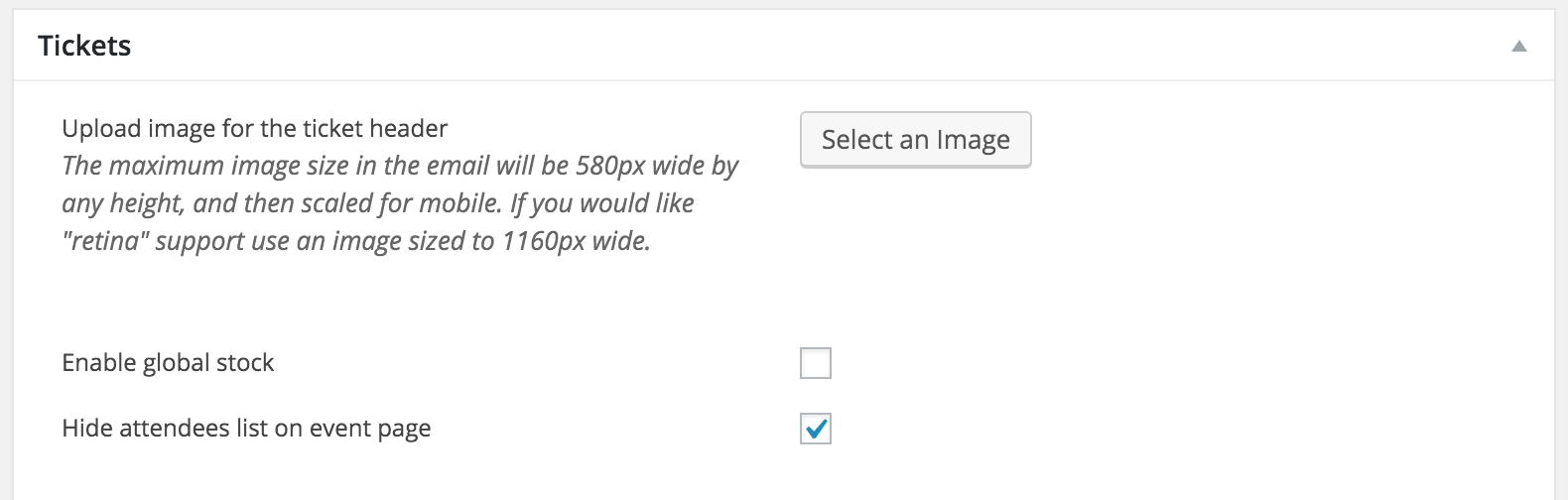
Let me know if I’ve answered your questions and we’ll go from there. Thank you for reaching out and take care!
ModeratorHello Nadia,
Welcome back! Sorry to hear about the issues… luckily we’re here to help 🙂
I noticed you said “yes” to both deactivating all other plugins except for ours and reverting back to the default WP theme as outlined in our Testing for conflicts, but I just want to confirm this. Another method to identifying errors is by right-clicking your mouse and opening “Inspect” – you should see any errors in that console.
In response to the Google Maps API key error – we are aware of this issue and working towards a solution. Stay tuned to your wp-admin and theeventscalendar.com/blog for more information.
Caching plugins can be extremely beneficial, but they are very finicky. One wrong setting can throw your entire site out of whack. However, I don’t believe a caching plugin would help solve the issues you’re currently experiencing.
Thank you for contacting us and please keep me updated with your findings. Have a great rest of your week!
ModeratorGraham,
Thanks for clarifying a bit more and my apologies for leading you in the wrong direction. I’m glad you’ve got it working as desired, so I’ll close this thread out. Please open a new one if you’ve got any more questions.
Take care and enjoy your week 🙂
ModeratorHey Jeff,
Welcome to the support forums!
Let’s see if we can narrow down the source of conflict. First off, would you mind reviewing our Testing for conflicts to see if we’re facing a potential theme and/or plugin conflict?
To revert back to previous versions, you can visit https://theeventscalendar.com/my-account/downloads/ and download previous versions from there. I would like to point out that it’s not recommended to use prior versions as it’s best to work out the conflicts rather than maintain outdated code.
Let me know if this helps and thanks for choosing PRO for your events calendar needs. Have a good one!
ModeratorHello Kathleen!
Welcome to the support forums and thank you for choosing PRO! We love seeing new faces around here 🙂
In response to your first question, if you visit any category page, you should be able to view a list of events (including images) tied to each category. For example, if your category is called “Movies” – you would visit http://www.your-site.com/events/category/movies (depending on your permalink structure found in both your WP permalink settings and your Events General settings).
To answer your second inquiry, so long as you have month view enabled under Events > Settings > Display (Enable event views), simply visit your main events page and select “Month” from the “View As” dropdown to visit your calendar page.
If you ever need to create custom templates, review our Themer’s Guide for information and examples. A few other articles worth mentioning include the Testing for conflicts and New User Primer.
I hope I’ve sufficiently answered your questions and please let me know if you need any more assistance. Have a great week!
ModeratorHey Daniel,
Thanks for reaching out. I’m not exactly sure I quite understand your question. Can you provide more information, possibly examples or screenshots?
Thanks again and I look forward to getting this resolved with you. Have a good one!
ModeratorHey Richard 🙂
First off, welcome to the support forums and thank you for choosing PRO! I’m sorry to hear about the troubles, but let me attempt to provide solid answers to your questions.
I am struggling to find /venue/list or something like that..
I’m not exactly sure I understand what you’re asking, but if you add an event and include a venue name, whether existing or new, the event should appear on the venue pages. If you’re asking if there is a page displaying all events, we don’t have that feature/functionality at this time, but it’s definitely an idea worth sharing with our UserVoice Feature Ideas if it hasn’t already.
To add venues to your menu, visit your WordPress Settings > Menus. From there, you should be able to add any/all venues and organizers.
In response to your follow up post; can you be a bit more specific as to how you would like them organized? All events, venues and organizers should be searchable, so I’m not sure why they’re not showing up in your results. Check our Testing for conflicts guide to see if you’re able to identify any issues. To alter styling, you can visit Events > Settings > Display and see if you’re able to get on the right track. You may need to do template overrides as outlined in our Themer’s Guide if you need anything specific that isn’t included “out of the box”.
I hope my response has helped and thanks again for choosing PRO! Have a great rest of your week 🙂
March 22, 2016 at 10:36 pm in reply to: Known Conflicts with The Events Calendar Pro and Divi Theme #1092730ModeratorHey Mandy 🙂
Thanks for reaching out. While we can’t guarantee you’ll experience zero conflicts, we do have a decent amount of users on the Divi theme. This means the amount of dcoumented support/conversation can contribute to solving issues should they arise.
Additionally, our support team members are here to assist you should conflicts arise and at the least, point you in the right direction to a solution. Lastly, we offer a 30-day money back “trial” period. So, if worst comes to worst (99/100 it doesn’t), we can refund your entire purchase so long as it’s within 30 days.
Let me know if I’ve sufficiently addressed your concerns and please reply back if you have any more questions. Thank you again for dropping in and enjoy the rest of your week!
-
AuthorPosts