

Forum Replies Created
-
AuthorPosts
-
Hunter
ModeratorHey Bill,
I appreciate you letting me know your issue has been resolved 🙂
I’ll close this thread out but please open a new one if you have any more questions. Enjoy your weekend!
ModeratorKaren,
Thanks for the update and I’m glad to hear you’ve got it resolved for the time being. I recommend setting up a demo site so you can test for errors in the future. The ability to test for conflicts will definitely make support easier on our end 🙂
Thanks again and enjoy your weekend!
ModeratorWelcome back,
Do you have “Week” view enabled under Events > Settings > Display? (see screenshot below)

Keep me updated and have a good weekend.
ModeratorHey Josh,
Welcome to the forums and thanks for choosing PRO!
We have a great article outlining how to create custom templates, such as listing the # of tickets available next to the ticket title. It’s called the Themer’s Guide. To get you started in the right direction, the specific template you’ll need to override is /events/calendar/pro/src/views/pro/single-event.php.
Let me know if this helps and feel free to follow up with any questions. Thanks again for choosing us for your events calendar needs and enjoy your week!
ModeratorWelcome back, Rami 🙂
Unfortunately, we are still hard at work incorporating tickets and recurring events. I wish I had a solid deadline for you but we don’t have anything set in stone. Stay tuned and rest assured we’re digging away and it’s still on our upcoming release radar.
Thanks for reaching out and for choosing PRO. Have a great weekend!
ModeratorHey Kelly,
Sorry to hear about the troubles. I’d be happy to investigate this with you 🙂
Can you please review our Testing for conflicts to ensure you’re not dealing with a theme/plugin conflict? Let me know and we’ll go from there. Enjoy your upcoming weekend and thanks for choosing PRO!
ModeratorHey Kadi,
Thanks for reaching out.
I was unable to access your event submission form as it’s set to not allow anonymous submissions. But one way you can achieve this via CSS is to right-click on your mouse when viewing the front end of your add event form and open “Inspect”. You can identify the cost fields and hide them with CSS.
Another route would be to do a template override as outlined in our Themer’s Guide. The submission form is located in /the-events-calendar-community-events/src/views/community (edit-event.php).
I hope this helps and please let me know if you have any more questions 🙂
ModeratorHey Oliver,
Welcome back 🙂
I see you said “Yes” to both reverting back to the default WP theme and Deactivated all other plugins, but can you just please confirm that for me? Additionally, would you mind responding back with your System Information as a private reply?
Thanks for the post and I look forward to getting this resolved with you. Enjoy your day!
ModeratorWelcome back, Bill 🙂
We did have some minor plugin name issues with our 4.1 release, but they have been addressed! I’ve linked this thread to the bug report in our backlog, so you’ll get notified here when we have some update or fix for this.
For now you can downgrade the plugins to version 4.0.7. You’ll find the past versions for our premium plugins in the download section of your account in this site (https://theeventscalendar.com/my-account/downloads/) and you’ll find the core plugin (The Events Calendar) past versions here: https://wordpress.org/plugins/the-events-calendar/developers/.
Cheers,
HunterModeratorHey Michael,
Welcome to our Pre-sales channel and thank you for the question 🙂
As you can see from the screenshot taken from wpshindig.com/events, there is the ability to filter events by distance. The second screenshot is from the Filter Bar back end settings.
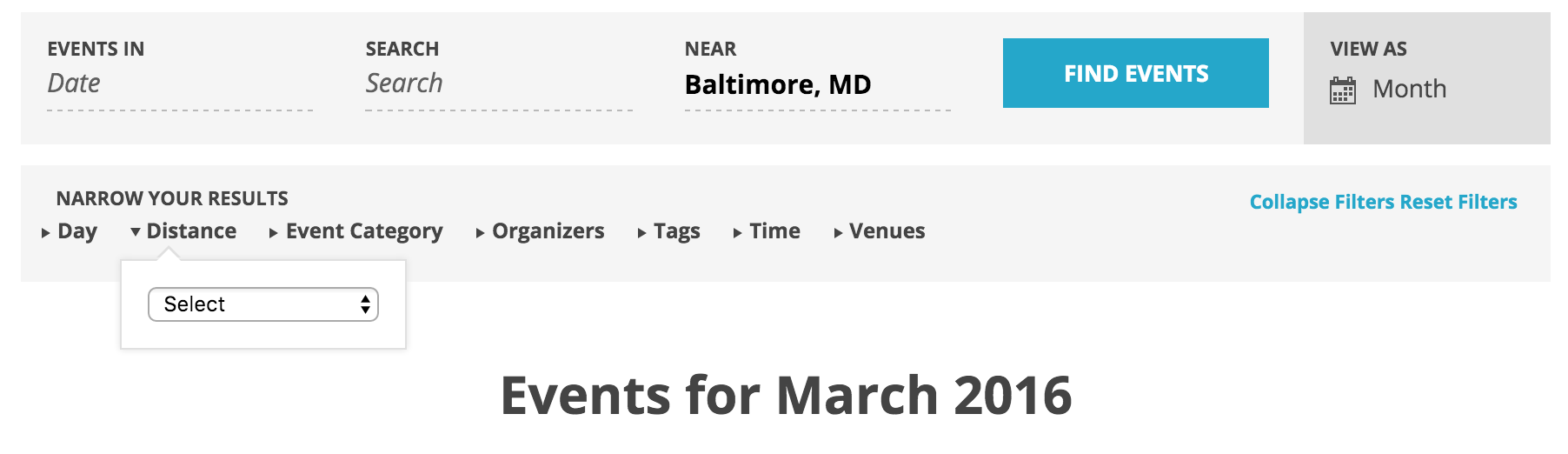
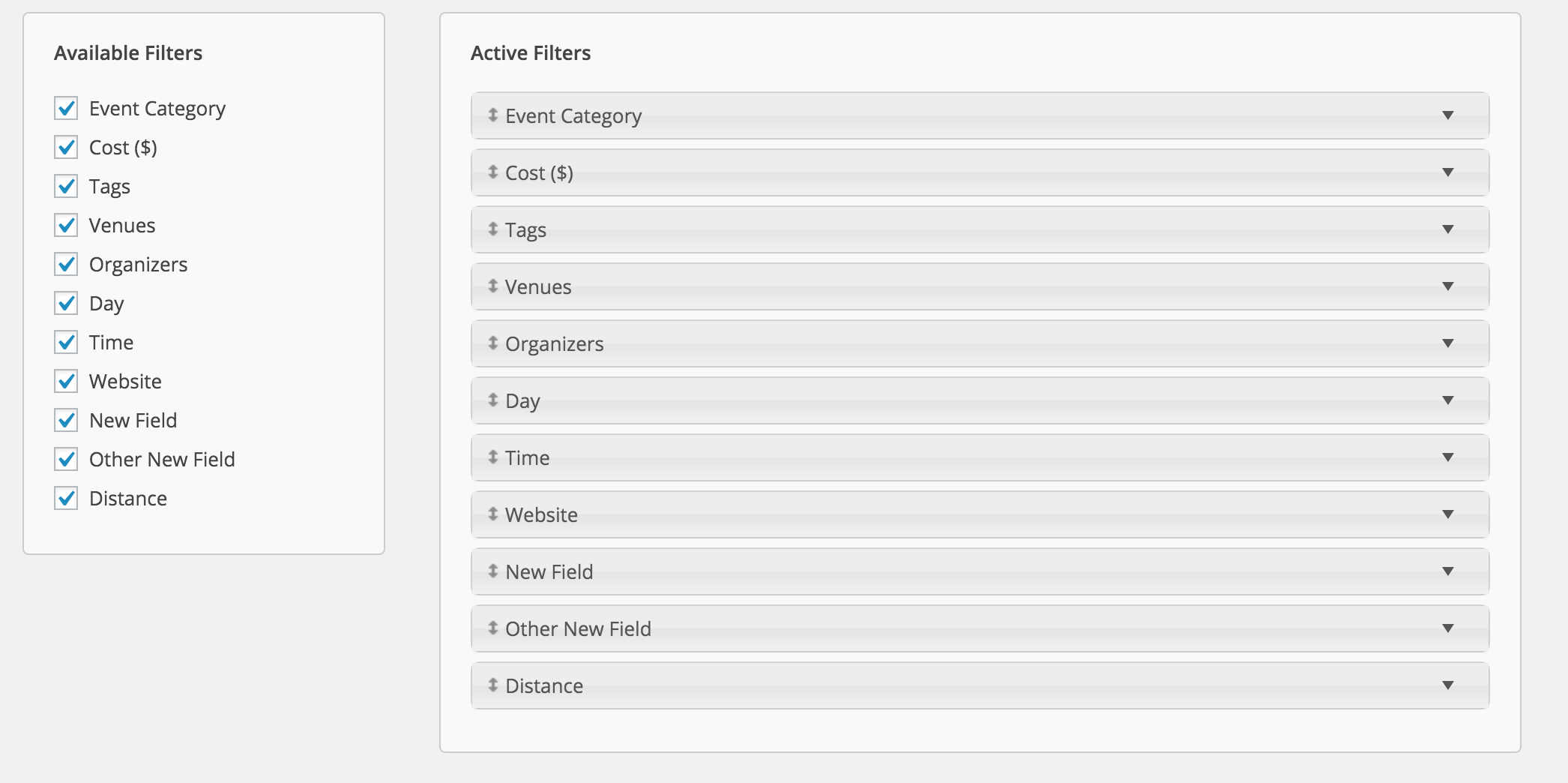
I hope I’ve answered your question and please feel free to respond if you have any follow up. Take care and have a great rest of your week!
ModeratorHey Donald,
Welcome back! Does the issue still occur when following the instructions outlined in our Testing for conflicts? Let me know and we’ll go from there. Thanks for choosing PRO and take care.
Cheers,
HunterModeratorHello,
I’m not 100% sure I understand your question, but I believe it may be more appropriate to reach out via our Contact page. We handle license renewals, extensions, and those types of things through email only.
Thanks for choosing PRO and enjoy your week.
ModeratorHello Jay,
Thanks for reaching out, I’d be glad to assist you 🙂
I visited the link provided and it appears those titles are coming from your theme rather than our plugin. You may want to review our New User Primer and Testing for conflicts articles. Another idea would be to visit your Event Settings > Display and try a few different options found there.
Emails should get sent out, but that is more related to your server/hosting environment. One plugin that can assist with resolving mail issues is Easy WP SMTP. I use it all the time and it usually works out.
For the third question, refer to the Testing for conflicts guide as mentioned above. Let me know if the issue still arises and we’ll go from there.
I hope I’ve sufficiently addressed your questions and I look forward to hearing back. Take care!
ModeratorHi Karen 🙂
Welcome to the forums and thanks for choosing PRO!
Can you confirm if you’ve reviewed our Testing for conflicts to rule out a theme/plugin conflict? Let me know and we’ll go from there.
Thanks for the post and I look forward to getting this solved with you.
ModeratorHello and welcome back,
I’m not involved with the development, so I can’t give you answer on the status. I was personally unable to reproduce the issue, but can you please confirm you have in fact disabled all plugins other than ours and reverted back to the default theme?
Thanks again and take care.
-
AuthorPosts