

Forum Replies Created
-
AuthorPosts
-
Hunter
ModeratorTed,
I’m glad you’ve got it working again and thank you for keeping me updated with the status of your situation. I’ll close this thread out but please open a new thread if you’ve got any questions or concerns.
Have a great week!
ModeratorWelcome back,
You should have the ability to select multiple categories on the Upcoming Events list widget (see screenshot below).
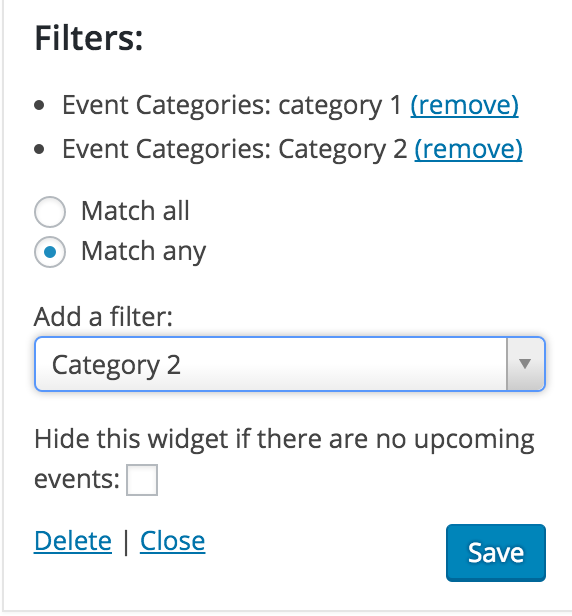
Let me know if this helps answer your question and have a good rest of your day.
ModeratorHello,
Can you please confirm if the issue still arises when reviewing our Testing for conflicts guide?
I don’t see any logged bugs reflecting the issue you describe and am unable to reproduce the issue on my testing environment, so please let me know how the testing goes. Thanks for choosing PRO and enjoy your week!
ModeratorHey Ted,
Sorry to hear about the troubles. Can you confirm your licenses match found at http://theeventscalendar.com/license-keys to what you have entered under Events > Settings > Licenses?
Let me know and we’ll go from there. Thanks for choosing PRO and enjoy your week!
ModeratorHello and sorry to hear about the troubles 🙂
It sounds like you’re experiencing a potential theme conflict, but I’d be happy to point you in the right direction. Check your settings found under Events > Settings > Display. Next, I’d review our Testing for conflicts and Themer’s Guide to see if you can identify the erroneous sidebar.
Let me know if this helps and thank you for choosing PRO!
March 28, 2016 at 7:27 pm in reply to: Editing tickets with discounts causes the discount to be rendered as the price #1095137ModeratorHello,
Thank you for sending over the System Information. Hang tight while we work on a fix for this! Enjoy your week 🙂
ModeratorHello Sebastien,
Your response made me laugh out loud (lol)! Thanks for the compliments and I’m happy to hear you’ve got it going as desired. If you’re ever experiencing issues with permalinks, always try that little trick first. I’ll close this thread out but please open a new one if you have any more questions. Enjoy your weekend!
ModeratorHey Kelly,
After doing a bit more research, I’ve located a bug logged in regards to the array issue. Unfortunately, I don’t have an immediate fix for you, but please stay tuned to your wp-admin and theeventscalendar.com/blog for maintenance release information.
Have a great rest of your week 🙂
ModeratorWelcome back, Oliver.
I’ve just spent a decent amount of testing on numerous testing sites as well as your site. It appears we are not including the venue location in the events search query. With that said, I’ve gone ahead and logged my findings and attached this thread for the developers to reference. Stay tuned to your wp-admin and theeventscalendar.com/blog for maintenance release info.
Thank you so much for assisting us in identifying this issue and your patience while we work towards a resolution. Enjoy your day!
ModeratorHi Kadi,
Unfortunately, it appears your submit event form is still hidden to logged out users. But as I previously mentioned, you can simply delete the information relating to cost via a template override as outlined in our Themer’s Guide. It’s a fairly simple process to do and shouldn’t take you more than 5-10 minutes.
Create a new folder inside your theme folder called tribe-events. You’ll then need to create another folder inside tribe-events called community. Locate edit-event.php found in /the-events-calendar-community-events/src/views/community. Copy the entire file (ctrl+c or command c) and create a new file. Paste the contents into this new file, delete or comment out line 70 (code below), then save this template inside the community folder as edit-event.php.
<?php tribe_get_template_part( 'community/modules/cost' ); ?>These are step-by-step instructions and essentially all the support I can provide. Best of luck with the template override and thank you for reaching out. Enjoy your week!
ModeratorJay,
Glad to hear we’re 2/3. Shall we try for 3/3?! Try adding this snippet to your theme’s functions.php file and see if orders get marked complete as desired.
Thanks for working with me on this and keep me updated with the last issue. Have a good one!
ModeratorSebastien,
You may need to refresh the permalinks. Try visiting your WP Settings > Permalinks. Hit “Save” and visit the week view to see if it’s working. Let me know if this works 🙂
ModeratorHello and welcome back,
First of all, I don’t want the user to have to select “month,” I want it to be the default view.
If you visit Events > Settings > Display, we have a Default view setting where you can select the Month view as the default.
Additionally, to hide certain categories from the calendar, you can do this via CSS. For example, if you wanted to hide the category “authors” from displaying on the calendar, you would add the following CSS snippet to your styles.css file:
.type-tribe_events.tribe-events-category-authors {

display: none !important;

}
Let me know if this helps and enjoy your day!
ModeratorWelcome back, Richard!
Based on the customizations you describe, it sounds like the Themer’s Guide will be of most help. You can basically do anything under the sun with customizations via this route.
As for the venue and organizer links not actually linking anywhere, does the issue still occur when reviewing our Testing for conflicts guide?
Thanks for the follow-up and take care!
ModeratorHello,
I completely understand your frustration, but unfortunately we don’t have a large amount of users reporting a similar issue. The reason I am confirming you’ve tested for conflicts is to ensure it’s not an issue on your end. As previously mentioned, your issue has been logged for testing to confirm if it is a bug or not. If so, we will address it in an upcoming release.
I wish I had more answers for you, but the developers are looking into the situation. Thank you for your patience and understanding and stay tuned to your wp-admin for update information.
Have a good week 🙂
-
AuthorPosts