remove tribe-attendees-list-container

Home Forums Calendar Products Community Events remove tribe-attendees-list-container

Viewing 3 posts - 1 through 3 (of 3 total)
  • Author
    Posts
  • #1092781
    Christopher
    Participant

    Hi The latest update has knocked my customisations out.

    I really would like to remove the new tribe-attendees-list-container – it’s a great addition but is not going to work for us.

    How do I remove.

    Also – can this / is this an option that can be selected by a user rather than recode…

    Personally I would say the same for display options for all views… in our case, we need to remove the headers / feature image / map / event description – basically everything except the booking form.

    Is there a way get this without changing the code everytime we update.

    Love this app btw

    thanks.

    #1093242
    Hunter
    Moderator

    Hey Christopher,

    Welcome to the forums! Sorry to hear you’ve lost some code :-/

    To avoid this in the future, I recommend reading our Themer’s Guide. We provide information on how to create custom templates and more importantly, where to keep them so you don’t lose them when updating.

    If I understand you correctly, to remove the new tribe-attendees-list-container, you can hide attendee information from being displayed on the front end when adding/editing a ticket on your edit event page (back end). If you want to get a little more gritty with a template override, the file is located at /event-tickets-plus/src/views.
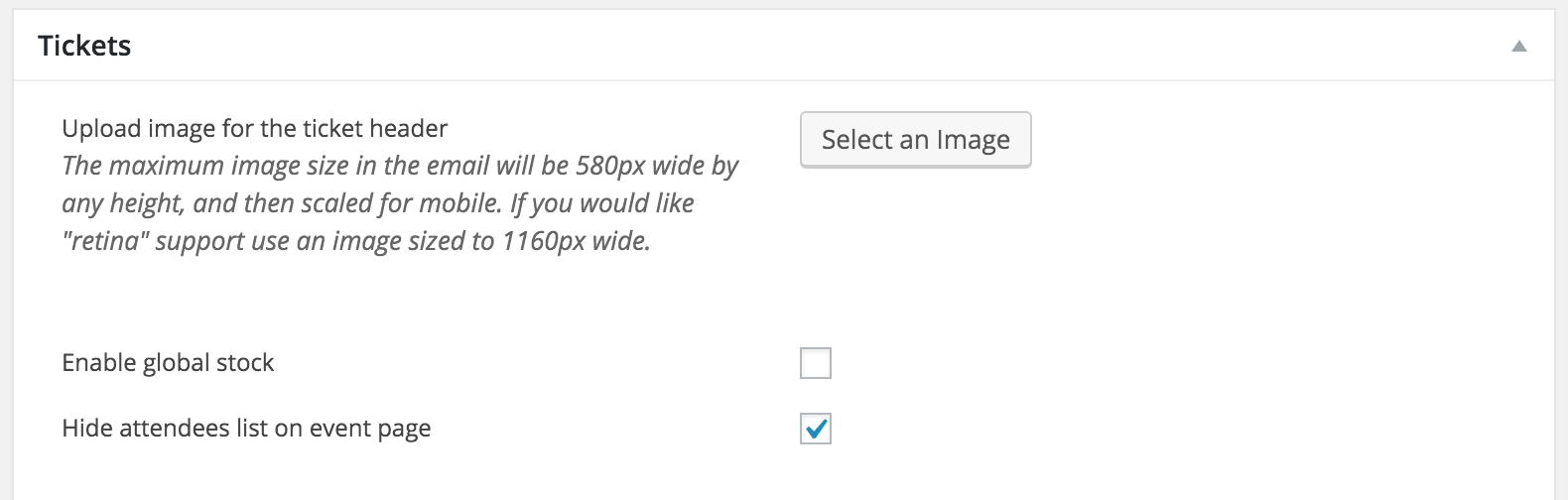
    Let me know if I’ve answered your questions and we’ll go from there. Thank you for reaching out and take care!

    #1099649
    Support Droid
    Keymaster

    This topic has not been active for quite some time and will now be closed.

    If you still need assistance please simply open a new topic (linking to this one if necessary)
    and one of the team will be only too happy to help.

Viewing 3 posts - 1 through 3 (of 3 total)
  • The topic ‘remove tribe-attendees-list-container’ is closed to new replies.