

Forum Replies Created
-
AuthorPosts
-
Hunter
ModeratorHi and welcome to the forums,
Sorry to hear about the troubles – I’d be happy to help out 🙂
This Knowledgebase article provides detail and screenshots on how to correctly input your license key.
If that doesn’t work, let me know and we’ll continue investigating. Again, welcome to the forums and thank you for choosing PRO!
ModeratorHi and welcome to the premium support forums!
You should be able to do it via FTP or can upload it under your WordPress Plugins > Add New. Our Themer’s Guide does a good job walking you through, step-by-step to get the plugin up and going.
Let me know if this helps answer your question and thank you for choosing PRO!
April 20, 2016 at 10:39 am in reply to: Switching license keys for Pro version on a live website #1104974ModeratorHi Lucy,
Thanks for reaching out! I’d love to answer your questions 🙂
Either of those scenarios would work for your client. The plugin won’t necessarily “break” once the license expires, but it’s always recommended to renew your license before it expires. We send out reminder emails a few weeks leading up to the license expiration date, so that should allow you plenty of time to make arrangements.
Does that help address some of the concerns you’ve raised? If you have any more questions or need more clarity, feel free to respond. Again, thanks for reaching out and I hope to see you around the Premium support forums. Have a great week!
April 20, 2016 at 10:26 am in reply to: Changing the content of the confirmation community events create page #1104968ModeratorHey Nick,
Welcome to our Premium support forums and thank you for choosing us for your calendar needs! Check in /events-community/src/Tribe/Submission_Handler.php. One line 86, look for
%s submitted.Let me know if that helps and have a great rest of your day 🙂
ModeratorHey Susan,
We recently moved our refund form to our Refunds page. Let me know if you have any more questions.
Best of luck with your project!
ModeratorHey Tim,
Welcome to the forums 🙂
The functionality you describe is definitely achievable, though not a built-in feature. You could always voice this recommendation in our UserVoice Feature Ideas. Additionally, we typically try and keep these types of inquiries under our Pre-Sales channel, so if you have any questions about features/functionality for any of our plugins, feel free to open a new thread there.
Let me know if this helps and thanks for choosing PRO!
ModeratorHey Hector,
Welcome to the forums and thanks for choosing us for your event needs! To edit the latitude and longitude for venues, visit the edit venue page (see screenshot below) and enter them there rather than on the edit event page.
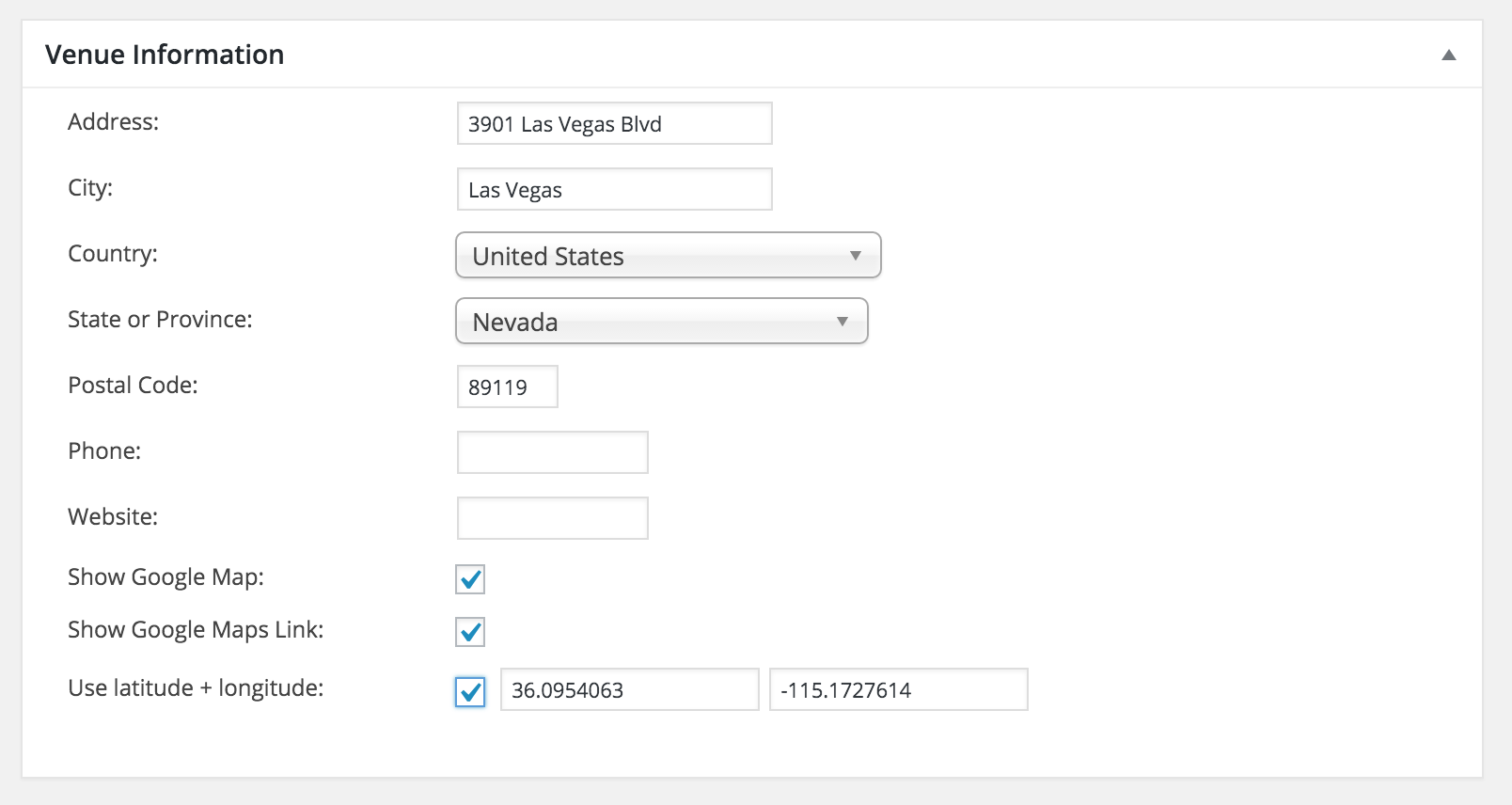
It took me a few minutes to find it too, so don’t feel too bad! Let me know if this helps and again, welcome to the forums 🙂
ModeratorHi and welcome back,
Thanks for providing me with that information as it is indeed helpful 🙂
Our plugin has never had the ability to add additional venues, but we do offer the ability to have multiple organizers attached to a single event. Is this what you meant? If not, please provide more clarification if possible and my apologies for not picking up your question the first time around!
Let me know and we’ll go from there. Thank you for choosing PRO and have a great rest of your day!
ModeratorHello and welcome to the Premium support forums!
I visited the link provided and experienced the issue described. Additionally, it appears the screenshot you attempted to share didn’t work properly, so if possible, please provide a working link and I’d be happy to investigate your recurrence “rules.”
Can you also please review our Testing for conflicts guide? It should always be the first action taken when you’re experiencing a conflict.
Let me know your findings and we’ll go from there. Again, welcome to the forums and thanks for choosing PRO!
ModeratorHey Rob,
Welcome back to the forums and I’m sorry to hear about the issue you’re experiencing. Before I get to testing, can you please confirm you’ve followed the instructions outlined in our Testing for conflicts guide so we can rule out a theme and/or plugin conflict?
I know it sometimes can feel tedious, but it is necessary in identifying any bugs our plugins may have. Thanks for understanding and I look forward to hearing back. Have an enjoyable rest of your day!
ModeratorWelcome back,
Glad to hear you’ve got it resolved. And we are always here to assist as much as possible, so don’t hesitate to open a new thread if you run into any more concerns. Thanks for keeping me updated and have a good rest of you week!
ModeratorHey Brandon,
I see you checked “Yes” for reverting back to the default WP theme and deactivating your other plugins as recommended in our Testing for conflicts guide, but can you please confirm this?
I just tried replicating the problem but everything appeared to work correctly for me. Let me know about the Testing for conflicts guide and we’ll take it from there. Thanks for the in-depth post, screenshots, and patience while we figure this all out! Enjoy your day 🙂
April 19, 2016 at 9:31 am in reply to: Clicking on recurring event opens all events, not single event. #1104330ModeratorHey Matt,
Welcome back to the forums and sorry to hear about the issue. I just tried replicating the issue on my local test environment using the latest version of WP, our plugins and the default Twenty Sixteen theme. I was able to navigate to the correct recurring event date rather than being taken to the “All” page.
I also took a look at our logged bugs report and don’t see anything in there with similar traits. With all that said, can you please confirm you’ve ran through our Testing for conflicts to ensure you’re not experiencing a theme and/or plugin conflict. I see you checked “Yes” for both of those, but I just like to double-check.
Let me know and we’ll go from there. Thanks for choosing PRO and enjoy your day.
ModeratorHey Keith,
The reason I ask to confirm is because I was unable to reproduce the issues you’ve described, so that leads me to believe that there is a possibility you may have accidentally skipped over one or more steps in the Testing for conflicts guide.
Under Events > Settings > General, what do you have for the following options? (see screenshot below) Try different options and see if anything changes.

With that said, there’s not much I can do without being able to reproduce the errors. Additionally, we don’t have any logged bugs reporting similar issues, so there’s nothing else to be done other than keep an eye on the bug reports and update this thread if I come across anything.
I wish I was able to be of more assistance and best of luck narrowing down the source of conflict.
ModeratorGlad it all worked out! I’ll close this thread out but go ahead and open a new one if you have any more questions. Have a good rest of your week!
-
AuthorPosts