

Forum Replies Created
-
AuthorPosts
-
Hunter
ModeratorGreat! Best of luck with the customizations and thanks for the recent input regarding the Filter Bar plugin. We’re always trying to provide the best possible products! Take care and have a great afternoon. Cheers 🙂
ModeratorHey John,
Thank you for sending that over. Let me know how the error log looks after you’ve updated your plugins and if possible, review our Testing for conflicts guide to see if the error still occurs while your site is in “testing” mode. Testing environments are handy for these scenarios.
Let me know how the updates go and take care. Cheers 🙂
ModeratorKeep me posted on your progress and have a great Wednesday!
ModeratorWelcome back and thank you for your patience,
Can you provide a copy of the file you’re importing and I’ll try to reproduce the issue? Also, when you say, “No conflicts that I know of.” Can you confirm you ran through our Testing for conflicts guide as instructed? We’ll need to make sure the issue still occurs with the default WP theme and only our plugins active before going any further.
Thanks again and have a great Wednesday 🙂
August 24, 2016 at 10:56 am in reply to: Help needed – Calendar display method, and Quantity not updating #1155464ModeratorHey Phillip,
If you have a value entered into the ‘Cost’ field, the price will display in the list of events (see screenshot below).
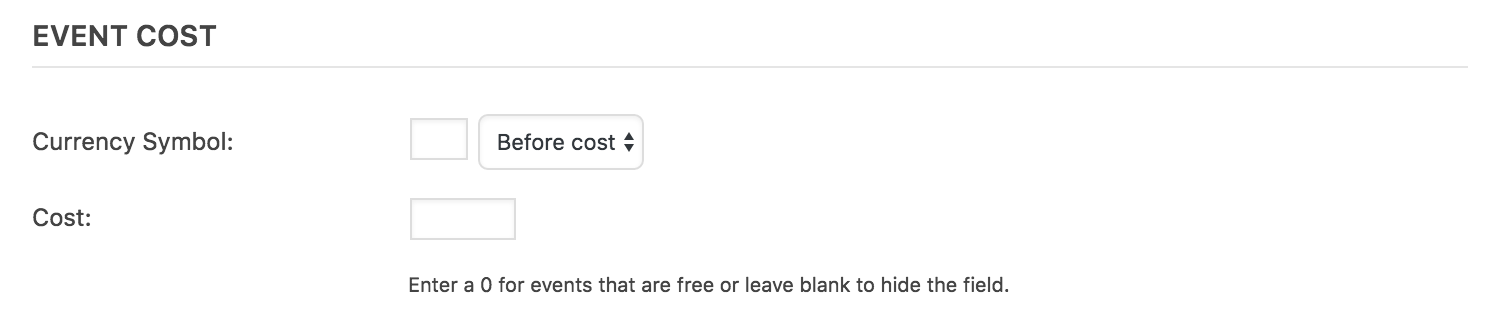
If you have Event Tickets and Event Tickets Plus activated, you’ll need to temporarily deactivate them in order for the ‘Cost’ field to appear when adding/editing an event. You can then delete the value entered. A few other options would be to create a template override and remove the line of code relating to the cost field. Instructions can be found in our Themer’s Guide.
If you want to hide it using CSS, here is a helpful snippet:
#tribe-events .tribe-events-list .tribe-events-event-cost span {

    display: none;

}
Let me know if helps and have a great afternoon. Cheers 🙂
ModeratorWelcome back,
Thank you for sending those screenshots over. Would you also be able to provide screenshots of your Facebook Import Settings found under the Events > Import > Import Settings tab? I’ll need to replicate your setup to see if I experience the same problem.
Thanks again and have a great afternoon. Cheers 🙂
ModeratorGlad to hear it’s been resolved! I’ll close this thread out but feel free to open up a new one if you have any more questions. Take care and enjoy the upcoming weekend!
ModeratorAlso, I just found this recent support thread where a fellow team member helped another user with a similar request. I hope it helps!
ModeratorHi and welcome back!
Check the
tribe_events_filter_valuesfilter. You should create a conditional based on the filter slug, and then modify the filter value array (the-events-calendar-filter-bar/src/Tribe/Filter.php) line 186.This might help, though in this case it’s just changing the array order, but the labels can be replaced.
An SQL query (make a backup before doing so!) would also do the trick, something along the lines of:
UPDATE wp_postmeta SET meta_value = REPLACE (meta_value, 'CT','Connecticut') WHERE meta_key LIKE '%_VenueState%';I hope this helps and have a great evening. Cheers!
ModeratorHey Karl!
Thank you for choosing us for your events calendar needs! I’d be happy to help point you in the right direction, but please note we’re limited on what we can provide for theme conflicts/customizations. If you visit Events > Settings > Display, we’ve included a few options right at the top that can hopefully help solve your problem. Try selecting different settings under the Basic Template Settings section. If you still don’t get the layout you need, refer to our Themer’s Guide as it’s filled with ways to create custom templates.
I hope this helps and please let me know how it goes. Cheers!
ModeratorHi and welcome back 🙂
Is it possible for you to paste the contents of your error log into Pastebin and share a link with me? Also, I notice in your System Information that you’re running outdated versions of our plugins. Are you able to update to the latest versions and see if the issues still appear in your error log? To ensure I’m not missing something, I did a check of our logged bug reports and don’t see anything resembling what you’ve described, so it doesn’t appear to be a widespread problem at this time.
Let me know on both accounts and have a good evening. Cheers!
ModeratorHey Craig,
Sorry to hear about the conflict. Oddly enough, Query Monitor is one of our favorite developer plugins! Does the issue still occur after reviewing our Testing for conflicts guide? Let me know the results of that test and if you’re still having issues, I’d be more than happy to continue investigating.
Thank you for reaching out and have a wonderful evening. Cheers 🙂
ModeratorHello and welcome back!
If you could, send over a link to the pages you need help on and I’ll do my best to accommodate. If you’re unable to send a link, check out this YouTube Video on identifying and making changes using the ‘Inspect’ tool in your browser.
Thanks for choosing PRO and have a good afternoon. Cheers!
ModeratorHey Douglas,
By design, the tickets aren’t sent until the order is marked as ‘Complete’ – to alter this behavior would require custom coding outside what we’re able to provide. One idea would be to visit this Woo article on Automatically Completing Orders. Let me know if it helps and if not, we’ve got a list of customizers that can help get the job done.
Have a great evening and thank you for choosing PRO and Event Tickets Plus. Cheers 🙂
ModeratorHi and welcome back,
Sorry to hear about the issues :-/
Could you possibly review our Testing for conflicts guide and see if the issue still occurs with the default WP theme active and only our plugins active? Let me know what you find out and we’ll take the next step.
I haven’t seen an influx of other users reporting similar issues and am not seeing the same behavior on my local test environment, so I imagine it has something to do with your theme as they are always one of the usual suspects.
Thanks for understanding and have a great evening. Cheers!
-
AuthorPosts