
Home › Forums › Ticket Products › Event Tickets Plus › Help needed – Calendar display method, and Quantity not updating
- This topic has 8 replies, 4 voices, and was last updated 10 years ago by
Phillip.
-
AuthorPosts
-
August 21, 2016 at 6:37 pm #1154199
Phillip
ParticipantHi, some questions:
1. How do we add continue shopping button to cart page?
2. When changing quantity in cart, why is it not updating quantity even after pressing update cart?
3. How can we handle display of 12 events each day, or just show a few events and then add a link to “see more” or “See all of this day’s events” in each date box?Calendar is here: http://www.kingdom-karts.com/?post_type=tribe_events
Thank you
August 22, 2016 at 4:17 pm #1154601Hunter
ModeratorHi and welcome back!
I’d be happy to help answer your questions 🙂
1. How do we add continue shopping button to cart page?
Visit WooCommerce > Settings > Products > Display and look for the ‘Add to cart behaviour’ option. Try enabling/disabling the checkbox to see if you get the desired results. Other than that, we don’t have a built-in setting for this functionality, so you might want to do some digging on the topic around the web to see if you’re able to come up with a viable solution. If it gets beyond your skill set, we have a list of customizers that can help out.
2. When changing quantity in cart, why is it not updating quantity even after pressing update cart?
I just tried reproducing this issue but was unable to. Can you please confirm the behavior occurs after reviewing our Testing for conflicts guide?
3. How can we handle display of 12 events each day, or just show a few events and then add a link to “see more” or “See all of this day’s events” in each date box?
You can visit Events > Settings > Display and about halfway down, look for the ‘Month view events per day’ setting. Enter however many days you’d like displayed in Month view and save your changes.
I hope this helps answer your questions and have a great rest of your day. Cheers!
August 23, 2016 at 11:24 am #1154963ParticipantI tried with firefox, internet explorer, and chrome, all 3 do not allow me to change quantity in cart and then update, when I click update cart nothing happens
August 23, 2016 at 11:26 am #1154966Participant“3. How can we handle display of 12 events each day, or just show a few events and then add a link to “see more” or “See all of this day’s events” in each date box?
You can visit Events > Settings > Display and about halfway down, look for the ‘Month view events per day’ setting. Enter however many days you’d like displayed in Month view and save your changes.
I hope this helps answer your questions and have a great rest of your day. Cheers!”
Hi, I actually already set this to 12 and realized it doesn’t display very nicely, so I was wondering how I could instead show a link in the date box that goes to a page showing all events for that day
Thanks
August 23, 2016 at 12:45 pm #1154990ModeratorHi and welcome back,
The lowest number of events you’re able to display on the calendar view is 1, so if you have more than 1 event on a certain date, the calendar will display 1 event and a link that says, “View all X Events”.
Anything needed beyond this functionality will take custom development which we’re unable to provide. If you need, refer to the list of customizers as previously mentioned and I’m sure someone can help out.
Let me know if this fully answers your question and have a good afternoon. Cheers 🙂
August 23, 2016 at 1:01 pm #1154997ParticipantWhy does the bottom of the page show price for just one event in the list? How do I change this? Please see screenshot http://puu.sh/qLPl5/72d45986ce.png
August 24, 2016 at 10:56 am #1155464ModeratorHey Phillip,
If you have a value entered into the ‘Cost’ field, the price will display in the list of events (see screenshot below).
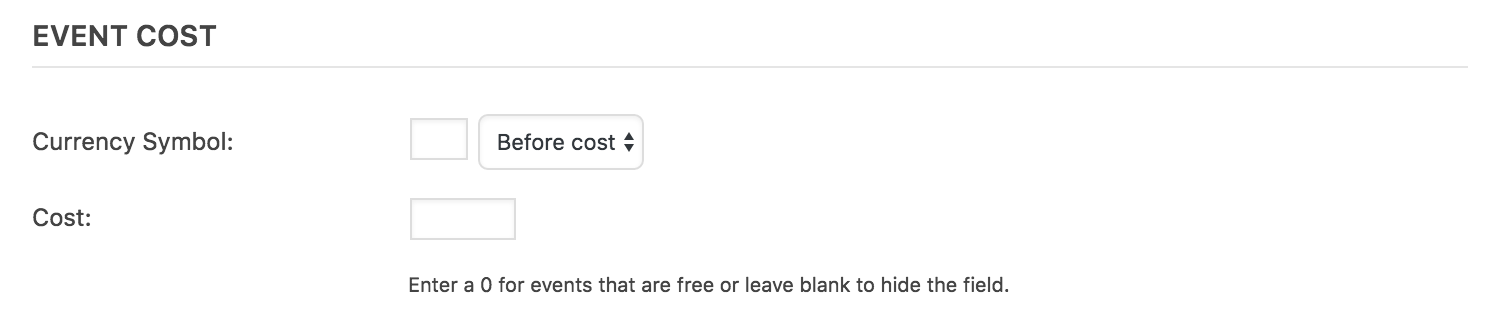
If you have Event Tickets and Event Tickets Plus activated, you’ll need to temporarily deactivate them in order for the ‘Cost’ field to appear when adding/editing an event. You can then delete the value entered. A few other options would be to create a template override and remove the line of code relating to the cost field. Instructions can be found in our Themer’s Guide.
If you want to hide it using CSS, here is a helpful snippet:
#tribe-events .tribe-events-list .tribe-events-event-cost span {

    display: none;

}
Let me know if helps and have a great afternoon. Cheers 🙂
September 15, 2016 at 9:35 am #1164641Support Droid
KeymasterHey there! This thread has been pretty quiet for the last three weeks, so we’re going to go ahead and close it to avoid confusion with other topics. If you’re still looking for help with this, please do open a new thread, reference this one and we’d be more than happy to continue the conversation over there.
Thanks so much!
The Events Calendar Support Team -
AuthorPosts

- The topic ‘Help needed – Calendar display method, and Quantity not updating’ is closed to new replies.