

Forum Replies Created
-
AuthorPosts
-
Hunter
ModeratorHello,
We are unfortunately unable to provide support through our Pre-Sales forum channel, but you can head over to The Events Calendar WordPress.org support forums for assistance and answers.
If you have a PRO license, you can log into your account and get assistance through the PRO forums.
Thanks for understanding and good luck resolving your issue. Have a good day!
October 26, 2016 at 7:50 pm in reply to: tribe_events_event_schedule_details in the layout of the event page #1183531ModeratorHi, Mona 🙂
Before creating custom overrides, have you explored Events > Settings > Display > Timezone settings to see if you can adjust what Date & Time info gets displayed? Please visit our Settings Overview: The Events Calendar and Events Calendar PRO and about halfway down you’ll see the Date Format Settings section.
If that doesn’t work, I’d be happy to help finding and editing the code to get the results you need. Let me know and we’ll go from there. Thanks for choosing PRO and have a wonderful evening. Cheers!
ModeratorHello, Enrique 🙂
Thank you for reaching out to our Pre-Sales Questions support forum. By creating custom templates as explained in our Themer’s Guide, you should be able to build any design you’d like. Most of what determines this is your level of coding capabilities. We are pretty limited on the amount of customizations we can provide, but we do our best to at least help point users in the right direction. We also have a great list of customizers filled with excellent coders and programmers.
I hope this helps answer your question and please let me know if you have any additional questions. Cheers!
ModeratorWelcome back, John 🙂
To rule out a theme and/or plugin conflict, can you please review our Testing for conflicts guide and reply back with your findings?
I’ll keep an eye out for your response and we’ll continue investigating from there. Thank you for choosing us for your events calendar needs and have a great evening. Cheers!
ModeratorHi and welcome 🙂
Thank you for reaching out via our Pre-Sales Questions channel. I’ll jump right into answering your questions:
1) It is possible with a little snippet magic. I believe we have something floating around we could provide you with.
1a) That would be a little more difficult to do and would probably require extensive custom code which we’re unable to provide. One option is to use the new [tribe_event] shortcode to embed the full-view calendar onto your homepage.
2) We have a few bug and feature reports focused on enhancing the Tribe Events Bar, specific to the concerns you’ve voiced. I don’t have a precise timeline when those improvements will be released, but keep an eye on our Release Notes and your WP admin dashboard for update info.
3) We are unable to provide support for conflicts in our Pre-Sales Questions channel, but you can head over to The Events Calendar WordPress.org support forums for assistance and answers.
If you have a PRO license, you can log into your account and get assistance through the PRO forums.
4) This sounds like another customization that would require additional code, so it is possible, but unfortunately something we couldn’t assist with.
I hope I’ve helped answer your questions and please let me know if you have any additional questions. Thanks again and have a wonderful rest of your evening. Cheers!
October 26, 2016 at 7:16 pm in reply to: Can we share Events to Social Media via WordPress Publicize Feature? #1183511ModeratorHello,
We are unfortunately unable to provide support through our Pre-Sales forum channel, but if you head on over to the PRO support forums, we’d be happy to take a look.
Thanks for understanding and good luck resolving your issue. Have a good day!
ModeratorMatthias,
Welcome back. Try adding the following snippets to the bottom of your theme’s functions.php file:
Let me know how things work out and have a great evening. Cheers!
ModeratorWelcome back, Mandy 🙂
In order to use Event Tickets Plus, you will also need to have Event Tickets installed and activated. Event Tickets Plus uses the same base code included with Event Tickets, but adds on E-Commerce functionality.
I hope this answers your question and the next time you need information about products you’re considering purchasing, please post over at our Pre-Sales Questions support forum.
Take care and let me know if you have any additional questions. Cheers!
ModeratorWilliam,
Welcome back. At this time, it is not possible to incorporate the filter for Scheduled Imports though it’s an idea worth mentioning via our UserVoice Feature Ideas page.
Let me know if you’ve got any more questions. Take care!
ModeratorThank you for the update,
I am currently awaiting a snippet from another support team member that will stop the ongoing import issue. Once we have that addressed, we’ll have a better idea as to whether it is the cause of conflict or not. I imagine you’ve already reviewed Events > Settings > Imports, but if not, I recommend going over them to make sure the options are set to your liking.
Check in on tomorrow with me and I should have the snippet for you. Thanks again and we appreciate your patience while we get this addressed. Take care.
ModeratorHello,
Thank you for the follow-up responses and for sending over the System Information. When you say the site crashes, does it go to a white screen, a 404, etc? Do you see any errors in your server’s error log? The more information you can provide, the better chance I have at being able to provide assistance.
Keep me posted and thanks again. Have a good evening 🙂
ModeratorHi and welcome back,
Excellent job describing the exact behavior I needed to reproduce the issues. I can confirm both problems you’ve voiced and have logged a couple bug reports for the developers to review while making improvements in upcoming maintenance releases.
I don’t have any specific timeframe when these fixes will be addressed, but please keep an eye on your WordPress admin dashboard and our Release Notes for more info.
I truly apologize you’ve having to deal with these issues and please let me know if you have any more questions or concerns. Cheers!
ModeratorHi and welcome back,
I completely understand what you’re getting at as it was the same thought process I had while discussing the matter with another support team member. It appears what you seek was possible at one point, but for some reason is not at this time. As previously mentioned, we have a feature report logged which has had semi-recent activity, so that’s a good sign things will be pursued though I don’t have a date for you.
I wish there was a better way other than to delete the event from your WP site and reimport it back into your site with the updated changes. Obviously, this isn’t ideal and rest assured I’ll bring this issue to the attention of the decision makers. Please stay tuned to your WP admin dashboard and the Release Notes for more info.
Thank you for being so patient and thorough while we explored the topics at hand and please let me know if you have any more questions. Enjoy your evening.
ModeratorHey William,
Thank you for reaching out via our Pre-Sales Channel. It is possible to filter events by keyword! I’ve included a screenshot of what displays when previewing events from Facebook through Events Aggregator. As you can see, I’ve used the keyword “whiskey” to filter relative results.
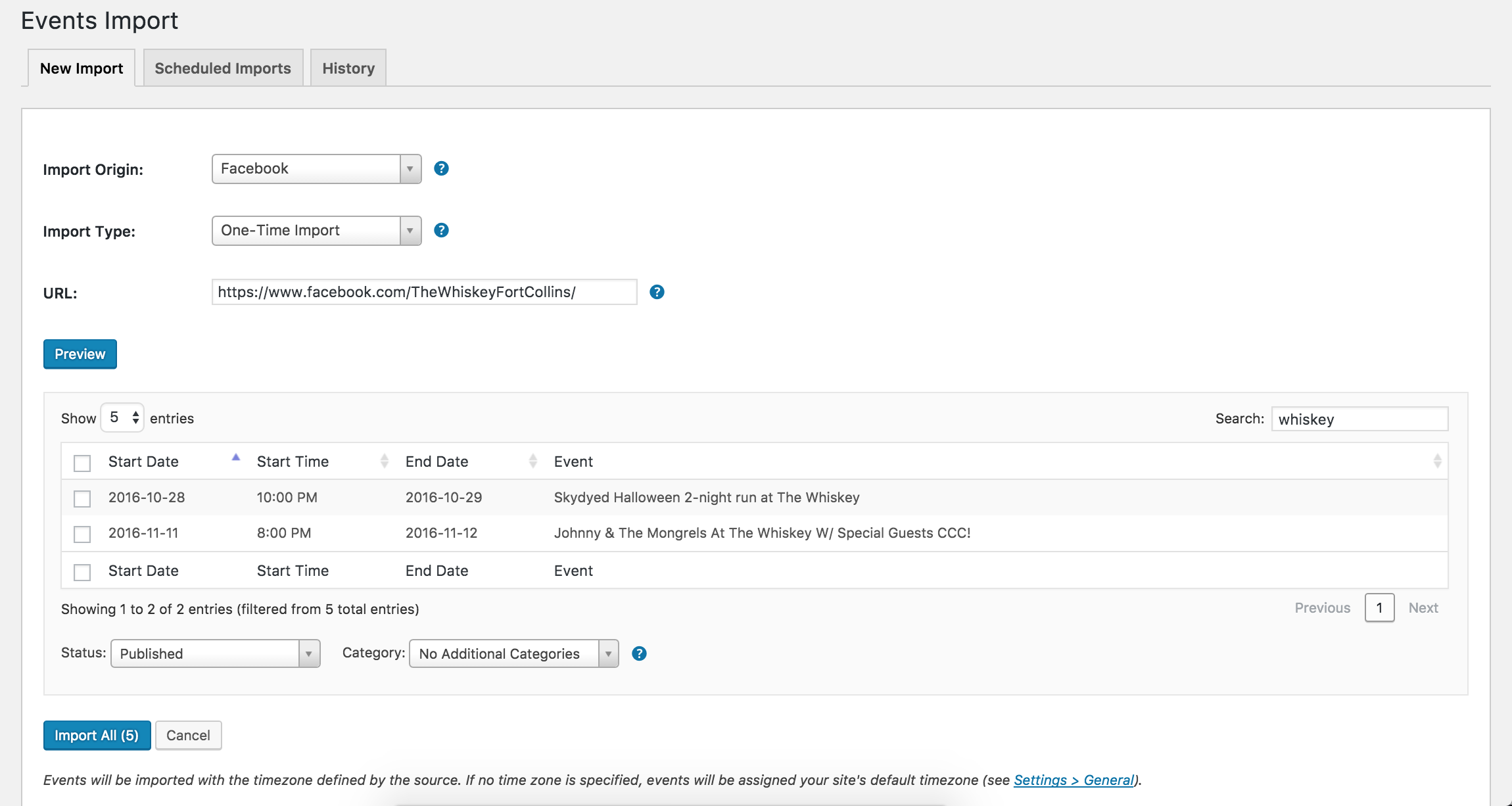
Please let me know if this helps answer your question and feel free to reply back if you need any other questions answered. Have a great rest of your week and hopefully we’ll see you on our Premium support forums soon. Cheers!
ModeratorHello, Samuel 🙂
Before I test the issue myself, can you please review our Testing for conflicts guide and reply back with your findings? And if you haven’t already, I recommend reviewing what you have set for your Events > Settings > Import options to see if it’s a simple setting adjustment.
Thank you for reaching out and have a great Wednesday. Cheers!
-
AuthorPosts