

Forum Replies Created
-
AuthorPosts
-
Hunter
ModeratorHello,
We are unfortunately unable to provide support through our Pre-Sales forum channel, but you can head over to The Events Calendar WordPress.org support forums for assistance and answers.
If you have a PRO license, you can log into your account and get assistance through the PRO forums.
Thanks for understanding and good luck resolving your issue. Have a good day!
ModeratorJust so I understand you correctly, you want both orders (1250650 and 1250654) cancelled? Let me know and I’ll process that for you. Cheers!
ModeratorHi and welcome,
Please do a quick test as outlined in the Testing for conflicts guide. Make sure WP_DEBUG and WP_DEBUG_LOG are enabled on your site’s wp-config.php file. Any errors will display at the top of your page and in your error log you try to reproduce the conflict. Please share any errors/notices/warnings with me.
Open the ‘Inspect’ tool to see if any errors display in the console. Review our Using Google Chrome Developer Tools tutorial for more information. Note what you find and please include it in your reply.
Do you have a PayPax Developer account where you can enter “Sandbox” mode so you can fully troubleshoot the issue? I checked our logged bug reports but am not finding anything resembling what you’ve shared with me.
Please let me know the results of your testing and we’ll go from there. Thanks and take care.
March 21, 2017 at 2:14 pm in reply to: Recurring events not showing up for a single month (October) #1257583ModeratorHello,
I’d love to help out, but we’re unable to provide technical support here in the Pre-Sales Questions channel. If you’ve got a valid license, please open a thread in the PRO support forums and we’d be happy to help further assist.
Thanks and have a good rest of your day 🙂
ModeratorHi and welcome,
Try using Easy WP SMTP to help ensure emails get delivered. It’s pretty simple to get set up and provides a tool to test if emails get delivered properly.
Let me know how it goes! Cheers :_)
ModeratorHello,
We are unfortunately unable to provide technical support through our Pre-Sales Questions channel, but you can head over to The Events Calendar WordPress.org support forums for assistance and answers.
If you have a PRO license, you can log into your account and get assistance through the PRO forums.
Thanks for understanding and good luck resolving your issue. Have a good day!
ModeratorHi and welcome,
We have a bug logged resembling what you’ve described, so I’ve added this forum thread to the ticket which helps expedite the process of getting a fix included in an upcoming release. I don’t have a precise date when it will be available, but please stay tuned to our Release Notes and the plugin changelogs for more information.
Try using the following CSS as a temporary workaround:
@media only screen and (max-width: 767px) {

.tribe-filters-closed.tribe-bar-is-disabled #tribe_events_filters_wrapper.tribe-events-filters-horizontal {

height: auto !important;

}

}
I tested it on your site using my Inspect tool and it appeared to work. Thanks again and let me know if you’ve got any additional questions or comments. Cheers!
ModeratorResponse for #1: any overrides by the X theme will reside in [your-theme]/tribe-events, so you can delete the files related to Photo view (refer to the Themer’s Guide). Basically, anything residing in the [your-theme]/tribe-events folder will take priority over the templates included in our plugin files.
Response for #2: I took a quick peek at your Photo view but I’m unable to come up with anything. If I were permitted to spend more time I’d probably be able to figure out a temporary solution. I’ll keep an eye on that bug report and should I learn any new information or possible workarounds I’ll be sure and update you here.
You could downgrade to the version that works best on your site. I believe the issue cropped up in TEC and PRO version 4.4.3, so try 4.4.2 and let me know if Photo view works as it should.
Thanks for your patience while we get this ironed out and let me know if you have any questions. Take care!
ModeratorWhat is your Time Format option set to under WordPress Admin Dashboard Settings > General? See screenshot below for example:
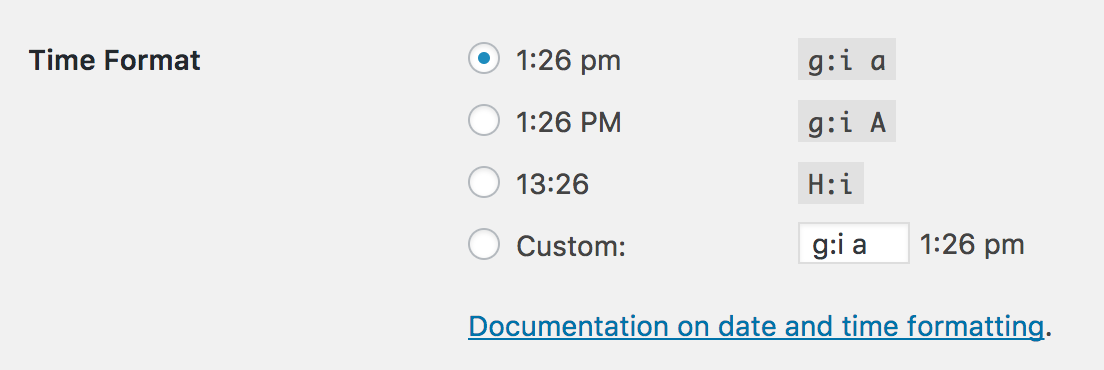
Let me know and we’ll go from there. Take care 🙂
ModeratorMake sure you have the correct text entered into the Events > Settings > General > Events URL slug/Single event URL slug fields. Did you flush your permalinks after saving the changes to your functions.php file? Visit your WordPress Admin Settings > Permalinks page and hit the “Save Changes” button, then check to see if things work.
Keep me posted! Take care 🙂
ModeratorThank you for the response. After reviewing the file provided, I can confirm the behavior you’re experiencing is from a known bug. I’ve added this forum thread to the ticket which helps expedite the process of getting a fix included in an upcoming release. I don’t have a precise date when it will be available, but please stay tuned to our Release Notes and the plugin changelogs for more information. We’ll also update you here in this thread.
I don’t see any temporary workaround in the report notes, so you can either downgrade to the version that best works on your site or hang tight while our devs patch things up.
Thanks again and let me know if you’ve got any additional questions or comments. Cheers!
ModeratorWelcome back,
The proper way would be to use the .po file. There are better ways than changing the string directly in the php file. You could either update from the pot file or use the latest version from Glotpress. Do you have any customized translations under wp-content/languages or wp-content/languages/plugins that are overriding the language files?
I’ll provide all information I have relative to translations, so please take a moment and review them:
• https://theeventscalendar.com/support/forums/forum/events/translation/
• https://theeventscalendar.com/knowledgebase/translating-the-events-calendar/
• https://theeventscalendar.com/knowledgebase/changing-the-language-on-your-calendar/
• https://theeventscalendar.com/knowledgebase/adding-or-updating-a-translation/Keep me posted and take care 🙂
ModeratorWelcome back,
The devs review each forum topic associated with bug reports, so we appreciate your input on the matter and rest assured a fix will be included in an upcoming maintenance release.
I just checked the map issue and it looks like the map is now showing… really weird – I didn’t make any changes but it’s now back so I’m happy.
Great! If you run into any more issues with the map, make sure you have your API key set up properly. Instructions are in our Setting Up Your Google Maps API Key tutorial. You can also spot errors which might lead to more info by using your ‘Inspect’ tool on pages the map isn’t displaying on. Review our Using Google Chrome Developer Tools tutorial. This Customizing WordPress #2 – Using Chrome Developers Tools YouTube video is also really helpful.
The one remaining error is the << and >> links in the mini cal widget, they link to [website].com/# and they don’t operate to show the previous and future months.
Does this happen with the default theme and only our plugins active? Do any errors show when you set WP_DEBUG to “true” on your site’s wp-config.php file? Do you notice any errors in the browser console by using the ‘Inspect’ element? Lastly, to better help me understand the issue, can you provide exact step-by-step instructions on how to reproduce the behavior? Screenshots and/or screencasts are always helpful. I checked our logged bug reports for anything resembling what you’ve shared with me but I’m not finding anything at this time.
Please check out these helpful resources which might help make your life a little easier:
• https://theeventscalendar.com/favorite-developer-plugins/
• https://theeventscalendar.com/wordpress-web-developer-extensions/
• https://theeventscalendar.com/extensions/
• https://theeventscalendar.com/knowledgebase/how-to-install-an-extension/Once I have more information I’ll have a better idea on how to proceed, so let me know what you find out and enjoy the rest of your day. Take care 🙂
March 21, 2017 at 11:59 am in reply to: How to handle daily ticket per person multiplicity? #1257497ModeratorWe use a variety of factors when deciding which features to include in feature releases, one including the number of votes on UserVoice suggestions. But there’s no set threshold, it’s usually more or less a question of, “does this UV submission have a lot of users interested in it?”
Sorry I can’t be more specific and let me know if you’ve got any additional questions. Take care 🙂
ModeratorI’m unsure on the answer to that question, so try searching our Technical docs and forums for that sort of information. I imagine there are a thread or two relative to the topic. We’re pretty limited with customizations as outlined in our What support is provided for license holders? Knowledgebase article, so reply back if you’re unable to find anything and I’ll see what I can do. Thanks!
-
AuthorPosts