

Forum Replies Created
-
AuthorPosts
-
George
ParticipantI’m sorry you’re having trouble here @Carol, I hope I can help out a bit. The first thing to note in that direction of things is that we’re quite limited by things specific to the .ics calendar file format, which is an important detail because, for example, one of the format’s limitations is that it does not allow for paragraph breaks.
The break between that paragraph above and this one, for example, can only be “represented” in an .ics file, not actually rendered as such, and so this leads to the “nn” in your event descriptions because “\n\n” is how you symbolize a paragraph break in .ics files. If you look at the output of your .ics file directly, you will see these characters in the event description as shown in this screenshot:
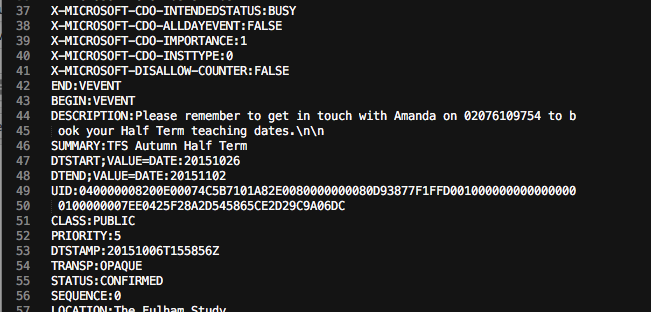
You can remove those characters if need be, for now. We are working on better handling of characters like these in future updates for the iCal importer.
This is important because things relating to the file format itself are at play with your other and main issue, the one where end dates are not being added to events; your .ics files seems to be labeling all day events with a Microsoft-specific parameter “X-MICROSOFT-CDO-ALLDAYEVENT:TRUE”. This isn’t an .ics standard, so our plugin likely doesn’t have support for this at this time.
To be clear, does your event that is not an all-day event import correctly?
ParticipantHey Hans-Gerd,
Thanks for elaborating on those details a bit. I’m sorry to say that I still do not produce any of these errors…although I must admit that I do still have trouble understanding what you mean in some of your descriptions of things. I’m sorry about this!
I’m also sorry that I didn’t address your ownCloud screenshots from earlier – I actually did check these out, but unfortunately didn’t learn much from them. I’m sorry Hans-Gerd 🙁
One thing I’m curious about just for the sake of simplicity is if you can have your site use all the default English URL slugs for now – it’s just temporary, and I’m curious if it makes any difference here whatsoever.
Reset the slugs to English defaults, and if you have any translation or URL-related plugins active, delete theme. Then go to Settings > Permalinks in your admin area, and just click “Save Changes” without actually making any changes which has been recommended before but is still a useful step to do after the changes mentioned above.
Finally, for now, I’m curious: do you have a /tribe-events folder in your child theme? If so, then if you backup this folder and then temporarily remove it does anything improve? If not, then what about if you switch to the Parent Theme of this child theme; does anything improve?
Thank you!
GeorgeParticipantHey @Matthew,
We’ve indeed been looking into this, and while I unfortunately do not have any specific update on your specific duplication issue, we have many improvements planned for major plugin updates coming some time at the end of October or in early November, if all goes to plan. Facebook Events is included in this major update and so hopefully some improvements in this update address your problems here.
I’m really, really sorry that I don’t have much more specific information than that 🙁 Is there anything else I can help with in the meantime here? Are your issues persisting exactly the same as before, or has the behavior changed at all?
Thank you for your patience @Matthew – we’re beholden to Facebook’s APIs in some ways and from what I know based on input from one of our developers, the issue with event duplication is hard to pin down; it doesn’t even happen that often, but can happen because of an issue where Facebook’s API doesn’t serve up a consistent “object ID” to check against to see if an event already exists…
— George
ParticipantHey @Rob,
As long as we’re not accessing the wp-admin area of your site, we can indeed log in and take a look. I appreciate you creating a login for us to do so, and I’ve used it to log in and see your homepage directly.
This is how I found your Mini Calendar widget when I first logged in:
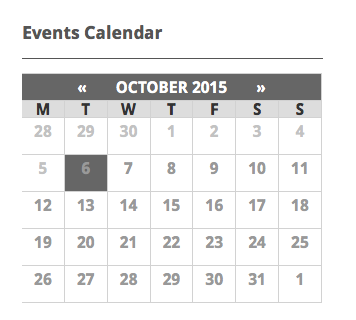
To change the colors, the thing to keep in mind is that the Mini Calendar is really just a jazzed-up HTML table element. Are you familiar with the “table” element in HTML?
Regardless of your familiarity, the key is just to work through the table item by item and tweaking things along the way. Before sharing some examples, I cannot recommend a free tool like Firebug if you use FireFox, or the Developer Tools for either Safari or Chrome enough here – we don’t offer support for customizations, technically, so I won’t be able to field many if any follow-up question related to specific style tweaks, but if you have one of these free tools you probably won’t need me anyways! They all have an “Inspector” tool that lets you mouse over an element whose CSS you want to change, and then it shows you exactly what CSS you’d need to change on your site to achieve the desired effect. This is exactly what I did in responding to your question here, as follows:
To customize the Mini Calendar appearance, head to the bottom of your theme’s style.css file and add your custom CSS there. Let’s get started!
I: Changing the Header Background Color
Let’s make the calendar header background the blue that you are using elsewhere on your site. Here’s the CSS to do that:
.tribe-mini-calendar thead {

    background: #00aeef !important;

}
II: Changing the “Day of Weeks” Background Color
Next, let’s make the “day of the week” headers have the rich purple-like color you’re using in your site header; we’ll also change the font for these items to White to match this color better:
.tribe-mini-calendar-dayofweek {

    background: #7d1a8e !important;

    color: #fff !important;

}
III: Changing the “No Events” Calendar Dates Text
These are the squares in the calendar where there are no events; e.g. by default these have a white background and gray text, with no dot in them. Let’s keep the white background, but make the text the same rich color used above:
.tribe-mini-calendar-no-event {

    color: #7d1a8e !important;

}
IV: Changing the “Current Day” Highlight Colors
Finally, for now, we will change the colors of the day on the calendar that represents the “current” day – by default, this has the dishwater gray background color you mentioned earlier, but the follwoing CSS will change it to use similar coloring as the “Awards” link in your site’s nav bar:
.tribe-events-present .tribe-mini-calendar-no-event {

    background: #ec008c !important;

    color: #fff !important;

}
V: Bringing it All Together
When all of the CSS above is added to the bottom of your theme’s style.css file, the Calendar Widget should look something like this:

It might not be exactly what you’re looking for, but should hopefully a) be a bit better than the default gray coloring and b) give you some great example code to get started on your own refined customizations.
Take this example code, use the developer tools I recommended above, and keep good backups of all custom code like this, and you should be set – have fun playing around with these customizations on your site!
Cheers,
GeorgeParticipantHey @Kerry,
Thank you for sharing this information, and for your patience with this issue. I downloaded both of the .ics files on the http://ge.tt page you linked to, and both imported fine for me on my test site.
With that in mind, then, there are a few things that we can try for troubleshooting purposes.
First, even though it’s a very small thing and almost certainly will not impact this issue, is to update The Events Calendar to its most recent version which is 3.12.3 – you’re already at version 3.12.2, so again, this will likely not be a factor here; but it never hurts to cover all the bases 🙂
Next, I’m wondering if you can run through the troubleshooting steps outlined in this article → https://theeventscalendar.com/knowledgebase/testing-for-conflicts/
After each step in that process, e.g. after each plugin deactivation especially, check on these import-related issues again. Do a test import. Do the issues persist? If anything suddenly improves along the way, then that reveals a code conflict with whatever theme or plugin you last deactivated before things worked.
I’m sorry that at this point this is the best step we have; but I can’t reproduce your problems and even tested your .ics files directly, and my PHP version is very close to your too, so your theme and plugins are the only variables left to test at this moment.
Let us know what you find from that testing!
Thank you,
GeorgeParticipantHey Deniz,
Unfortunately, the iframe element might be getting stripped of some of its code because of filters in WordPress that are there for security reasons. I suspect this because of what you said as follows: “As of now it is not showing at all. In the field name it does not allow the code to be input.”
This is unfortunately a bit harder to work around than the other problem that we solved in step 1.
You can start by going back to that same file I mentioned in my first thread; the one where I recommend using wp_kses_post() instead of esc_html()…
Well, for starters, you can try fixing this other issue related to iframes by simply removing wp_kses_post() altogether, so that the variable is just output without filters. This is not recommended, but neither is using iframes at all (or, trying to store them in the database through these field inputs, at least), so the decision is yours if this additional security risk is “worth it”.
If this doesn’t help, then I’d recommend adding wp_kses_post() back to the file. However, at this point the next best step would be to do some deeper digging into WordPress and into the Events Calendar Pro plugin files directly, and search for where these input processes are sanitized. Though annoying in this one case of using iFrames, this code-stripping is otherwise a very important security measure, and I personally do not recommend sacrificing this filtering for the use of iframes in additional fields. That is just my personal disclaimer here – I hope the rest of this reply helps and that you are able to get things working to some degree on your site.
Sincerely,
GeorgeParticipantHey @Charles,
I’m sorry about the addition of erroneous “license limitation” notices on your site here. There should not be a problem and if this issue persists, thus preventing you from updating the plugins on your site, then I would recommend heading to http://theeventscalendar.com/my-account/license-keys and using the “Disconnect” link next to the problematic domain names.
Once disconnected, go back to the admin area of that site and try entering the license key in the plugin settings again; hopefully this will resolve that issue. If not, then disconnect the License Keys again from and proceed with a manual software update. You can get the necessary code at http://wordpress.org/plugins/the-events-calendar for The Events Calendar core plugin, and here at http://theeventscalendar.com/my-account/downloads for all other plugins.
—
Now, back to your main issues – I’m glad that we’ve been able to narrow things down to your child theme. Thank you for doing all that testing!
When it comes to your child theme, do you have a /tribe-events folder in it? If so, I’d recommend first making a backup of this folder somewhere. Then, delete the original /tribe-events folder from your child theme and check out the issues on your site. Do they persist? Or do things work normally again?
If there is no such /tribe-events folder – or if there is, but removing it does not change the behavior of any of your issues – then unfortunately the next best thing I can recommend is to upload a .zip of your child theme along with a .zip of your parent theme to a site like http://ge.tt. Then, share a link to that download here with us. I will download the themes and take a look at what’s going on.
Now, I need to put out the disclaimer that we do not offer any support for themes or custom code whatsoever. I cannot guarantee I will find out anything useful. But I hate unresolved issues and want to help you out here! 🙂 So I will take a look and see what I can find.
Thank you for your patience so far; I’m sorry now in advance if my exploration of your themes does not lead to a conclusion here, I do not want to get your hopes up. But I’m happy to help and hope we can at least narrow things down enough to a point where you can troubleshooting things effectively.
Sincerely,
GeorgeParticipantI appreciate the additional testing you did, @Stephan, and your sharing your System Information with us. All of these things are helpful!
As are your suggestions about hiding the filters altogether if Private Browsing is activated; upon further research, however, it turns out that there is NOT, in fact, a reliable to tell if a user is using Private Browsing these days. In 2013 and such, it was easier to tell, but improvements have been made in browsers so that local storage is still used in Private Browsing, just in a smarter and more ephemeral way.
I’ve made a development ticket for this issue despite all of this. There may indeed be something we can improve on our end of things here. As for a quick fix or a simple JavaScript check for local storage capabilities to determine if the user is in Private Browsing or not, however, there is unfortunately no solution for this at this time 🙁
I’m sorry to bear that news, @Stephan. Let me know what you think and if there is anything else I can help with.
Sincerely,
GeorgeParticipantThanks for this information, Bill!
In your first post on this thread, you mention this as a summary of your issues:
Unfortunately when I select ical url and click on SEARCH nothing happens. not even an error message.
Can you share a link to a version of your iCal file that we can download, or the iCal URL if it is publicly accessible? I will try replicating the issue you face.
If the file is private or has event information you do not want the public to be able to access, you can upload the file to a site like http://ge.tt and then share the link to the file download in a “Private reply” here on the forums; this will make it so that only you and us on the support team can see the download link.
Thank you!
GeorgeParticipant@atldreamcenter, I know you still need help and don’t mean to keep you waiting at all – thank you very much for your patience! Our support hours tend to be in the “normal” working hours of 9am-ish to 5pm-ish in our local timezones; after the weekend, I had many support followups on Monday and did not get to your thread here before the day was out.
I’m really sorry about that and appreciate you hanging on here.
The irony, or rather the painful thing about my delay, is that my response is so simple and I wish I had checked in on your thread over the weekend to send this quick reply:
The answer is YES, you do need to activate The Events Calendar on your site for all of the other add-ons to work.
You should have all of the following plugins active and at their latest versions, which are listed below along with where to manually get the latest version if need be:
- The Events Calendar 3.12.3 – https://wordpress.org/plugins/the-events-calendar/
- Events Calendar Pro 3.12.2 – http://theeventscalendar.com/my-account/downloads
- Eventbrite Tickets 3.12.1 – http://theeventscalendar.com/my-account/downloads
Once things are like this on your site, do issues persist? If so, describe them in detail, and provide more screenshots if possible – they’re super helpful! You can upload screenshots to a site like Imgur.com and then share the URL to those images here, if you have any.
Thank you,
GeorgeParticipantNo worries Simon! 🙂 Again: thanks for your patience in arriving here finally…I hope the license works well for you and that WooCommerce Tickets serves you well!
I’ll close up this thread for now but if any other issues, questions, concerns, etc. arise, open a new thread on the forums here any time.
Best of luck with your site!
GeorgeOctober 6, 2015 at 6:20 am in reply to: Next/Prev event navigation links doesn't lead to correct events #1011832ParticipantHey @twkmedia
Thank you for the update, and for your patience with this problem. I’m sorry that you have to go to such lengths as setting up a whole test site just to test this issue, but testing a default WP theme and disabled plugins will be an immensely valuable test here.
Keep us posted on your “clean slate” testing – it should hopefully reveal a conflict, and if not, it will at least definitively rule out the possibility of a conflict which is a huge step forward in its own right since conflicts are so often the cause of issues…
Thanks you,
GeorgeParticipantHey Fabien!
I’m not Jean, of course, but wanted to chime in anyways to get you a speedier response – Jean claims to have updated the .po and .mo plugin files (“I updated the .po and .mo files for the French language”).
Changing the .po and .mo files is, unfortunately, pretty much the only way to get around the issues that Jean originally reported here.
What are your specific issues, Fabien? Also, are you familiar with .po and .mo files and how to edit them in general? We can’t offer much help with general things like this, but we do have to some Knowledgebase articles that you might find helpful. They cover the translations processes for our plugins and how to set up translations on your site:
• Translating The Events Calendar: http://theeventscalendar.com/knowledgebase/translating-the-events-calendar/
• Translating our premium add-ons: https://theeventscalendar.com/knowledgebase/adding-or-updating-a-translation/
• Changing the language on your site: https://theeventscalendar.com/knowledgebase/changing-the-language-on-your-calendar/
Just sharing these articles in case you haven’t seen them yet – I hope they’re helpful! 🙂
Cheers,
GeorgeParticipantHey Simon,
Thank you for verifying the exact status of things; I’m sorry this dragged on so long over some relatively minor details, but appreciate your verifying everything and I confirmed your claims by checking your account records. I also went ahead and regenerated a nice new WooCommerce Tickets license for you – I bumped its expiration date ahead a bit so that it expires on August 19th, 2016, like your Events Calendar Pro license.
Head to http://theeventscalendar.com/my-account/ to find your license keys; let me know if this new Personal WooCommerce Tickets License appears in your account page.
Thank you! 🙂
GeorgeParticipantHey Hans-Gerd,
I appreciate your patience with this issue so much. I admit that I’m having a bit of trouble fully understanding the issues at this point, to be honest. Can we clarify the status of things first before proceeding further?
For example, earlier you gave the following description of your problems:
Only old dates (from January to March) on the website
../veranstaltungen/kategorie/flohmarkt/
are shown when I click on “Previous Events”.
When I specify a date on the search, eg. 19.9. recent events are displayed.Do these issues persist?
If so, can you clarify exactly what you mean by them? e.g. when you say that “only old dates on the website are shown when Previous Events is clicked”, that sounds like correct behavior to me; because old dates are the dates that have happened previously and so clicking “Previous Events” will show them. What is happening here that is not correct?
Next, when you say “When I specify a date on the search, eg. 19.9. recent events are displayed.”, do you mean if you search for e.g. “19.9”, there are no events from 19 September that show, and just some random recent events show up in the search results?
If possible, provide screenshots of your issues (which you can do by uploading images to Imgur.com and then sharing links to them here in your reply).
I’m sorry for my uncertainty about some of these things, @Hans-Gerd! I just want to be 100% certain in my understanding of your issues so that I can best help resolve them.
Thank you so much for your patience.
Sincerely,
George -
AuthorPosts