

Forum Replies Created
-
AuthorPosts
-
George
ParticipantHi @Therese,
We do not offer any support for custom coding here, so unfortunately you will have to take the reins on these remaining three customizations 🙁
For starters, replacing the dot may require more than CSS; you might have to head into the widget template files directly and edit that dot, as described in our Themer’s Guide here → https://theeventscalendar.com/knowledgebase/themers-guide/
To add a border to the top of the calendar, you’d use CSS like this:
.tribe-mini-calendar {

    border-top: 1px solid #fff;

}
For spacing and borders on the names of the days of the week, you unfortunately cannot apply margins because these are locked into an HTML table and this is a limitation of tables 🙁 You can use padding however, which is exemplified below – this following example also shows adding a border along the bottom that is white:
.tribe-mini-calendar th.tribe-mini-calendar-dayofweek {

    padding: 0 5px 0 5px !important;

    border-bottom: 1px solid #fff !important;

}
For any further CSS-related customization questions, please check out a [free!] tool like Firebug if you use FireFox, or the Developer Tools for either Safari or Chrome – these all come with “inspector” tools which are immensely helpful for finding out CSS for customizations like this!
Cheers,
GeorgeOctober 7, 2015 at 6:07 am in reply to: Add the price of the ticket in the mail when tickets are delivered. #1012214ParticipantHey @ephrain,
It is generally possible, but not without writing custom code to do so. We do not offer any support for helping with custom code, unfortunately, but we do have some documentation related to it that should be quite helpful. Our “themer’s guide”, for example, is the best place to start → https://theeventscalendar.com/knowledgebase/themers-guide/
You can use the system described in that guide to customize the ’email.php’ tickets template in The Events Calendar to include anything you would like.
Best of luck with your customizations!
— George
October 7, 2015 at 6:05 am in reply to: Filter bar bug when browser window is resized to below 767px #1012212ParticipantHey Jessica,
Sorry to hear about this!
For starters, can you share your System Information with us? Here’s how to do so → https://theeventscalendar.com/knowledgebase/sharing-sys-info/
Next, can you try activating a default WordPress theme like Twenty Twelve or Twenty Fifteen? Once activated, try recreating this problem with Filter Bar again – what do you find? Does the exact same behavior happen?
Thank you!
GeorgeParticipantHey Mike,
The /events/ is auto-generated by The Events Calendar as, technically, an API endpoint. So, in reality, it works more like a “feed” than an outright “page”. But we try to make it accommodate page-like editing and theme-specific style and sidebar rules and such.
When it comes to Visual Composer, I unfortunately do not know how to incorporate that with The Events Calendar; it may not be possible at this time.
But to try and get theme sidebars showing fine (and this might also help with the Visual Composer problems – not sure, but it might), you should head to your wp-admin and then to Events > Settings > Display. Once on this tab, there’s an “Event template” option there, as shown in this screenshot:

Try out all of the different options there, and see if any of them work better for your needs than the other.
I hope this information helps!
— George
ParticipantHey Jennifer,
Unfortunately, the calendars and all other Events Calendar plugin features only work on the “Events” post type 🙁
Let me know if this helps and/or if you have any other questions, comments, concerns, etc.!
— George
ParticipantHey @vitaldesign,
What’s the name of the category you are trying to hide? A simple solution here might be to add a second layer of hiding that category, but this time with CSS. This way, there’s a secondary layer of code on your site in the CSS so that if an event in this category is on the page, it will be hidden completely.
I recommend this because doing more PHP work to try and prevent it coming in from AJAX, and/or stopping the AJAX pagination altogether, are a bit more complicated than this simple CSS tweak. And these former 2 customization ideas would also be significantly harder to maintain over time and could break other things on your site unintentionally….
Let me know what you think about this! If the category you want to hide is called “bad movies”, or something, for example, then the trick we’ll be doing here is just using the class name .tribe-events-category-bad-movies to hide anything with that category on your site.
Cheers!
GeorgeParticipantHey Felicia,
We’re indeed humans here on the forums helping out 🙂 but we do not have a support number at this time.
Let me know if you have other questions or if there’s anything else I can help out with in general.
Cheers!
GeorgeOctober 7, 2015 at 5:51 am in reply to: Set default organizer, categories, tags per imported feed #1012199ParticipantHey @Jason,
We haven’t tested that snippet that Nico shared extensively – if what you mean when you say “have it apply to a specific feed” is that you want it to apply to events that are imported from a specific iCal source, then unfortunately I do not know if this is possible for two reasons. First is that the code requires the tribe_events_update_meta() action to run, which I don’t think happens upon an import. Next is that you can’t really specify within code what iCal source the imported event came from at this time.
Next, you asked this series of questions quoted below:
One other question related to this? If I want to apply multiple categories to a feed is it ok to have 2 recurring imports for the same feed but applying a different category? Will this duplicate the events? Will both categories be applied to the same event?
I’m sorry to admit this, but I don’t fully understand your questions…I’m sorry about that! Can you clarify exactly what you mean, perhaps provide some examples and such? This part is the specific part I do not understand: “apply multiple categories to a feed is it ok to have 2 recurring imports for the same feed but applying a different category?”
I’m sorry about my misunderstanding here – I just want to be 100% certain I know what you’re asking so that I can best help out 🙂
Cheers,
GeorgeParticipantHey Shannon,
Sorry you’ve run into some issues here, happy to help. I went to bookit.org and unfortunately was not able to find an events page anywhere, just a landing page like in this screenshot → https://cloudup.com/cr5Aji1sK7Z
We cannot log into user sites for any reason, so I’m curious: can you temporarily make your site public at all so that we can check out your events pages? If your problems are not happening on bookit.org, let me know the correct domain and I’ll take a look there.
In the meantime, can you share your “system information” with us? Here’s how to do so → https://theeventscalendar.com/knowledgebase/sharing-sys-info/
Thank you!
GeorgeParticipantHey Sean,
We don’t officially offer any support for custom code, but I’m happy to help here because this should be a fairly simple, straightforward tweak to make. You should be able to use the same function that Casey recommended in the original thread you linked to: get_term_link().
His example was as follows:
<a href="<?php echo esc_url( get_term_link( $your_category_id, 'tribe_events_cat' ) ); ?>">
Replace the variable $your_category_id with the ID of the events category you would like to link to. You can find the category ID by going into your admin and going to Events > Event Categories, then hover your mouse over the category you would like to link to.
When hovering over the category, the URL in the bottom of the browser should have a parameter in it like &tag_ID=4 or something. This number is the category ID. Check out this screenshot for example, and see the URL in the bottom left as I hover over the “Concert” category name:
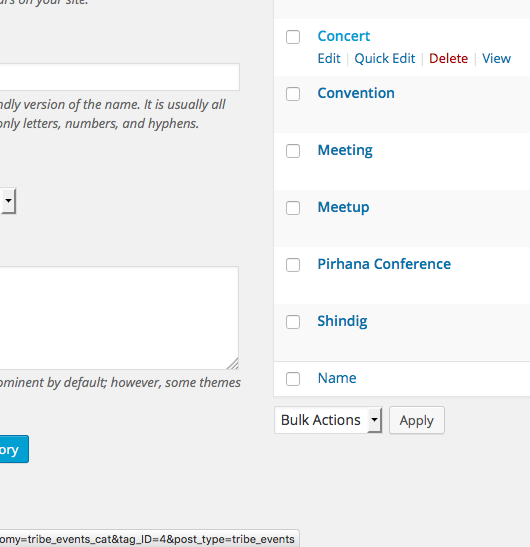
I hope this helps – best of luck with your customizations!
— George
ParticipantHey @Johannes,
Thanks for reaching out!
What you’re seeking to do here might not be possible without code customization, unfortunately; but before jumping to that conclusion, I’m curious if the built-in “Events template” option of The Events Calendar will help here?
To see if this option will help, I’d recommend navigation to Events > Settings > Display in your site’s wp-admin.
Once on this settings tab, scroll down until you see the “Event template” option like in this screenshot:

I’d recommend trying every single option there. Change the option, save your changes, and then check out events and single events. Does any template come close to what you’re looking for here?
Cheers!
GeorgeOctober 6, 2015 at 9:38 am in reply to: Ticketing for woocommerce – How to delimit the payment methods by organizer #1011965ParticipantHey @Victor,
There is unfortunately no way to do this unless you were to write some extensive custom code 🙁 We unfortunately cannot help with custom code projects, but we do keep a list of highly-reviewed developers for hire here if you are interested in hiring someone to build these features for you → http://m.tri.be/18k1
If you’re a bit code-savvy yourself, or comfortable exploring and learning with some tinkering, you might be able to get pretty far along by first reading our Themer’s Guide to learn how you can customize the display of events on your site → https://theeventscalendar.com/knowledgebase/themers-guide/
Once you have a grasp on that, you can head to your plugin files for The Events Calendar and navigate to this folder there: /src/functions/template-tags. This “template-tags” folder has a bunch of files with a bunch of publicly-usable functions that you might be able to then use to show different markup based on the organizer.
I’m sorry that I’m not able to provide example code here; as I mentioned, this is a bit of an involved customization 🙁 But hopefully the information here is helpful regardless.
Let us know if that’s the case, and/or if there’s anything else I can help with!
Sincerely,
GeorgeParticipantSorry to hear about these problems, @Lee!
1. Just to be completely, 100% clear – when you say “Event tickets are still available after the date an event closes.”, do you mean to say that, for example, if an event ends at 10pm on Thursday night, then the next day or over the weekend someone can still go to the event; put a ticket in their cart; and purchase the ticket?
If this is not exactly what you mean, let me know what the exact behavior is instead.
2. Does setting a date for the “End sale” date field when creating a ticket make any difference with this issue?
3. Can you share your System Information with us? Here’s how to do so → https://theeventscalendar.com/knowledgebase/sharing-sys-info/
Thank you!
GeorgeParticipantHey @Lee,
There unfortunately isn’t an easy way to configure things so that a role can only see event Submissions. The closest you can get to that sort of functionality is to set users to a WordPress user role like “Contributor” or “Editor”, which allows some admin access to view content like this but does not let the user do other admin activities like change or see site settings, activate/deactivate plugins or anything like that, and so on.
If you truly need a custom role that can only view submissions, then unfortunately that would take some hefty custom coding. We don’t support custom coding or general WordPress questions, so there isn’t a whole lot of insight I have here, but in terms of documentation on how WordPress user roles can be created and specified there are indeed some pieces of documentation I’d recommend checking out to get started.
First is this Codex overview of the add_role() function → https://codex.wordpress.org/Function_Reference/add_role
Next is add_cap() → https://codex.wordpress.org/Function_Reference/add_cap
The opposites of these functions, respectively, are remove_role() and remove_cap(), which may also be helpful for you here. Articles about these removal functions are linked to from the “add” functions if you’re curious.
I hope this documentation helps!
— George
October 6, 2015 at 9:16 am in reply to: Linking to events at the day, I have chosen in Mini Calendar #1011954ParticipantHey @Hans-Gerd,
Can you specify what, exactly, is failing when you do this? And also can you paste in the un-edited copy of your customized version of the “mini-calendar-widget.php” file you mentioned into a Gist at http://gist.github.com, then share a link to that file in your reply?
I should note that we offer no support whatsoever for custom code here, technically, and so I can’t guarantee a solution…
…but I’m happy to take a look! 🙂
Post your customized file into a Gist at http://gist.github.com, then share a link to that Gist here – I’ll take a look and see if I can spot anything quick that might be causing this to fail.
Thank you,
George -
AuthorPosts