

Forum Replies Created
-
AuthorPosts
-
George
ParticipantHey Sean,
We don’t offer any support for custom code, so unfortunately I cannot lay out the code for how to get everything working and looking as you hope. One thing you asked, however, is this:
Can you tell me how to pull the category of the event being displayed?
Do you mean that you want to get the categories for the currently-viewed event? This seems to be the case based on your comment about already having tried looking in single-event.php…
Assuming this is what you mean, then getting the category or categories for the currently-viewed event is possible with built-in WordPress function get_the_ID(). This does the magic of getting the Post ID for the currently-viewed item; so in the context of events, for example, just use this function and the tribe_get_event_categories() function together like this:
tribe_get_event_categories( get_the_ID() );
If you want to learn more about this function, check it out in the plugin directly here: the-events-calendar/src/functions/template-tags/general.php
Best of luck with your customizations!
— George
ParticipantHey Heinrich, looks like you’ve resolved that other thread all on your own – nice!
I’ll leave this thread for @Brandon to update when they have time.
Cheers!
GeorgeParticipantI’m sorry to hear about this @Earl! Unfortunately, in my experience this has usually come up because of conflicts with code from your theme or from other plugins on your site 🙁
Before jumping to that conclusion though, can you first head to Events > Settings > Display in your wp-admin, and then scroll down to where you see the “Datepicker date format” option? Here’s a screenshot of that specific option for reference: https://cloudup.com/cmSUir2f-Lm
Try out different date formats here and see if this effects the issue at all; I know this seems like an odd, trivial detail, but this was a bug in the past so I just want to see if it’s at play here at all.
If not, then can you share your system information with us? Here’s how to do that → https://theeventscalendar.com/knowledgebase/sharing-sys-info/
Thank you!
GeorgeParticipantSorry to hear about this @Daniel James!
I’m curious about two things, for starters:
First, can you share your system information with us? Here’s how to do so → https://theeventscalendar.com/knowledgebase/sharing-sys-info/
Next, can you elaborate a bit on your following comment:
Unfortunately, now the events will not import and the ical plugin is throwing back errors.
Can you share what some of those errors are, specifically? If you can include screenshots of your issues, even better! (You can do that by uploading screenshots to Imgur.com, then sharing links to those images here).
Thank you!
GeorgeParticipantHey Jen,
Thanks for the update! I’m glad things are working a bit better now, even though I admit to not knowing what exactly caused that error…it’s one I haven’t seen before, and seems to be server-related. If it pops up again, contact your webhost’s support team about it, and open a thread here too if relevant.
Best luck with your site!
George
October 8, 2015 at 8:07 am in reply to: How can i display the events of child site(s) in parent site? #1012724ParticipantIt is indeed unfortunate 🙁 Thanks for being cool despite the bad news – I will close up this thread for now but if other questions/comments/concerns ever arise, open a new thread any time!
Best of luck with your project,
GeorgeParticipantHey @suzannegoodwin,
I’m so sorry to report this again, but going to that link led me to a page where I was still not able to see the breadcrumb issue in action 🙁

Can you make sure the page with the breadcrumbs are temporarily visible? I will work quick to minimize the amount of time it is viewable!
Thank you so much for your patience here; sorry to be reporting this same thing again!
— George
ParticipantHey @atldreamcenter,
Thank you for the screenshot there – it is showing the versions of Tribe plugins on your site as version 3.8.x, which is far outdated!
There are two things here that are really important: one a question, and one an answer to one of your questions:
1. If you go to http://theeventscalendar.com/my-account/downloads, do you see the 3.12.x version numbers I reported in my second reply on this thread? I just want to make sure you can access the most up-to-date files. These are as follows:
- The Events Calendar 3.12.3 – https://wordpress.org/plugins/the-events-calendar/
- Events Calendar Pro 3.12.2 – http://theeventscalendar.com/my-account/downloads
- Eventbrite Tickets 3.12.1 – http://theeventscalendar.com/my-account/downloads
2. You asked this question which is a very important one:
If I manually download them from those links you provided, will I lose any information from my previous version (calendar information, etc.)?
No, manually deleting the existing plugins and then uploading the new versions of the plugins “fresh” on your site will not delete any existing calendar data. And this is the recommended way to manually update, in fact. However, just for the record it is pretty much always a good idea to do a backup of your site and database before installing or updating ANY theme, plugin, or WordPress Core update; this is not just limited to The Events Calendar, in other words. It’s just a good idea regardless. So if you are able to make a backup of your site and database, please do! I would not recommend manually updating without backups first.
I hope all of this information helps. Thank you so much for your patience here – let me know how updating goes and/or if you have any other questions for the time being that I can help with!
— George
ParticipantThanks for the update! I’m glad you found the culprit 🙂
Best of luck with your site going forward; I’ll close up this thread for now, but if other issues arise, feel free to come back and open a new issue any time.
Cheers!
GeorgeOctober 8, 2015 at 6:33 am in reply to: Set default organizer, categories, tags per imported feed #1012635ParticipantHey Jason,
To answer things in reverse order here, the _EventIcalSource custom field holds string values. This is the “source” of the iCal file/feed, which is equivalent to the X-WR-CALNAME property of the file if it exists.
As for the importing of events, I double-checked and Nico/you/Dan are all correct that the meta is saved and updated upon import. This means that you can likely then just take Nico’s snippet, and add a call to the wp_set_object_terms() function. You can learn more about this function here → https://codex.wordpress.org/Function_Reference/wp_set_object_terms
But basically, you can first get the taxonomy IDs of the event categories that you would like to be defaults on imported events; then, using that function above, you can check for the meta field _EventIcalSource to see if the event is one that is imported from iCal. If it is, then wp_set_object_terms() on that event so that it belongs to the default categories you’d like it to belong to…
That should all work in theory. Nico’s snippet is a great starting place for this and that Codex article above on wp_set_object_terms() should be helpful, too.
Best of luck with your customizations!
— George
ParticipantHey Hans-Gerd,
I appreciate the update here and your willingness to close up the discussion here even though things are not resolved. I’m sorry that I was not able to narrow down the source of the problem and thus was also not able to help fix it 🙁
I will close up this thread, then, and see you elsewhere on the forums. Thank you Hans-Gerd!
Cheers,
GeorgeOctober 8, 2015 at 6:17 am in reply to: Linking to events at the day, I have chosen in Mini Calendar #1012627ParticipantHey @Hans-Gerd,
Unfortunately it seems like this function will only work in the single-day.php widget template. One thing that might help is to specify a $day variable before the function is called; this is how it’s done by Events Calendar Pro itself, so it might make a difference:
$day = tribe_events_get_current_month_day();

tribe_events_the_mini_calendar_day_link();
ParticipantIt definitely warrants further thought, Stephan. I’ve logged a development ticket and thus it will come up for discussion on next week’s weekly meeting where we share newfound bugs, feedback, etc. Keep your eyes on the “Changelogs” of the plugin after an update is published – if we’re able to handle this any better, we’ll note it there!
Cheers,
GeorgeParticipantHey @suzannegoodwin,
I went to the links you provided but was unfortunately met with “500 – Internal Server Error” on each page as shown in this screenshot: https://cloudup.com/ctLtdarOWR0.
So I wasn’t able to see your pages live, in person….
Regardless of that, however, you mention the breadcrumb elements being hard-coded into the templates; to be clear, they are hard-coded into your theme or another plugin, not The Events Calendar or any Tribe add-ons.
So, do you have any Breadcrumb-related plugins on your site? If so, this is the source; if not, your theme is…
Let us know if you can get the links working above, I will take a look and see what I can recommend there.
Cheers!
GeorgeOctober 7, 2015 at 6:25 am in reply to: How can i display the events of child site(s) in parent site? #1012226ParticipantHey @Umar,
Thanks for reaching out! And for buying that license 🙂 One thing to note about this license, however, is that it is “Multisite” because it allows you to register the plugin for a multisite network with an undefined number of sites on the network. However, it does not mean that this edition of the plugin has any special multisite-specific features or anything like that.
So, unfortunately, there aren’t any built-in ways to do the things you are trying to do here 🙁 Even worse, there’s no simple way to do this at all even with custom code! This is because WordPress’ WP_Query class does not allow you to query in a special way across multisite networks. Check out this WordPress Core development ticket, which someone made when trying to make this a feature → https://core.trac.wordpress.org/ticket/22816
It was closed by a Core WP Developer who left this note as to why they are cancelling the proposed idea there:
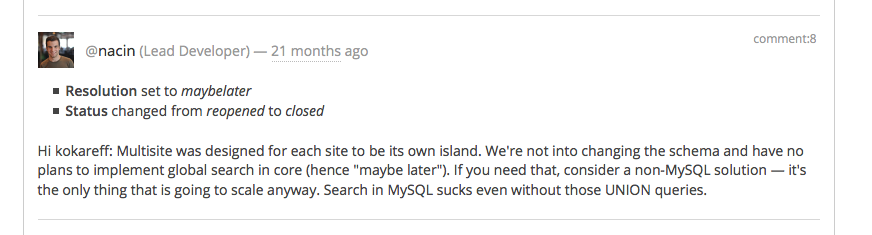
So for the time being, doing #1 and #2 as you requested would require some extensive and clever code customization to work. We do not offer support for custom code here to begin with, but also even if we did this customization would be quite specific to your site and hard for us to be able to offer much insight on.
One possible solution is to use the function switch_to_blog() – essentially, you’d run one query for events on the current site (parent or child, whichever you’re currently on). Then you’d “switch to blog” with that function to the ID of the other blog you want to pull from – then run another events query. Then repeat this for all sites you want to query from, and at the end of it all use the function restore_current_blog() to make sure you stay on the current blog for other code to run.
Check out these functions here for more info:
https://codex.wordpress.org/Function_Reference/switch_to_blog
https://codex.wordpress.org/Function_Reference/restore_current_blogSorry about all of this, @Umar! Let us know what you think.
— George
-
AuthorPosts