

Forum Replies Created
-
AuthorPosts
-
George
ParticipantNo worries! Just wanted to direct you to the proper place so you could get this resolved as fast as possible – we unfortunately don’t know the Eventica code so would have very little insight here.
Best of luck with your issues, and your site in general!
— George
ParticipantHey @Jan,
Thanks for elaborating on things here!
Events will display in order of start date by default, so if you find that is not happening that I would recommend sharing your system information here – here’s how to do that: https://theeventscalendar.com/knowledgebase/sharing-sys-info/
So by default, let’s say you have three events on Monday.
• Event A starts at 11:30am
• Event B starts at 9:00am
• Event C starts at 10:15amThen by default, the events would display in Calendar views in this order:
Event B [9:00am]
Event C [10:15am]
Event A [11:30am]Do you find this to NOT be the case on your site?
If so, can you share screenshots of this on the front-end of your site, or link to specific event pages where we can see this in person? To share screenshots, upload the images to Imgur.com and then share the Imgur.com links here.
Thank you!
GeorgeParticipantThank you @Mike. In my reply above your last one, I wrote this:
That may be part of the problem; I know you said you already did testing for conflicts, but I would recommend deactivating all plugins except for The Events Calendar and The Events Calendar: Community Events.
Let me know when your site is in this state; I will take a look at the Community Events submissions page to see if there are any JavaScript errors and et cetera.
Can you let me know about if/when your site is in the state I described there with all plugins except The Events Calendar and The Events Calendar: Community Event disabled?
— George
ParticipantHi @clarity,
If you are interested in making the code customizations to alter these features, I elaborated a bit more on the steps required to do so in this other forum thread → https://theeventscalendar.com/support/forums/topic/search-all-events-not-just-the-events-that-month/
We’ve had to make some challenging decisions about these features because some users are extremely upset about the performance issues of “searching all events”, and they have many events, so limiting searches by month helps drastically with performance. But then other users are – understandably – frustrated by the change in functionality.
—
To be clear, this limitation by month only happens in the Month View. If you go to /events/list, for example, and search for the same thing, it will query outside the current month.
— George
November 6, 2015 at 9:05 am in reply to: Change Event Categories to Drop-Down Menu On Submission Form #1022587ParticipantHey @Kevin,
Sounds good, thank you for the update here! As for your other two questions, yes, both are possible and just take further code customizations 🙂
— George
ParticipantThank you for your patience Ryley! I’m glad things are resolved for now 🙂
Best of luck with your site,
GeorgeNovember 6, 2015 at 9:02 am in reply to: Events Calendar List widget shows only one date in display "list-date" #1022582ParticipantWoot! 🙂
November 6, 2015 at 9:00 am in reply to: Can Import from Eventbright to WP, but can't upload from WP to Eventbright #1022581ParticipantI’m sorry for the trouble @Maarten! We’re indeed working on this still – sit tight, your patience means a ton and this an odd issue that we’re still having trouble with pinpointing…
Thank you!
GeorgeParticipantHey @Xavi!
No customization is needed to get the Category names added as classes to an event – the plugin already does this, and I would recommend removing all custom code related to this.
The classes are on the parent div of the event container. So, for example, if you have an event that belongs to the event categories “Barbecue”, “Concert”, “Convention”, and “Meeting”, then all of the following class names are added to the event container in all plugin views:
• tribe_events_cat-barbecue
• tribe_events_cat-concert
• tribe_events_cat-convention
• tribe_events_cat-meetingAnd so if you wanted to target the Schedule Details for events in the Barbecue category, you’d use CSS like this:
.tribe_events_cat-barbecue .tribe-events-meta-group {

    color: red !important;

}
And as you can see it changes the details to the color red, which is gross but just an illustrative example 🙂
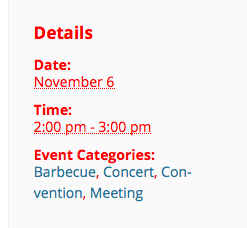
I hope that helps!
George
ParticipantHey @Projectyogarichmond,
I’m sorry for the trouble here. One thing I noticed is that you post an incomplete version of your “System information” here – it only shows a few data points.
Can you start by posting your complete “System Information”? Here’s how → https://theeventscalendar.com/knowledgebase/sharing-sys-info/
—
Next, your version of The Events Calendar is reported as version 3.11.1, which is a tad out of date and this version inconsistency could be the source of the problems.
I would recommend upgrading The Events Calendar to its most recent version (3.12.5 at time of this writing) and Events Calendar Pro to its most recent version (3.12.6 at time of this writing).
Once those are up-to-date, let me know if this issue persists!
Cheers,
GeorgeParticipantSorry @corrado – I see that in your system information the original “Post Types Order” plugin is NOT present at all.
With that in mind though, based on the last time this came up I would recommend the same old troubleshooting steps again – https://theeventscalendar.com/knowledgebase/testing-for-conflicts/
I recommend that because I cannot recreate the exact problems 🙁
Let us know what you find, and sorry that this has come up again!
— George
ParticipantHey @corrado,
Is the Post Types Order plugin activated on your site again?
— George
ParticipantHey Tim,
The “password-protection” status should apply to events just as well as it does to posts…in other words, that you can link to an event or something, but its content won’t show unless you enter the password into the text input that you’re prompted to use…
I’m curious:
1. Are you viewing things while still logged in as an admin user? If so, then once you log out, do the Password Protection features seem to take hold?
2. To be clear, are you using the built-in Password Protection features in the edit-event screen that come with WordPress? Or are you using some Password features from another plugin or a membership plugin or something?
3. Do the methods you’re using on events work totally fine for other content like posts and pages? In other words, are “events” the only content type that don’t honor the password protection?
4. If you’re comfortable with it, can you share your “System Information” with us? There’s no sensitive data included with it; just stuff like software version numbers, your site’s PHP version, et cetera. Here’s how to share System Info → https://theeventscalendar.com/knowledgebase/sharing-sys-info/
Thanks!
GeorgeParticipantFirst of all, thanks for calling our product “fabulous” – welcome to the forums! 😀
You can indeed change the amount of “related events” that are pulled into the Related Events sections on your site, but it will unfortunately require a bit of custom at this time 🙁
To change the amount of events, head to your theme’s functions.php file and add some code like this somewhere in that file:
if ( function_exists( 'tribe_get_events' ) ) {add_filter( 'tribe_related_posts_args', 'tribe_support_1022557' );
function tribe_support_1022557( $args ) {
$args['posts_per_page'] = 5;
return $args;
}
}
That’ll increase the number to 5, but change it to any number you’d like and it should do the trick! 🙂
Cheers,
GeorgeParticipantHey @Janine,
If you’re not familiar with adding folders and files to your theme, I would recommend Googling around for WordPress tutorials and spending some time learning the basics of WordPress’ file structure and how everything works.
For now, though, YES, you would go to the /wp-content/themes/ directory on your site via Filezilla; then find the folder for your theme; then make the new folder inside the theme called /tribe-events, as directed by that KB article; and then you can make your customizations.
We unfortunately can not offer baby steps-level help here, or step-by-step instructions; customizing code is something you should only embark on if you know what you’re doing.
I’m not saying I can’t help, or won’t! 🙂 And feel free to pose further questions here; however, operating a website and customizing code like this fall into the category of “General web development skills” – our customer support is just for issues of or relating to The Events Calendar itself, and so customizing it or using FTP or navigating the WordPress file structure or writing PHP code are all things that fall outside of that category and I just want to be honest and set your expectations up front.
In closing, these are some great resources online for learning the basics of web development and such:
• http://www.wpbeginner.com/
• https://www.youtube.com/watch?v=sd0grLQ4voU
• https://codex.wordpress.org/Editing_FilesCheers,
George -
AuthorPosts