
Home › Forums › Calendar Products › Community Events › Star date
- This topic has 10 replies, 3 voices, and was last updated 10 years, 8 months ago by
Support Droid.
-
AuthorPosts
-
November 5, 2015 at 9:09 am #1022229
Jan
ParticipantHello,
Is it posible to have start date of an event in calendar from the earliest to the latest of in kind of automatic way?
November 5, 2015 at 9:21 am #1022237George
ParticipantHey @Jan,
Can you elaborate a bit on what you mean here, exactly?
I don’t quite understand your question, and am sorry about that! But I just want to be 100% certain I know what you’re asking so that I can best help you out 🙂
Provide any details or examples you can, if possible.
Thank you!
GeorgeNovember 5, 2015 at 11:29 am #1022289ParticipantOk, so for example I have one event which starts 10.45, another 9.30, and 11.30 on the same day, I like to have all events in the order from 9.30, 11.30, 11.45 even if I add an event which starts 11.30 first, how to modify the order of events hours to have that pattern.
November 6, 2015 at 9:22 am #1022594ParticipantHey @Jan,
Thanks for elaborating on things here!
Events will display in order of start date by default, so if you find that is not happening that I would recommend sharing your system information here – here’s how to do that: https://theeventscalendar.com/knowledgebase/sharing-sys-info/
So by default, let’s say you have three events on Monday.
• Event A starts at 11:30am
• Event B starts at 9:00am
• Event C starts at 10:15amThen by default, the events would display in Calendar views in this order:
Event B [9:00am]
Event C [10:15am]
Event A [11:30am]Do you find this to NOT be the case on your site?
If so, can you share screenshots of this on the front-end of your site, or link to specific event pages where we can see this in person? To share screenshots, upload the images to Imgur.com and then share the Imgur.com links here.
Thank you!
GeorgeNovember 9, 2015 at 2:35 am #1023149ParticipantThis reply is private.
November 10, 2015 at 9:46 am #1023829ParticipantThanks for this @Jan!
To get started on fixing these issues, your first step is to make sure that you update both The Events Calendar and Events Calendar Pro to their latest versions. Here’s where to get the most up-to-date files:
• The Events Calendar – version 3.12.5 – https://wordpress.org/plugins/the-events-calendar/
• Events Calendar Pro – version 3.12.6 – https://theeventscalendar.com/my-account/downloads/—
If problems persist after updating, then unfortunately the next best step is to run through all of the troubleshooting steps here: https://theeventscalendar.com/knowledgebase/testing-for-conflicts/
Let us know what you find!
— George
November 12, 2015 at 4:07 am #1024505ParticipantThis reply is private.
November 12, 2015 at 5:04 am #1024523ParticipantHey @Jan,
One of the things I wrote was this:
If problems persist after updating, then unfortunately the next best step is to run through all of the troubleshooting steps here: https://theeventscalendar.com/knowledgebase/testing-for-conflicts/
I totally understand your apprehension about updating to 3.12.5 and stuff; but if you do the updates recommended and problems happen, what do you find if you run through the troubleshooting steps linked to above?
Thanks!
GeorgeNovember 15, 2015 at 5:24 am #1025826ParticipantThis reply is private.
November 16, 2015 at 12:44 pm #1026561ParticipantHey @Jan,
I’m sorry about your frustrations here, and am hoping to help resolve things not make them harder! I really appreciate your patience! 😀
Let’s stick with photo view for now – update to the latest versions you can.
If photo view is not available, head to Events > Settings > Display in your wp-admin.
1. On this settings page, do you see this option here called “Enable event views”?:
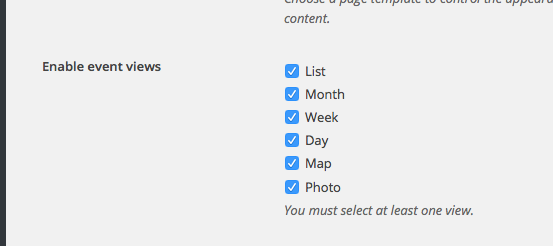
2. Is “Photo View” checked in this option?
3. If photo view is checked and still does not show up, then please leave your site in the “Testing for conflicts” state where a default theme like Twenty Twelve is active and the only active plugins are The Events Calendar and Events Calendar Pro, and then let me know and I will manually review things at this point.
We can tend to other issues after this one. Thank you for your patience, these are odd issues and are hard to pin down!
Sincerely,
GeorgeFebruary 18, 2016 at 8:31 am #1075632KeymasterThis topic has not been active for quite some time and will now be closed.
If you still need assistance please simply open a new topic (linking to this one if necessary)
and one of the team will be only too happy to help. -
AuthorPosts
- The topic ‘Star date’ is closed to new replies.