

Forum Replies Created
-
AuthorPosts
-
George
ParticipantHey @Daniel!
We indeed have lots of planned features coming after our 4.0 release that will make these sorts of customizations and optional inputs much easier. At this time however, unfortunately, custom solutions are still required. You might also be able to find an extension for WooCommerce itself that enables something like this; the checkout process itself is powered by WooCommerce, not our plugins, so you might actually have some luck finding an extension here.
I hope this information helps!
— George
November 17, 2015 at 7:12 am in reply to: Can't get [tribe_mini_calendar] to work (it turns out HUGE) #1027007ParticipantHey @Hans,
Unfortunately this is a theme-related issue – your theme’s HTML and CSS are causing the layout to break 🙁
I say “unfortunately” because we can not help with theme design issues. I would recommend contacting your theme developer’s support services as soon as possible about this!
Cheers,
GeorgeParticipantHey @Luc,
There is unfortunately no way to do this at this time 🙁 But we do have a new plugin coming some time before the New Year that will have some simple “RSVP”-style features like you describe.
I’m sorry if this is a huge bummer! Please let me know what you think and if I can help with anything else.
Cheers,
GeorgeParticipantHey @areadmin,
I went to what I presume is your events URL here → http://www.retailenvironments.org/events/
The month view was indeed loaded by default and I didn’t see any “tabs” at all on the page – here’s a screenshot showing what I saw:
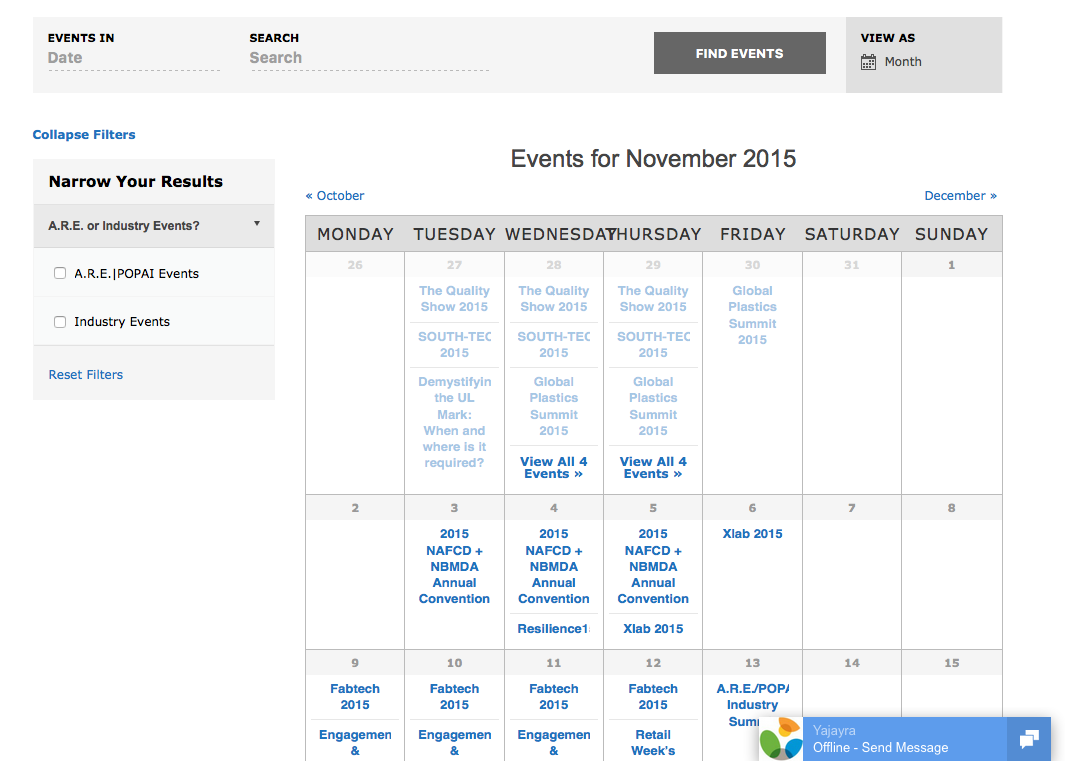
Can you confirm whether issues remain here? If so, can you elaborate on what those issues are specifically, and possibly include screenshots or something? Sorry for my misunderstanding here! Just want to be 100% sure I know what you’re talking about so I can best help out with the problems.
And one last note on screenshots, you can do so by uploading the screenshot to Imgur.com, Flickr.com, CloudUp.com, or any similar image-hosting site; then just share the links to those images here and I’ll take a look.
Thank you!
GeorgeParticipantHey @Matthew,
Thanks for reaching out!
When did you purchase your license? It looks like you might have last purchased your license in April of 2013, so if you have not renewed the license at any point since then, then you will indeed have to buy a new license at this time.
Let me know if this helps or if you have any further questions about this!
— George
November 17, 2015 at 6:29 am in reply to: how to echo message if there is no ticket for event #1026975ParticipantHey @Marc-andre,
It seems like the best solution here is to just write out the text in the bottom of your event description if there are no tickets there. Maybe in some bold text just write something like “No tickets for sale yet!” or something.
Do you agree? If not, can you please explain all the things you mean about how the tickets.php file is involved at all here? As you mentioned, if there are no tickets then this file will not be called, so you can’t change that behavior at this time.
Thanks,
GeorgeParticipantHey Thomas,
This is unfortunately a theme design question, which we cannot help with but I’ll try to help a little bit anyways because why not 🙂
This is powered by CSS “background-image” properties, so if you’re not familiar with those things then definitely spend some time on the old Google reading about this sort of thing. A great website is http://css-tricks.com, by the way….
But anyways this is the CSS on your site that is adding that background image:
#theme-page {

    background-attachment: scroll;

    background-color: #ffffff;

    background-image: url("http://www.tonetickets.com/wp-content/uploads/2015/08/Temples-Tickets_Bannersoffsetv3-1.png");

    background-position: center center;

    background-repeat: no-repeat;

    background-size: cover;

}
You can get started with adding this to the single-event pages by adding CSS to like the following to your theme’s style.css file:
body.single-tribe_events #mk-boxed-layout {
background-attachment: scroll;
background-color: #ffffff;
background-image: url("http://www.tonetickets.com/wp-content/uploads/2015/08/Temples-Tickets_Bannersoffsetv3-1.png");
background-position: center center;
background-repeat: no-repeat;
background-size: cover;
}Further CSS tweaks will almost certainly be needed but I hope this helps you get started!
Cheers,
GeorgeParticipantHey @Pim,
There is unfortunately not a way to import all of that information intact 🙁
You can import the events for sure, but importing the Tickets accurately and having the Tickets link to events correctly is tricky, and we currently have no way to do this at this time.
One method that MIGHT work, however, and is worth testing on a test site first would be to use the default WordPress importer plugin here:
• https://wordpress.org/plugins/wordpress-importer/
Then basically, run through the following steps:
1. Go to Tools > Export in your first site’s wp-admin. Export all Events, then all “Products”, then you can also do Venues and Organizers if you’d like.
2. On the site where you want to replicate this data, use the aforementioned “Importer” plugin to import the files you exported in step #1 onto your new site.
3. See if things work – there is a chance they will, as these files include all of the post meta data which is what is needed for Tickets and Events to be linked together, but I need to be clear that this is just a possibility, and likely will not work 100% 🙁
—
Finally, one thing that might be the best solution is to get down and dirty with a full-on database transfer. We’re not able to provide much insight on that, but you can read about it in many places online and there are even some plugins that enable that sort of transfer, like the famous WP Migrate DB plugin: https://wordpress.org/plugins/wp-migrate-db/
I hope this information helps at least a little bit 🙂
Cheers!
GeorgeParticipantHey Sven,
Sorry about these missing translation string! Thank you for altering us to them – hopefully we will fix that in the coming releases.
As for editing the files, you do risk losing those files in a plugin update. You can move the customized files into your theme if you follow the guidelines in our Themer’s Guide here → https://theeventscalendar.com/knowledgebase/themers-guide/
However, those changes would be overwritten in a theme update – so you unfortunately cannot be 100% safe 🙁
As long as you just make a backup of your customized files somewhere on your computer, you should be able to replace your customizations without issue if they are ever overwritten in a theme or plugin update.
I hope this helps!
– George
ParticipantHey @Stevenradams,
Just to be 100% clear, you mean the vertical bar character right? So that, essentially, instead of “| Free” you just want “Free”?
If so, try adding the following bit of CSS to the very bottom of your theme’s style.css file:
.tribe-events-divider {

    display: none !important;

}
Cheers!
GeorgeParticipantThanks for confirming that @Ken – can you proceed with sharing the “System Information”, as described here? → https://theeventscalendar.com/knowledgebase/sharing-sys-info/
Next, can you confirm whether this problem affects only settings only for Community Events, like the “anonymous submissions” box? Or do settings for The Events Calendar also fail sometimes?
Thanks!
GeorgeParticipantAnd you’re telling me that the previous fix you gave me is causing this time problem?
No, I explicitly said that the code I shared does not cause this problem, and that this problem is not one I can reproduce at all on my local testing site.
As for choosing how the time displays, you have total control over this. Please remove the snippet of code I shared with you, and then go to your site’s wp-admin. Go to Events > Settings > Display and use the “Date Format Settings” to format your date-times as needed.
—
Now, if you do not find that those settings achieve the specific format you want, please let me know what format you’re looking for. You said that the format you were looking for was just the display of time and then “am” or “pm”, but now it is allegedly not the right format.
Please remove my code snippet so that you’re not running any of my custom code.
Then, confirm these things definitively and clearly:
1. How does the time currently display on your site?
2. How do you want the time to display on your site instead?
Thanks,
GeorgeParticipantWe’ve worked with Yoast’s plugins in the past and indeed strive for compatibility. However, the link you provided does not address the 404 issues specific to The Events Calendar.
I appreciate your input here and to be clear, I’m not saying that there’s nothing we can do to improve things! We are working on better ways to handle the number of 404s generated.
However, the 404s are shown in a diagnostic tool. It is simply a diagnostic tool, which is suggesting that you look into those 404 errors, but there is no “SEO penalty” or any other negative fallout from those 404s existing.
I hope that helps!
GeorgeNovember 16, 2015 at 12:55 pm in reply to: Excluding Part of a Day Without Breaking Reoccurrence #1026571ParticipantThe only workaround would be some form of extensive code re-writing to pull this off 🙁 I’m sorry to keep bearing bad news Dan!
November 16, 2015 at 12:53 pm in reply to: Function to remove "lost your password" text from admin area breaks Google Maps #1026570ParticipantIt is indeed the same code, I just wanted to recommend it in case something with quotation marks in your original code was messing it up or something, no worries on this.
Back to the issue, there are few things:
1. The map on the link you provided worked fine for me. I’m in Firefox on a Mac – what about you? If you try a different browser and/or operating system, does the behavior change for you?
2. Do you mean to say that literally everything works, then you just add this one password-reset-link snippet on your site, and then the map just stops working suddenly?
3. I went to your site and it appears it’s broken in ways related to your theme or something, not The Events Calendar – for example, on page load there’s just a huge list of unstyled links above the page content:
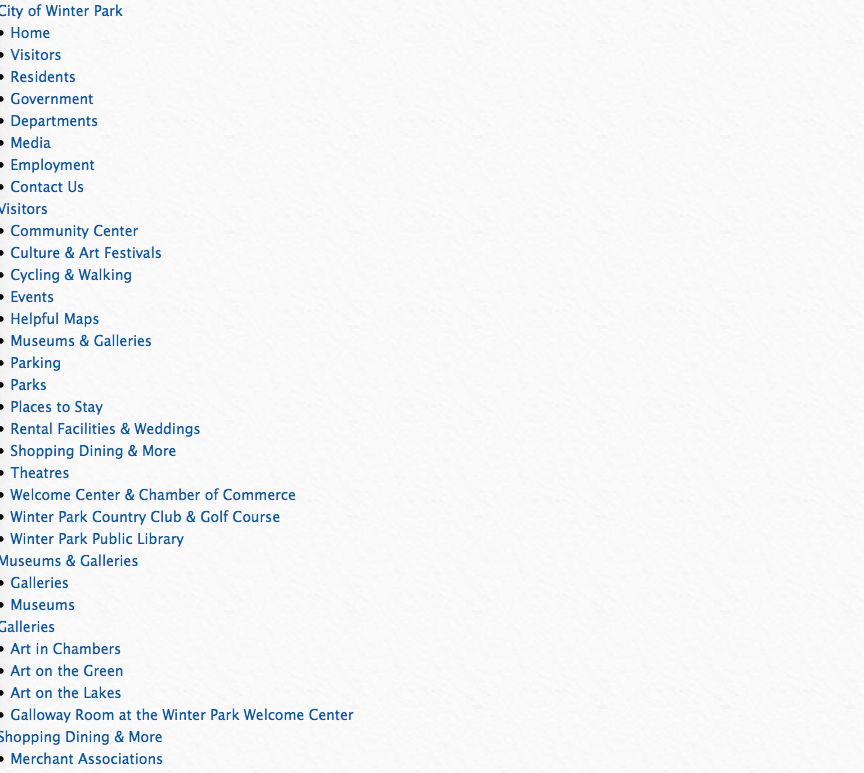
We don’t have to do it now but at some point I may recommend testing for theme conflicts here…
Thanks for your patience!
George -
AuthorPosts