

Forum Replies Created
-
AuthorPosts
-
George
ParticipantHey Adage,
When you say the link remained active, do you literally mean that clicking on it opened the link in a new window?
If so, can you please link to a page on your site where this widget is in place and where my customization is active too?
I will take a look and see what I can learn – thank you! 🙂
George
ParticipantI unfortunately do not have this time shift with my custom code on my own testing site, and there isn’t anything in my code snippet above that would cause a time shift 🙁
At this point I am unfortunately not sure of either of these two things:
1. What you are trying to do here if it is not what you said earlier.
2. What is causing the weird time shifting on your site with the presence of the PHP snippet I shared.Very odd indeed 🙁
ParticipantHey @Jan,
I’m sorry about your frustrations here, and am hoping to help resolve things not make them harder! I really appreciate your patience! 😀
Let’s stick with photo view for now – update to the latest versions you can.
If photo view is not available, head to Events > Settings > Display in your wp-admin.
1. On this settings page, do you see this option here called “Enable event views”?:
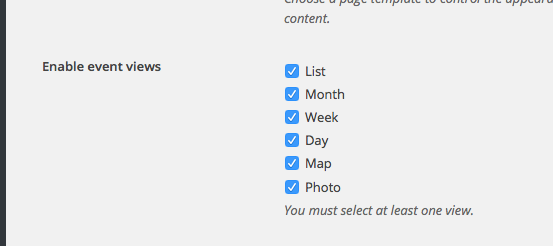
2. Is “Photo View” checked in this option?
3. If photo view is checked and still does not show up, then please leave your site in the “Testing for conflicts” state where a default theme like Twenty Twelve is active and the only active plugins are The Events Calendar and Events Calendar Pro, and then let me know and I will manually review things at this point.
We can tend to other issues after this one. Thank you for your patience, these are odd issues and are hard to pin down!
Sincerely,
GeorgeParticipantThanks for clarifying the method! With that in mind, I am trying to reproduce your problems but unfortunately cannot at this time. I will keep trying and will log a bug ticket if I find the problem here!
November 16, 2015 at 12:36 pm in reply to: Does the pro version allow embedding the full calendar with a shortcode? #1026556November 16, 2015 at 10:18 am in reply to: View events from a specific location only based on user selection or ip address #1026511ParticipantHey @Shiavni,
This is technically possible but is a complicated code customization. We are unfortunately not able to help with code customizations like this 🙁
Let me know if I can help with anything else!
Cheers,
GeorgeParticipantHey Ken,
Before any further investigation here, I think resolving this discrepancy is the most important first step:
I am running a multisite with a single activation of The Events Calendar (not pro) and Community Events on a subsite.
You should make sure that the plugins are activated in the same way, so that either The Events Calendar & Community Events are both network-activated OR they are both sub-site activated together.
Does anything improve if you assure this is how things are set up?
Thanks!
GeorgeNovember 16, 2015 at 10:11 am in reply to: Add link to the calendar view that only shows events by a specific organizer #1026508ParticipantHey there! Limiting the posts-per-page can not be done with the code you gave as an example, you would need to use this code instead:
add_filter( 'tribe_events_single_organizer_posts_per_page', 'tribe_support_1026055' );function tribe_support_1026055( $count ) {
return 6;
}
Change the 6 to whatever number of posts you want to show up, of course 🙂
—
Adding a view more link like you described is a bit more complex but you’ve got the right idea by modifying single-organizer.php.
Cheers!
GeorgeNovember 16, 2015 at 9:57 am in reply to: Re-ordering Events That Start At The Same Time On Same Day? #1026501ParticipantHey @creativecollab,
There’s unfortunately no easy way to do this at this time 🙁
The order is dictated by code deep within the core of the plugin, and so it’s unfortunately pretty complicated to modify at all. And since it’s core plugin code, it would be overwritten any time you updated the plugin.
—
Despite what I wrote above, if you’re REALLY interested in changing this regardless, then you would have to head to your plugin files for The Events Calendar. Then navigate to /src/Tribe/Month.php
Once in this file, look for the method get_daily_events() – I highlighted the code in a Gist for you here → https://goo.gl/2W2Jgb
To alter the order, you would modify the 'orderby' parameter. You can learn all the acceptable options for that parameter here → https://codex.wordpress.org/Class_Reference/WP_Query#Order_.26_Orderby_Parameters
I’m sorry that this isn’t easier to change at this time – but I hope this information helps!
Cheers,
GeorgeParticipantHey Paul,
Sorry to hear about these issues! I’m curious if you can first share a link to this problematic event, or at least one similar to it.
Next, can you share your system information with us? Here’s how → https://theeventscalendar.com/knowledgebase/sharing-sys-info/
Thank you!
George
—
P.S.
Also, can you change the UX a little bit so that after a event-duplicate the edit-event page is selected and not the list with all events?
This is good feedback – we unfortunately wouldn’t be able to change the UX immediately or anything, but improving that UX is something we should definitely do. There are a handful of UX improvements already slated for the forthcoming 4.0 release, as well 🙂
Cheers!
GeorgeParticipantHey Jodi,
Thanks for reaching out, and for your interest in the plugin!
At this time, the closest thing we have to a “trial” is just our 30-day no-questions-asked refund policy; so that essentially, you can buy a plugin license and try things out for a couple of weeks. Then if you don’t like it, as long as you request the refund within 28 or so days from the date of your purchase, we can issue that refund in full immediately 🙂
I know that earlier I said “30 days”, but I just recommend requesting a refund a few days before then just in case you request it on a Friday and we’re out of office on the weekend or something.
Let me know if this helps!
George
ParticipantHey Luke,
Adding custom fields is indeed technically possible, but the act of wiring up Event meta specifically to that plugin is something a bit outside of the scope of our support forums, as it sounds like you’d have to modify code within that Post Notifier plugin.
But in general, you can just use WordPress’ built-in meta functions to get event meta. Learn about the function get_post_meta() here, for example → https://developer.wordpress.org/reference/functions/get_post_meta/
—
One other thing to note is that for some specific things, we also have “helper” functions that are even simpler than the WordPress meta functions.
For example, you mention getting the start date for an event – you can do that with a function called simple tribe_get_start_date()
Getting the Venue for a given event can be done as well by simply using tribe_get_venue()
—
One last tip about all of this: to explore the available “helper functions” like tribe_get_start_date() and such, head into your The Events Calendar plugin files and navigate to this folder: src/functions/template-tags. Inside this folder are a bunch of named files, which indicate what type of helper functions are within them. So for example, the venue.php file here contains helper functions like the aforementioned tribe_get_venue() function.
I hope this all helps!
— George
November 16, 2015 at 9:17 am in reply to: Function to remove "lost your password" text from admin area breaks Google Maps #1026485ParticipantHey Daniel,
Thanks for reaching out – there are a few specific things I’m curious about here:
- Why are you trying to disable this link? I know that in some sense it’s none of my business! 🙂 Just curious, as this is a very essential feature of any site where users will be logging in and out…although maybe you don’t have users other than yourself or just a few admins or something, so that would make sense. Just curious!
- When you say “it breaks Google Maps” do you just specifically mean the “Map View” generated by The Events Calendar? Can you link to where this is broken so that I can see how specifically it’s manifesting?
In closing, for now, there’s a bit of code that does this that I took right from the Jetpack plugin. It’s essentially the same exact code you currently have, but just in case you’re interested in trying it out:
function remove_lost_password_text( $text ) {

	if ( 'Lost your password?' == $text )

		$text = '';
return $text;
}add_filter( 'gettext', 'remove_lost_password_text' );
Thanks!
GeorgeNovember 16, 2015 at 9:05 am in reply to: Again: Anonymous Users Unable to Add New Venues or Organizers 3.12.6 #1026472ParticipantHey Enno,
I’m glad to hear that the organizers-related issue is resolved. On the topic of organizers, to answer your last question about infinite organizers, the behavior you described is currently allowed by design at this time.
Now, as for your comment about venues: “adding new Venues is still missing” – can you elaborate a bit on this issue? If there’s a specific thread on the forums about this that you are referring to, can you link to that thread?
I’ll look into this and if there’s still a bug will ensure that it’s in our development system so that we can fix it!
Thank you 🙂
GeorgeNovember 16, 2015 at 8:57 am in reply to: Excluding Part of a Day Without Breaking Reoccurrence #1026458ParticipantHey Dan,
Thanks for reaching out. What you described is unfortunately the current set of limitations with the plugin at this time:
If the whole day is canceled I can exclude, but I can’t seem to figure out how to exclude part of a day for a holiday
I’m sorry about this limitation Dan!
— George
-
AuthorPosts