

Forum Replies Created
-
AuthorPosts
-
George
ParticipantThank you for embarking on those debugging steps – they are indeed quite annoying.
But, alas, they’re very very useful as evidenced here.
I’m sorry to hear about the conflict but am glad you can move forward with your project. I will close up this thread for now, but come back and open up a new thread any time if other issues arise.
Best of luck with your project,
GeorgeParticipantThank you for looking into this, and for your patience here!
What I would recommend from here sounds tedious but is actually a much quicker process than it first appears – to be specific, I recommend going through the complete set of steps in this article → https://theeventscalendar.com/knowledgebase/testing-for-conflicts/
After EACH STEP in that process, have another look at your admin events page and see if things still do not appear.
Let me know what you find!
Thank you,
GeorgeJanuary 11, 2016 at 4:03 pm in reply to: All recurrences URL shows events earlier than current month by default #1054232ParticipantHey Sitecrafting,
Thanks for your updates here.
I would NOT recommend rolling back to earlier versions because that would vastly increase the surface area for more bugs and weirdness to occur.
So, then, what I would recommend from here sounds tedious but is actually a much quicker process than it first appears – to be specific, I recommend going through the complete set of steps in this article → https://theeventscalendar.com/knowledgebase/testing-for-conflicts/
After EACH STEP in that process, to the “Save permalinks” trick I recommended above, and then see if your issues here persist.
I recommend this process because I am still unable to reproduce this issue.
Please let me know what you find by doing these steps.
Thank you very much for your patience here. You mention needing to launch soon and with this in mind I will try to be checking this thread more often that I normally would. I’m sorry about these current issues on your site and the difficulty in tracking down why they’re happening; hopefully the steps I recommended above will move us closer towards a solution.
Thank you!
Sincerely,
GeorgeParticipantThanks for sharing this James. To apply this solution to other text, you should just be able to add more “case” checks for the text. So, code like this:
case 'Events In' :

    $translated_text = __( ‘Events in alt example’, ‘tribe-events-calendar-pro’ );

    break;
case 'Search' :
$translated_text = __( ‘Search alternative example’, ‘tribe-events-calendar-pro’ );
break;
If you add this code to the above snippet that you posted, then it will change text “Events In” to be “Events in alt example”, and would change “Search” to “Search alternative example”.
You can of course use whatever “replacement” text you would like 🙂
Since this venturing into the world of customizations, I will have to leave you with the reins on implementing this and other code customizations – I hope this information helps though!
Thanks,
GeorgeParticipant@Derrill, I appreciate your patience with this immensely and am sorry that we couldn’t arrive at a more concrete solution here!
The closing of this thread is not the closing of this “issue” outright – if you ever do start seeing real issues arising on your site, and this error persists and it seems like things are genuinely having problems all of a sudden, please do not hesitate to come back and open a new thread so we can help again.
I will close this thread for now – I wish you the best of luck with your project in the meantime! And once more: come back any time to open a new thread if issues arise again 🙂
Thanks for your patience and politeness throughout our exchange.
Sincerely,
GeorgeParticipantHey @Laughtmasters,
You unfortunately can only pull something like that off with custom code.
We are unfortunately not able to help with custom coding. Please see the “Product Support” section of this page for more information → http://theeventscalendar.com/terms
—
I would recommend this knowledgebase article for some help getting started with customizations → https://theeventscalendar.com/knowledgebase/themers-guide/
If you are interested in hiring a developer to help you make these customizations, we have a list of some highly-rated ones here that might be helpful too → http://m.tri.be/18k1
Sincerely,
GeorgeJanuary 11, 2016 at 3:42 pm in reply to: Recurring Events on the Same Day & Recurring Events Featured Events #1054218ParticipantThank you @Josh.
Can you share a screenshot of the full “Edit Event” screen for your second event? To be clear, I mean this event: http://lyric.kohndev.com/event/rudolph-the-red-nosed-reindeer-the-musical/2016-12-27/
If possible, go to the wp-admin edit screen for this event; where you set up the start time, end time, recurrence info, etc.
Then, screenshot the whole page (google how to do this in your browser of choice if not familiar; it’s simple!) – you can then share the image by uploading it to Imgur.com, Flickr.com, CloudUp.com, or any similar image-hosting site; then just share the links to those images here and I’ll take a look.
—
I’m sorry to recommend this if it’s a bit of a pain – but we cannot log into customer sites for any reason, so I cannot log into your site, but I am curious to see the admin configuration for that event.
Just to be clear, here is a the sort of screen I am talking about when I say “the ‘Edit event’ screen → https://cldup.com/rDZEW4J1j5.png
If you can upload an image like that for the event I linked to, it would be immensely helpful.
Thank you!
GeorgeJanuary 11, 2016 at 3:32 pm in reply to: Advanced List Widget Graphic Date doesn't match actual date #1054206ParticipantHey @Shannon,
I agree that this is disappointing. I’m sorry about this reality and would like to address your separate points.
1. First, yes you can temporarily remove those erroneous date icons until a bug fix arrives. To do this, you would need to add the following CSS to the bottom of your theme’s style.css file:
.tribe-mini-calendar-event .list-date {

    display: none !important;

}
2. Next, I would like to address your comments about this bug not being mentioned in the “marketing literature”. Bugs do not belong on the marketing pages for a product, which is why it was not mentioned there. For context, every single new release of our products comes with some fixes for old bugs, and some new bugs of its own. This is the nature of software. Events Calendar Pro is not a finite product, it is a living and breathing piece of software that is constantly evolving. And so to update our “static” marketing page for every single release does not make sense. (Plus, if we knew about the bug before shipping, we would not have written about it – we would have fixed it! 😀 )
This is very much the norm for any piece of software. A good and quick example is just WordPress itself – check out the front page for WordPress, http://wordpress.org
• What is the number of code bugs you see listed on the front page of http://wordpress.org?
• How does this number compare to the number of actual development tickets that “need-patch” (need to be patched; fixed; etc.) on the actual WordPress development tracker? → https://core.trac.wordpress.org/tickets/needs-patch
As you can see, at the time of my writing this, there are 2,081 bugs, enhancements, and tweaks that need addressing within the WordPress code base.
And the number of these things listed on the homepage? 0. [zero]
I only mention all of this because I really, really do not want you to feel like we are trying to swindle folks or something. It is a norm to not list bugs right on the main marketing page of a product, because the marketing of and development for a piece of software are separate things. We make our product page a static page that we do not need to update specifically so that we can spend more time on the actual product code instead of updating that page 🙂
Bugs – and the frustrating, time-constrained realities of fixing them – are part-and-parcel of open source software like WordPress, The Events Calendar, Events Calendar Pro, and others.
I hope that you can see that bugs are common, which is of course an unfortunate fact – and for a bug like the one you have, it is especially embarrassing because this bug with the mismatched dates is very easy to see and is very discordant for users when they visit the page.
I am genuinely sorry about the existence of the bug, and the fact that there is not a specific ETA for when this bug will arrive. However, what follows from all of this is not an extra set of discounts or extra support time. What follows for you is what follows for all of our customers: a guarantee that we take this seriously and are working hard on a bug fix.We patch bugs in our premium plugins faster than in our free ones; this is one of the benefits of being a premium license holder.
But at this time, there are not discounts or license extensions I can grant you.
Please let me know your thoughts on all of this. I hate seeing bugs like this and knowing the frustration from your end. As I mentioned earlier, this bug is not something we are all recreating; it’s a hard bug to track down and there may be a third-party code conflict element to this. So I do not know when we will have a fully-tested fix in place.
But a fix is underway and your patience with us is much appreciated while we keep working on this and other bugs.
Please share thoughts and let me know any further questions, comments, and concerns you might have. I cannot fix this bug immediately – though I would if I knew its source! – but am happy to try just about anything else I can do to help here.
Sincerely,
GeorgeParticipantYour summary of the “Create recurring events in advance for” feature is exactly correct, Anthony. Yes – if you have it running through 2020, then instead of all 4 years of those events being generated only “three months from now” worth of events will be generated.
“Now” is constantly changing of course – it is updated with that option specifically every day.
This is designed specifically to try and minimize the performance impact here.
Try it out and play around with it a bit – see how things look and behave when you compress this window. It’s a handy feature and I hope it helps!
Sincerely,
GeorgeJanuary 11, 2016 at 2:27 pm in reply to: Recurring Events on the Same Day & Recurring Events Featured Events #1054158ParticipantHi Josh, can you clarify what you mean you say the following:
If you look at my sample, the second day is perfect, but the first day isn’t working.
1. What is “your sample”, specifically?
2. Can you link directly to the “Second day” event?
3. Can you link directly to the “First day” event, and clarify how specifically it is “Not working?”
If you address these items in the order they appear it will be helpful, I’ll try to pin down exactly what you mean and what the issue is.
As for the original thing here, see the example I gave above about events being on multiple times on the given day.
• An event cannot occur more than once per day.
• An event cannot have multiple start times or multiple end times.
• You cannot “link” events together in any way other than the default, out-of-the-box recurring features.
I hope this information helps!
— George
ParticipantThank you for doing this. If the “fatal error” is being reported but your site is still fully operational, then for now I unfortunately cannot see another course of action here except for chalking this up to a fluke from the BulletProof Security plugin’s reporting system.
I cannot recreate this bug anywhere; and it is allegedly a fatal error but is not stopping page load, which a fatal error will do. So I unfortunately cannot see another cause of this other than that plugin causing the weirdness.
This sort of thing can happen – “diagnostic” tools can often misfire or can be too aggressive in pointing out a problem. Even Google’s webmaster tools do this with 404 pages, for example…
Do you have any final thoughts on this matter?
If this error persists but you do not notice any actual problems on your site, then I would recommend considering this a diagnostic error with the BPS plugin and not an actual Fatal Error that occurs on the site.
I appreciate your patience with all of this!
Sincerely,
GeorgeParticipantThank you for sharing this Aris – sorry to hear about other issues arising! We will get to the other thread you open as soon as possible.
Best of luck with your site,
GeorgeParticipantHey @Anthony,
14,000 instances is unfortunately large enough where there would indeed be some very large database sizes like you have mentioned 🙁
There is no way to reduce this at this time – I’m really sorry about this! Performance is actually one of the things we are really hoping to improve dramatically in 2016, but for now this massive database size is unfortunately a consequence of our plugin’s code and the raw fact of 14,000 event instances.
If there’s anything you can do to minimize those instances, it can help. For example, how far into the future are you letting your recurring events generate? If you head to Events > Settings > General in your site’s wp-admin, you will find two options related to this, as shown in this screenshot:
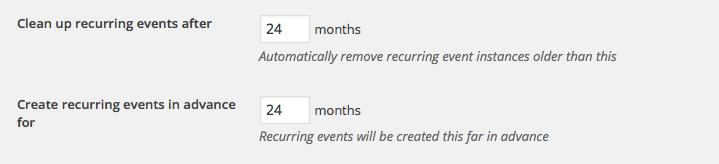
If you decrease the time frame there, fewer events will be generated at a time and it can make a huge difference (and the events will still be functional, automatically – every day, as time goes on, the plugin will look that number of months ahead and ensure that any events that are expected to be generated will, in fact, be generated).
I hope this information helps!
Thank you,
GeorgeParticipantHey Enrico,
Do you mean that you want to hide the “Export Month’s Events” buttons on your site? If so, then yes, you can ensure these links never show up on any calendar view by adding the following code snippet to your theme’s functions.php file:
if ( function_exists( 'tribe_get_events' ) ) {

	/**

	 * Prevent calendar export links from showing anywhere on the front-end.

	 *

	 * @link http://theeventscalendar.com/?p=1053965

	 */

	function tribe_support_1053965() {
remove_action(
'tribe_events_single_event_after_the_content',
array( 'Tribe__Events__iCal', 'single_event_links' )
);remove_action(
'tribe_events_after_footer',
array( 'Tribe__Events__iCal', 'maybe_add_link' )
);
}add_action( 'init', 'tribe_support_1053965' );
}
I hope this helps!
— George
ParticipantHey Joseph,
This sounds like a JavaScript code conflict arising from other software on your site. From your system information it looks like you have an immense number of plugins on your site – this is fine, of course, but may be the source of the problem.
I’m sorry to recommend this, but since I cannot recreate this issue I would recommend going through the complete set of troubleshooting steps here → https://theeventscalendar.com/knowledgebase/testing-for-conflicts/
After EACH STEP in that process, after EACH AND EVERY SINGLE PLUGIN DEACTIVATION for example, go back and try to recreate this issue you found.
Does anything change along the way?
If you are doing this process and then suddenly the issue does not appear any longer, let us know what the last step in the process was that you did before things started working again.
Thank you!
George -
AuthorPosts
