
Home › Forums › Calendar Products › Events Calendar PRO › Recurring Events
- This topic has 4 replies, 3 voices, and was last updated 10 years, 7 months ago by
Support Droid.
-
AuthorPosts
-
January 11, 2016 at 11:30 am #1054041
Anthony
ParticipantHowdy!
I’ve only a few events, but most of them recur daily.
With 14,000 instances is it normal to expect a SQL database in the area of 300mb?
Just checking; it seems excessive. I’m assuming each recurrence is treated as a separate event. Any way to reduce that?
January 11, 2016 at 12:19 pm #1054088George
ParticipantHey @Anthony,
14,000 instances is unfortunately large enough where there would indeed be some very large database sizes like you have mentioned 🙁
There is no way to reduce this at this time – I’m really sorry about this! Performance is actually one of the things we are really hoping to improve dramatically in 2016, but for now this massive database size is unfortunately a consequence of our plugin’s code and the raw fact of 14,000 event instances.
If there’s anything you can do to minimize those instances, it can help. For example, how far into the future are you letting your recurring events generate? If you head to Events > Settings > General in your site’s wp-admin, you will find two options related to this, as shown in this screenshot:
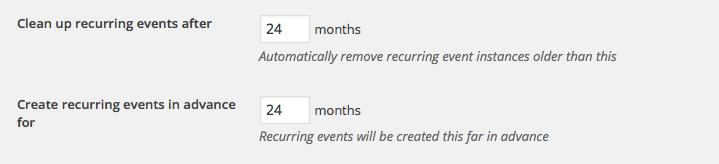
If you decrease the time frame there, fewer events will be generated at a time and it can make a huge difference (and the events will still be functional, automatically – every day, as time goes on, the plugin will look that number of months ahead and ensure that any events that are expected to be generated will, in fact, be generated).
I hope this information helps!
Thank you,
GeorgeJanuary 11, 2016 at 12:41 pm #1054105ParticipantHi George,
Thanks for the quick reply. Question about “Create recurring events in advance for…” feature.
Just to confirm: If I create an event that is supposed to go through 12/31/2020, but set the “…in advance for…” feature to 3 months, will it automatically create a new recurrence 3 months out every day? So basically, that feature is just controlling how far out a user could view the event, correct?
January 11, 2016 at 2:34 pm #1054160ParticipantYour summary of the “Create recurring events in advance for” feature is exactly correct, Anthony. Yes – if you have it running through 2020, then instead of all 4 years of those events being generated only “three months from now” worth of events will be generated.
“Now” is constantly changing of course – it is updated with that option specifically every day.
This is designed specifically to try and minimize the performance impact here.
Try it out and play around with it a bit – see how things look and behave when you compress this window. It’s a handy feature and I hope it helps!
Sincerely,
GeorgeFebruary 18, 2016 at 8:34 am #1076679KeymasterThis topic has not been active for quite some time and will now be closed.
If you still need assistance please simply open a new topic (linking to this one if necessary)
and one of the team will be only too happy to help. -
AuthorPosts
- The topic ‘Recurring Events’ is closed to new replies.