

Forum Replies Created
-
AuthorPosts
-
George
ParticipantHey Alex,
Thanks for reaching out. The features you describe here are unfortunately not provided by any of our plugins “out of the box” 🙁
The features are possible, but would unfortunately would require many code customizations to implement.
So to implement the features you describe, you would have to write that custom code or hire a professional developer to write the code for you. We have a list of great developers here → http://m.tri.be/18k1 (and have no affiliation with any of these folks–they’re simple some well-respected names in the community that we’ve compiled to share in situations like this one).
Sorry to disappoint!
Sincerely,
GeorgeParticipantHey Gail,
I agree with you that having better support for bulk discounts is a great thing; we are working on that, but it will unfortunately take quite some time to fully develop into our codebase 🙁
In the meantime, I’m glad you have a temporary solution for now and appreciate you sharing your solution!
Thank you,
GeorgeParticipantThanks for sharing this solution, Christian!
Best of luck with your site,
GeorgeFebruary 23, 2016 at 10:52 am in reply to: Times shift with recurrent and no recurrent events from Google Calendar #1080894ParticipantNice! Thanks for the update, @Fabrice 🙂
ParticipantThis reply is private.
February 23, 2016 at 9:53 am in reply to: Widget not showing on today's events (eventbrite) #1080859ParticipantHey @jessie,
Thank you for the update. The fact that this only happens the night of the show could reveal a timezone-based issue.
I notice in your “System Information” that your site’s timezone is set to “America/Los_Angeles”.
If you change this setting to its “Numerical” equivalent, does anything change with this issue? What I mean is, the America/Los_Angeles time zone is equivalent to UTC-8. If you go to Settings → General in your site’s wp-admin, and set “UTC-8” as the timezone instead of America/Los_Angeles, does anything improve with this issue?
I realize that this can seem trivial, however both the Eventbrite API and the Facebook API are very picky with timezones and sometimes changing this setting alone can resolve issues like this. It’s a worthwhile thing to rule out at the very least.
I’m very sorry about these issues, @Jessie, and your patience with this process means a lot. Thank you. I want to also underscore that, in the meantime, I have been exploring Eventbrite bug reports to see if there’s anything related to this issue. There isn’t at this time 🙁 But I will also be roping in the help of another developer to investigate and see if they have any ideas, as well.
Let me know if the timezone issue seems to make any difference!
Sincerely,
GerogeFebruary 23, 2016 at 9:48 am in reply to: Basic community events user registration question #1080855ParticipantThis reply is private.
ParticipantHey Nathan,
Thank you so much for testing the removal of jQuery. If the version of jQuery on the site was 1.7.2 by default, because of your theme, removing that IS an ideal solution! If the theme works fine otherwise, then removing that jQuery is an excellent step here.
When you say that you removed the file, can you clarify exactly how you did this?
Also, would you be willing to upload a .zip file of BOTH your parent theme and the child theme? You can upload this zip to a site like http://ge.tt or Dropbox or something like that; anywhere where I can download the files without logging into a site.
I will then try to see how the theme is registering its version of jQuery, and if possible, I will recommend code to ensure that the proper jQuery that is included in WordPress itself is loaded.
Thank you!
GeorgeParticipantThis reply is private.
ParticipantHey Peter,
Our ticketing plugins are indeed WooCommerce Extensions. They require WooCommerce to function.
You cannot link to one single ticket with no context at this time. The tickets are purchased through a simple ticket form on a post type, like an “event.” Users select how many tickets they would like; then click “Buy”, then are brought to checkout.
To alter this functionality, you would have to write a lot of custom code or hire someone to do in the same fashion I described earlier in this thread.
As for QR Codes, there have indeed been bugs in the past but they are now resolved. The QR codes work effectively. When you scan a QR Code, it simply “Checks in” the event attendee who shows the code. To learn more about what “checking in” means in general, I would recommend reading this knowledgebase article which covers our Attendee Management features in depth: https://theeventscalendar.com/knowledgebase/managing-your-orders-and-attendees/
I hope that helps!
Sincerely,
GeorgeFebruary 23, 2016 at 9:03 am in reply to: Display Additional Field outside of "other" grouping #1080829ParticipantHey Mad Dog,
Thanks for the further elaboration here. My first response to you does seem to address this, then 😀
1. Putting Info at the Top of the Page
You will want to use tribe_events_community_form_before_template to generate information at the top of the page.
2. Making That Info be the Value of One Custom Field
To get just one field and pull it out of the “OTHER” section and move it into the section from tribe_events_community_form_before_template, you will need to use the get_post_meta() function I described initially.
This function returns the post meta, and so you can then pull just one item from this post meta because it is an array of values. If you do the var_dump() method I recommended, you’ll see what array key this field is, then just echo this array key.
I hope this helps!
— George
February 23, 2016 at 8:52 am in reply to: Widget not showing on today's events (eventbrite) #1080811ParticipantThank you for this information, @Jessie.
I’m sorry that these issues persist—I’ve been looking through your system information and at the events you linked to on your dev site and on Eventbrite, though have yet to identify a culprit.
While I continue to investigate, I’m wondering—are there any real examples that are live on your actual site at this time with these issues? (Not on your dev site.) I’m only wondering this because at this time, the two events you linked to are passed and so some of the behavior is inherently different because of that fact.
If there are any upcoming events on your live site that have this issue, let me know! I’ll take a look at these live events and will try to identify an inconsistency.
Thank you!
GeorgeFebruary 23, 2016 at 8:38 am in reply to: Display Additional Field outside of "other" grouping #1080808ParticipantSorry about my misreading of your question, Mad Dog. This was what I was responding to:
I am using add_action(‘tribe_events_community_form_before_template’, ‘my_custom_text’); and could put some code in with that if there’s a way to call that specific Additional Field
Your second question here, though, seems to imply that the action tribe_events_community_form_before_template is not working, though? Is this right?
Because that is the action I would recommend using! It should do the job here well, in terms of letting you place content before the section you are referring to.
Thank you for your patience here, and again, apologies for the misunderstanding on my end! 😀
— George
ParticipantThank you for this information!
Investigating Your Issues
I’ve taken a comprehensive look at your site issues and have indeed been able to reproduce the behavior you describe here:
The problem comes with the mobile version where nothing displays and there is just a blank space.
But… if you select a date in the event search tool then the loading gif displays, works and then the events display.
This does seem to be a theme-related issue—which is not a coded way of saying “we cannot help,” I’m just describing what seems to be the cause thus far.
The reason the theme seems to be such a culprit here is that with our own demo site, and with my own testing site which is using the default Twenty Sixteen theme, I cannot reproduce the “blank space” issue. And as has been reported here, the manifestation of this issue itself is quite inconsistent, and happens in some mobile browsers but not others and on some device sizes but not others.
When there are display-related issues that vary in manifestation as widely as this one, the issue is most commonly one of the following things, a combination of them:
- The validity of the page’s HTML, which is mostly dictated by the active theme.
- JavaScript errors from the theme or a plugin.
I have searched diligently for JavaScript errors to no avail, other than a random “404” in the console over a missing font file—but this 404 would not cause the problems on your page.
So that leaves the validity of the HTML, which I investigated, and it does seem like there are some major errors with your page’s HTML structure. To test this yourself, head over to http://validator.w3.org
There are many inconsequential little things listed there, but then if you notice near the bottom of the validation report there are some serious breakages, as shown in this screenshot of the error report when I tested it myself:
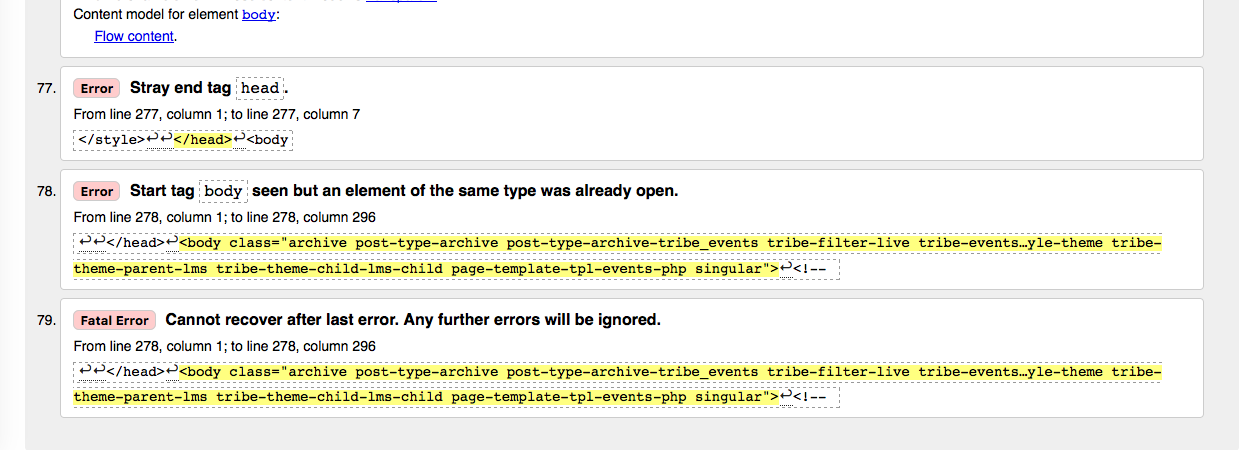
Where to Go From Here
1. Fixing the page HTML
The screenshot I shared above reveals that some of your page’s HTML is broken. This is NOT the sole source of the problem here, but it will definitely only make things worse and is a big part of the behaviors described here. I would recommend trying to fix the HTML errors reported on the official W3C validator as shown in the image above—you can do this on your own if you’re comfortable with custom coding, but if not, you will have to contact your theme author for assistance in doing this.
2. Testing Plugins
In your “System Information”, it shows that you have a plugin called “Justified Image Grid.” I did not see any specific JavaScript issues on your page, but I’m wondering if anything improves with your Photo View if you temporarily deactivate the Justified Image Grid plugin?
In fact, if possible I would strongly, strongly encourage you go through the complete set of troubleshooting steps outlined here: https://theeventscalendar.com/knowledgebase/testing-for-conflicts/. Check on the Photo View after each step in that process, and see if your issues with it persist. This step is recommended and immensely useful, but optional.
3. A Genuine Bug in Our Code
I have not isolated a specific bug at this time. However, I’ve enlisted the help of another developer on our team and we are both able to reproduce your errors intermittently. We will continue investigating a specific thing within our own code that might be causing—or at least contributing to—this issue. If so, we will be able to make a bug ticket and then try to release a bug fix as soon as possible.
Now, we still have not pinpointed a bug, and if we do, it could take several weeks for an official bug fix to be released. But this process is underway and if there is a reproducible bug we can identify within our code a fix will be on its way promptly.
I hope that steps #1 and #2 above are things you can act upon and that they help bring you closer to a better-working Photo View. In the meantime, we will continue trying to isolate a specific bug here, perhaps a JavaScript solution within our code base. If we can identify such a bug, we will try to ship a fix as soon as possible; we are on faster release cycles these days so hopefully that happens within two to three weeks after we find the bug, if one exists.
Thank you,
GeorgeParticipantHey @aafhhl,
Thanks for your interest in translating! We unfortunately cannot take full language files any more; our premium plugins are now translated on our community-powered translations site here → http://translations.theeventscalendar.com
If you would like to contribute your translations there, you are more than welcome, and we do indeed tend to give discount codes to folks who contribute a lot there (not full licenses, usually, but up to 30% off discount codes).
To learn about this translations site and how it works, how to contribute, etc., we’ve got three knowledgebase articles about it that should help:
• Translating The Events Calendar: http://theeventscalendar.com/knowledgebase/translating-the-events-calendar/
• Translating our premium add-ons: https://theeventscalendar.com/knowledgebase/adding-or-updating-a-translation/
• Changing the language on your site: https://theeventscalendar.com/knowledgebase/changing-the-language-on-your-calendar/
Cheers!
George -
AuthorPosts