
Home › Forums › Calendar Products › Events Calendar PRO › Widget not showing on today's events (eventbrite)
- This topic has 11 replies, 3 voices, and was last updated 10 years, 7 months ago by
Support Droid.
-
AuthorPosts
-
February 19, 2016 at 6:14 pm #1078657
Jon
ParticipantWe have had this happen several times and are not sure what the problem is, but it is a BIG DEAL because we are unable to sell our tickets on some events the day of the event!
We set up a dev server so you can see the issue. Not sure what it is about these events, but it doesn’t happen to all our events, but it has happened to a handful (seemingly randomly).
Check out these two events:
http://dev.slimspresents.com:9090/event/jeff-austin-band-formerly-of-ymsb-gamh/
http://dev.slimspresents.com:9090/event/barcelona-slims-playing-absolutes-in-its-entirety-w-the-young-wild/Neither are showing the widget for buying tickets even though all the settings say it is still connected to EventBrite and there are still tickets available.
What can we do???
February 22, 2016 at 11:01 am #1080070George
ParticipantI’m sorry to hear about these issues, Jessie!
Is there any progress with these issues if you ensure the following two things:
1. Ensure the “Display tickets on event page” option is set to YES.
2. Ensure the “Eventbrite event status” option is set to LIVE.
There are screenshots for examples of both of the options above on this knowledgebase article → https://theeventscalendar.com/knowledgebase/creating-tickets-and-publishing-to-eventbrite/
If you have ensured both things on events but issues persist, then in your reply could you include your “System Information”? Here’s how to do that → https://theeventscalendar.com/knowledgebase/sharing-sys-info/
Thank you!
GeorgeFebruary 22, 2016 at 2:31 pm #1080211ParticipantBoth of those boxes are checked. We cannot find a difference in the settings for the events that are not showing the widget and the ones that are.
Here is the system info:
http://www.slimspresents.com
INSTALL KEYS
tribe-eventbrite =
WORDPRESS VERSION
4.4.2
PHP VERSION
5.5.9-1ubuntu4.14
PLUGINS
All In One WP Security version 4.0.5 by Tips and Tricks HQ, Peter, Ruhul, Ivy(http://www.tipsandtricks-hq.com/)
Better Search Replace version 1.2.9 by Expanded Fronts(http://expandedfronts.com)
Force Regenerate Thumbnails version 2.0.5 by Pedro Elsner(http://www.pedroelsner.com/)
Ninja Forms version 2.9.33 by The WP Ninjas(http://ninjaforms.com)
Related Events HandHugs version 7.0 by Hand Hugs(http://handhugs.com)
Search Everything version 8.1.4 by Zemanta(http://www.zemanta.com)
The Events Calendar: Eventbrite Tickets version 4.0.1 by Modern Tribe, Inc.(http://m.tri.be/27)
The Events Calendar version 4.0.6 by Modern Tribe, Inc.(http://m.tri.be/1x)
Toolset Types version 1.9 by OnTheGoSystems(http://www.onthegosystems.com)
Varnish HTTP Purge version 3.7.3 by Mika Epstein(http://halfelf.org/)
WordPress Importer version 0.6.1 by wordpressdotorg(http://wordpress.org/)
WP-SCSS version 1.1.9 by Connect Think(http://connectthink.com)
NETWORK PLUGINS
–
MU PLUGINS
–
THEME
Slim’s
MULTISITE
–
SETTINGS
recurring_events_are_hidden = hidden
tribeEventsTemplate =
tribeEventsBeforeHTML =
tribeEventsAfterHTML =
previous_ecp_versions = Array
(
[0] => 0
[1] => 3.9.3
[2] => 3.10
[3] => 3.11.2
[4] => 3.12
[5] => 3.12.1
[6] => 3.12.2
[7] => 3.12.3
[8] => 3.12.4
[9] => 3.12.6
[10] => 4.0
[11] => 4.0.1
[12] => 4.0.2
[13] => 4.0.4
[14] => 4.0.5
)
latest_ecp_version = 4.0.6
eventbrite-app_key = ACY5P5CPCEWCOT5VOA
eventbrite-client_secret = DZTDZTRSDDRF7Z2G2J4XH4FVV23GTDMIHRIFD3AWP6V4TKJUSE
eventbrite-auth_code = BLX6HTPE4MEJ5ASHKI52
eventbrite-token = 3NUCM3XTFEZG55AZEX7Z
eventbrite-user_id = 140666818972
earliest_date = 2015-06-05 20:00:00
latest_date = 2016-11-30 23:55:00
viewOption = list
stylesheetOption = full
tribeEnableViews = Array
(
[0] => list
[1] => month
[2] => day
)
tribeDisableTribeBar =
monthEventAmount = 5
dateWithYearFormat = l M d, Y
dateWithoutYearFormat = l M d, Y
monthAndYearFormat = F Y
dateTimeSeparator = @
timeRangeSeparator = –
datepickerFormat = 2
schema-version = 4.0.6
last-update-message = 4.0.6
enable_month_view_cache = 1
donate-link =
postsPerPage = 15
liveFiltersUpdate = 1
showComments =
showEventsInMainLoop =
eventsSlug = events
singleEventSlug = event
multiDayCutoff = 00:00
defaultCurrencySymbol = $
reverseCurrencyPosition =
embedGoogleMaps =
embedGoogleMapsZoom = 10
debugEvents =
pue_install_key_tribe_eventbrite = ae48e45533599b1c97be6027a112101dab742fdf
WORDPRESS TIMEZONE
America/Los_Angeles
SERVER TIMEZONE
UTC
COMMON LIBRARY DIR
/var/www/vhosts/wp.slimspresents.com/wp-content/plugins/the-events-calendar/common/src/Tribe
COMMON LIBRARY VERSION
4.0.6-
This reply was modified 10 years, 6 months ago by
Nico.
February 23, 2016 at 8:52 am #1080811ParticipantThank you for this information, @Jessie.
I’m sorry that these issues persist—I’ve been looking through your system information and at the events you linked to on your dev site and on Eventbrite, though have yet to identify a culprit.
While I continue to investigate, I’m wondering—are there any real examples that are live on your actual site at this time with these issues? (Not on your dev site.) I’m only wondering this because at this time, the two events you linked to are passed and so some of the behavior is inherently different because of that fact.
If there are any upcoming events on your live site that have this issue, let me know! I’ll take a look at these live events and will try to identify an inconsistency.
Thank you!
GeorgeFebruary 23, 2016 at 9:35 am #1080845Participanti dont think we have any events with that issue right now. The problem is it usually only occurs the night of the show, so when it happens again, I can email you but unless you monitor this at night, it will have passed by the time you read it 🙁
February 23, 2016 at 9:53 am #1080859ParticipantHey @jessie,
Thank you for the update. The fact that this only happens the night of the show could reveal a timezone-based issue.
I notice in your “System Information” that your site’s timezone is set to “America/Los_Angeles”.
If you change this setting to its “Numerical” equivalent, does anything change with this issue? What I mean is, the America/Los_Angeles time zone is equivalent to UTC-8. If you go to Settings → General in your site’s wp-admin, and set “UTC-8” as the timezone instead of America/Los_Angeles, does anything improve with this issue?
I realize that this can seem trivial, however both the Eventbrite API and the Facebook API are very picky with timezones and sometimes changing this setting alone can resolve issues like this. It’s a worthwhile thing to rule out at the very least.
I’m very sorry about these issues, @Jessie, and your patience with this process means a lot. Thank you. I want to also underscore that, in the meantime, I have been exploring Eventbrite bug reports to see if there’s anything related to this issue. There isn’t at this time 🙁 But I will also be roping in the help of another developer to investigate and see if they have any ideas, as well.
Let me know if the timezone issue seems to make any difference!
Sincerely,
GerogeFebruary 23, 2016 at 6:34 pm #1081169ParticipantI went ahead and changed the timezone to UTC-8 and it is still happening. On one of tonights shows, the widget is not showing.
In case you don’t see this until tomorrow, we have another show tomorrow night that you can look at. not sure if the error will occur or not, but if it does, then you can see it happening.
http://www.slimspresents.com/event/vokab-kompany-gamh/February 24, 2016 at 2:29 pm #1081716ParticipantHi Jessie,
On this show the form is still displaying → http://www.slimspresents.com/event/vokab-kompany-gamh/
Here’s a screenshot of the ticket form for example:
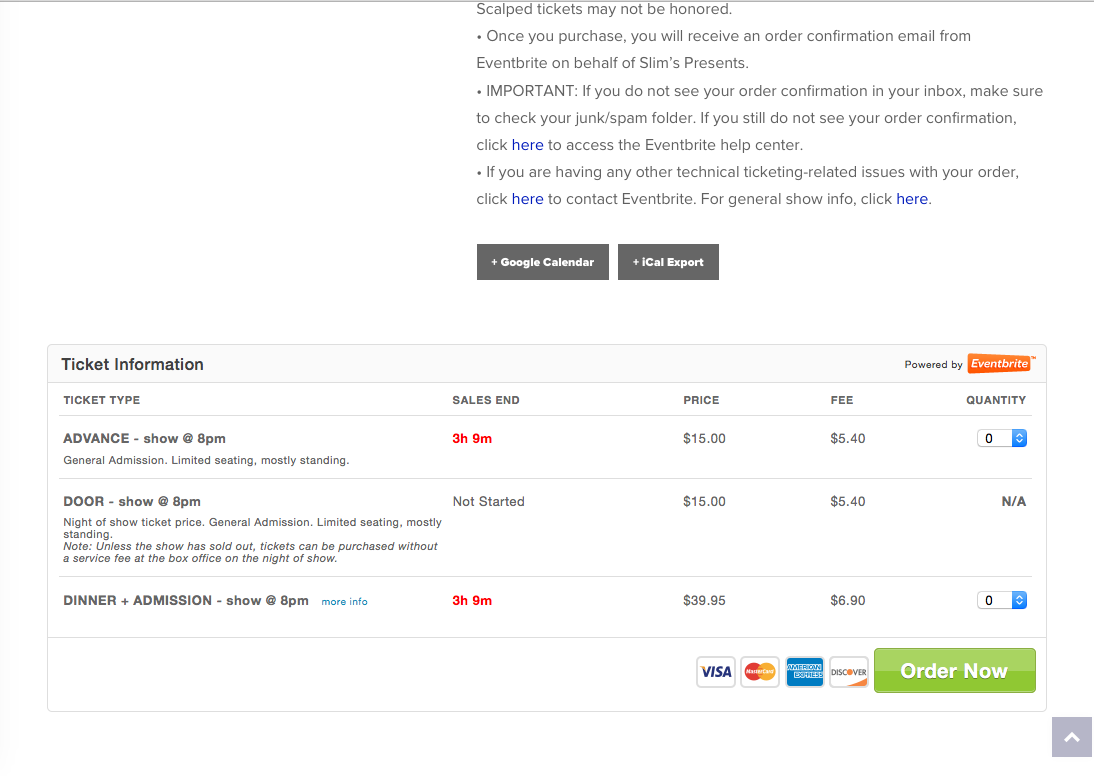
That show says it starts on Wednesday Feb 24, 2016 at 8:00pm [doors at 7pm]. That’s the PT timezone. I’m writing this reply right now at 5:23pm ET on that same day, Wednesday Feb 34.
So even though my timezone is 3 hours ahead of the PT timezone, it seems like the ticket form is working fine on this event. Would you say the same? Would you agree?
Just curious about this event; if this one is example of a working event then we can compare to your non-working event and try to identify any meaningful differences.
Thank you for your patience and persistence this; it’s an odd issue but I am determined to help resolve it and appreciate your cooperation with this process.
Sincerely,
GeorgeFebruary 24, 2016 at 3:17 pm #1081748Participantthanks George!
Yes that event is still working for us here on the west coast as well. we are keeping a close eye on all upcoming events to try to pinpoint when the form stops displaying and trying to figure out why. So far we can’t see any patterns, so it is hard to reproduce. I will keep you updated.February 25, 2016 at 10:27 am #1082102ParticipantOk it disappeared sometime between 4:00 and 4:25 Pacific time. I have a feeling this is happening on EVERY event we just haven’t noticed on the others. All the ones we have watched so far have disappeared before the sales end, and before the show starts. 🙁
February 25, 2016 at 4:05 pm #1082249ParticipantHey @Jessie,
Thank you so much for your patience here. I’m really sorry about these persisting issues, and that none of my recommendations have helped thus far!
I’ve been working with another developer on this, and we’ve even gotten some heads-up from the folks at Eventbrite about this, so I will try to itemize where things currently stand in terms of bad news and good news at this juncture.
The Bad News
First in terms of bad news is that neither I nor one of our developers, Barry, have been able to recreate the problem at this time. This is bad news namely because we’ve checked for many different possible and likely culprits so far, to no avail—these efforts include all of the testing that you have done, too, and again we really appreciate your cooperation and testing here!
The unfortunately result of these facts is that, at this time, there’s really only one test left on the board that could be helpful, which is to do a “clean install” test. This test will reveal the presence of a theme or plugin conflict on your site—or, equally as valuable, if no such conflict is found then the process will definitively rule-out the possibility of there being such a conflict.
These steps can and should be performed on your dev site. If possible, on this development site would you be able to activate a default theme like Twenty Sixteen, and then deactivate every single plugin on your site except for just The Events Calendar and The Events Calendar: Eventbrite Tickets?
Once your site is in this state, create a range of test events / test tickets and share the event posts (and the matching Eventbrite.com posts!) with us. We can then inspect these events with your site in this state and keep the conversation going from there.
This process would be immensely helpful. Let me know what your thoughts are about this and if it seems like something you can do.
The Good(ish) News
This bug is still persisting, and affecting your site and business, and so I’m hesitant to call anything here “good” news. However, I mentioned earlier that the Eventbrite.com folks have reached out to us and so there’s an active investigation into this odd behavior here.
We are devoting a number of resources to this bug and are eager to help resolve it.
Thank you, @Jessie! Please let me know what questions you might have, thoughts on all of this, etc.
Sincerely,
GeorgeMarch 11, 2016 at 8:35 am #1087780KeymasterThis topic has not been active for quite some time and will now be closed.
If you still need assistance please simply open a new topic (linking to this one if necessary)
and one of the team will be only too happy to help. -
This reply was modified 10 years, 6 months ago by
-
AuthorPosts
- The topic ‘Widget not showing on today's events (eventbrite)’ is closed to new replies.