

Forum Replies Created
-
AuthorPosts
-
February 24, 2016 at 2:45 pm in reply to: Facebook events can be imported manually, but I fail to run it automatic #1081731
George
ParticipantHey Menno,
I would recommend doing one step of testing here to double-check if my assumption here is correct. If the issue truly is just a matter of not having traffic yet, then you can test that by doing the following steps:
• Install this plugin on your site → https://wordpress.org/plugins/wp-crontrol/
• Ensure that your Facebook Events automatic imports are all set up, whether they are hourly or weekly or daily or anything.
• Use the WP Control plugin to force the “cron” jobs for those imports to run. You can identify these cron jobs because they should have _tribe in their name and/or facebook.
Once you force-run these cron jobs, do events from the pages you’ve entered seem to come in correctly? There has to be new events, of course, but this should work.
— George
February 24, 2016 at 2:39 pm in reply to: Translation issues in Events Community Plugin 4.0.5 #1081722ParticipantThank you for confirming that! I’ve added it to the bug report 🙂
— George
ParticipantHey @Nathan,
I’m sorry to hear that issues persist. It’s not an issue of multiple copies of jQuery, unless there is some other plugin on your site that is doing the same jQuery trickery that your theme was doing.
It seems like your theme is deeply broken and unstable. I am sorry about this, Nathan. There are no other moves on the board for us to do, which I’m sorry about as well, but at this point your best options would be to contact the theme support team or load a different theme on your site. You could also hire the help of a professional developer to fix all of the JavaScript issues for you, I guess; that is a valid course of action here. I think the theme is a sinking ship, however, so would not recommend investing time or money in trying to make it work.
I’m sorry to be the bearer of bad news Nathan, and genuinely wish you the best of luck with your project.
Sincerely,
GeorgeParticipantHey Sue,
I appreciate your offer here! We unfortunately cannot log into customer sites for any reason; so please do not share any login information here for the sake of security.
If your site will be going live soon, share a link to where we can see an example of your problem and I will work quickly to provide a solution if possible.
In the meantime, you might find some success with WordPress’ various image resizing and cropping tools. You can learn about those here → https://en.support.wordpress.com/images/image-editing/
Thanks!
GeorgeFebruary 24, 2016 at 2:29 pm in reply to: Widget not showing on today's events (eventbrite) #1081716ParticipantHi Jessie,
On this show the form is still displaying → http://www.slimspresents.com/event/vokab-kompany-gamh/
Here’s a screenshot of the ticket form for example:
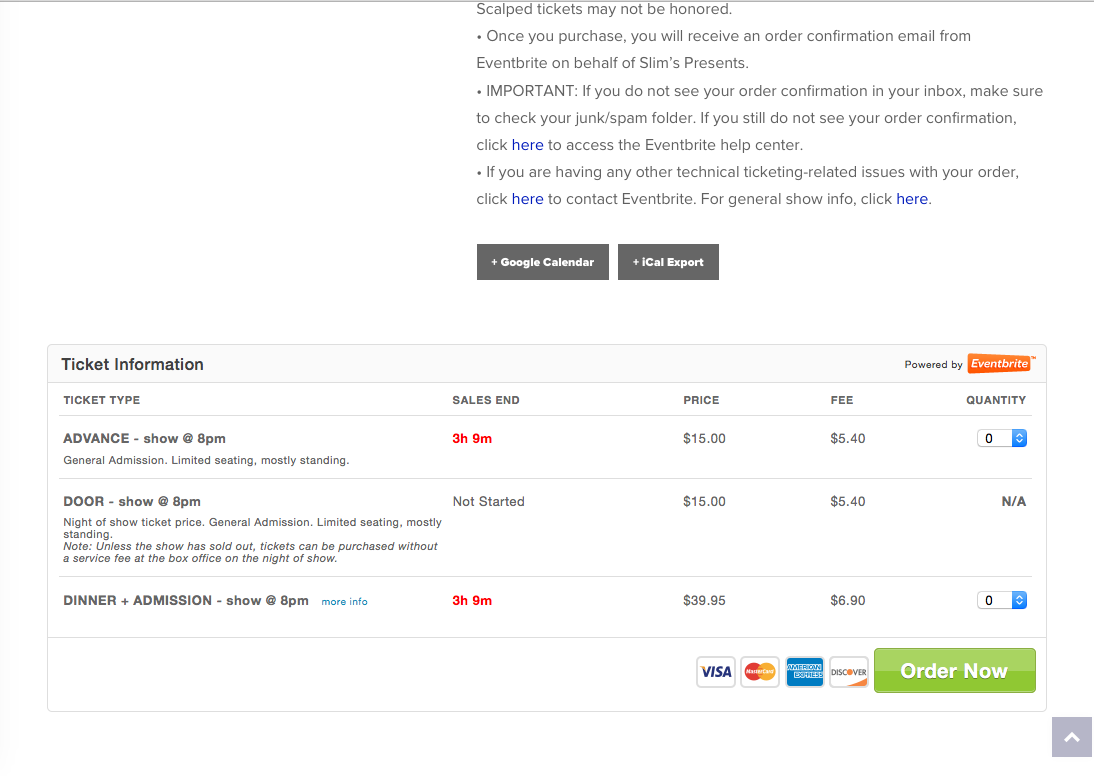
That show says it starts on Wednesday Feb 24, 2016 at 8:00pm [doors at 7pm]. That’s the PT timezone. I’m writing this reply right now at 5:23pm ET on that same day, Wednesday Feb 34.
So even though my timezone is 3 hours ahead of the PT timezone, it seems like the ticket form is working fine on this event. Would you say the same? Would you agree?
Just curious about this event; if this one is example of a working event then we can compare to your non-working event and try to identify any meaningful differences.
Thank you for your patience and persistence this; it’s an odd issue but I am determined to help resolve it and appreciate your cooperation with this process.
Sincerely,
GeorgeFebruary 24, 2016 at 2:18 pm in reply to: Submissions with Errors Create Duplicate Organizer Details Fields #1081710ParticipantHi Jonathan,
There is no update at this time, I’m sorry. I would recommend updating to the most recent version of our plugins all of the time—our most recent updates could possibly help, for example.
After each time you update, check on the issue and see if it persists. I do genuinely hope that one day you will do this and the issue is gone; but no, I unfortunately do not have an ETA on when this will be.
At this time I still cannot even recreate the issue locally 🙁 And to be clear, our developers *are* already looking on it. The tricky part is trying to come up with an actual fix!
I hate being the one to bear this bad news. I appreciate your patience.
— George
ParticipantHey Alex,
You can retrieve the post ID of a given piece of content by using the WordPress function get_the_ID().
We cannot help with code customizations, and on top of that this is also the Pre-Sales Questions forums, so I won’t be able to provide further code-level assistance, but if there’s anything else I can help with let me know!
— George
ParticipantThank you! 😀
February 23, 2016 at 4:02 pm in reply to: Facebook events can be imported manually, but I fail to run it automatic #1081091ParticipantThanks for this Menno!
You offered creating a user account for us; this is much appreciated! However, please do not make such an account and please do not post any login information for your site anywhere on this site.
We unfortunately cannot log into user sites under any condition, so for security’s sake you shouldn’t post any information here! 🙂
As for your issues, how much traffic does your website tend to get? This may seem an odd question, but part of the problem here might be the way Cron jobs work in WordPress.
WordPress doesn’t enable “real” cron jobs that run on the server itself all of the time automatically. WordPress’ cron job system is powered by WordPress, not the server, so if for example there is an hourly cron job (like the Facebook Events Importer “hourly import” feature!), then WordPress loads the job up, but the job only runs if the site is accessed after the one-hour mark for the job.
This is a limitation of WordPress itself, not of our plugins.
So I’m curious, does your site get much traffic? If not, and there are multiple hours or days with no visitors, then the imports may simply not be running.
Let me know what you think; apologies if anything I wrote here is confusing! Let me know and I will try to clarify.
— George
February 23, 2016 at 3:58 pm in reply to: Basic community events user registration question #1081088ParticipantHey Clarity, the functions.php file does not require a closing PHP tag, and in fact most of the time it can cause issues to add the unnecessary tag there. I’m glad things are resolved now regardless.
Be sure to bookmark this thread and/or otherwise backup that custom code in case its lost in a theme or site update; that’s unlikely, but just in case!
Best of luck with your project,
GeorgeParticipantHey @Nathan,
Thanks for the further elaboration here, and for your patience with this.
While I cannot guarantee that this will resolve all issues on your site, I have identified the problem and modified your CherryFramework theme so that it does not force its own, terribly outdated version of jQuery on your site.
You can download this modified version here, and replace the old framework theme files with these files completely (which should not erase any content on your site, but definitely back up your site beforehand just in case!) → https://cloudup.com/cV2FRc3ygVA
The problem—with jQuery, at least—was this code in the theme-scripts.php file:

The deregistering of Core jQuery is one of the Cardinal Sins of WordPress theme development, so definitely raise an issue with the theme developer if you haven’t already! They need to fix that. You are more than welcome to use the above screenshot 🙂
I’m sorry in advance if other issues persist even after this change; those issues may fall outside of the purview of our support, but let me know how things go and I will still do what I can.
Thank you,
GeorgeFebruary 23, 2016 at 3:43 pm in reply to: Filter Bar, selecting and displaying events once picked. . .process time #1081082ParticipantThank you for this information! I took a look at the issue in person and can see what you’re referring to; I investigated in-depth for JavaScript errors and could not find any, but what I did notice was the AJAX response for category filters is entirely blank.
This is why the “AJAX Loading” spinner image doesn’t go away, and why the filters don’t work….
Now, unfortunately this sort of behavior is usually the result of a theme or plugin conflict. I say “unfortunately” because the only to test for this is to run through the complete set of troubleshooting steps on this page → https://theeventscalendar.com/knowledgebase/testing-for-conflicts/
I would recommend starting with plugin testing, not your theme. After EACH STEP in that process, check back on your events page and try a category filter; does the issue persist? Does it ever suddenly start working along the way in the testing process? If so, when?
The process seems tedious, but fortunately it moves along much faster than it seems.
Let me know if you run through these steps and what you find if so!
Sincerely,
GeorgeParticipantI’m sorry that you’re disappoint with the theme options out there, Peter 🙁 It can indeed be a frustrating process. I genuinely wish you the best of luck with this process regardless of whether you use our plugins or not!
Are there any further questions about The Events Calendar or our other plugins that I can try to help with here?
Thank you,
GeorgeParticipantThank you again for your further elaboration here. I definitely understand your aims a bit better and our products should quite work well for the sort of task you describe here:
We’d like to have a global calendar view with all our events shown, and divisional calendar views which show only the events for a given division.
The “global” calendar is the main calendar with no filters applied to it; however, once you start filtering by categories, the view itself will indeed update to only show the filtered results, and you can link directly to such “filtered” views so that you, in essence, sort-of “fake” the appearance of multiple different calendars, but in reality it’s just the same set of calendar views with various event information being withheld from some based on the active category filter.
I hope this elaboration of my own doesn’t make things more confusing—let me know if so or if there’s anything else I can try to help with here!
Sincerely,
GeorgeParticipantNo worries! It sounds like some progress has been made here; with that in mind, I’ll be closing up this thread for now, but open a new thread any time if there’s ever something we can help with.
Best of luck with your project,
George -
AuthorPosts