

Forum Replies Created
-
AuthorPosts
-
George
ParticipantHey Sara,
Thanks for your patience with my delayed reply here!
Is it possible to not have The Events Calendar live until we enter all of the calendar information. We’d like to keep our current events calendar up until we populate the events calendar.
It’s unfortunately rather difficult to pull of the sort of separation of events content that you describe here, but one option that might be helpful is to use a “Maintenance Mode” plugin that lets you limit access to parts of your site while you build out those parts.
Our plugins do not provide these features, unfortunately, but you can search for “Maintenance Mode” plugins online to find a free one that works well for your needs.
I’ll close up this thread for now, but you can open a new thread any time if other questions/comments/concerns arise—best of luck with building out your site! 🙂
— George
March 7, 2016 at 2:03 pm in reply to: Customizing theme not possible when The Events Calendar is activated #1086001ParticipantGlad to hear it, Simon!
When it comes to removing the sidebar from the calendar page, this may just require changing the “Events Template.” To do this, there’s an option in your site’s wp-admin at Events → Settings → Display literally called “Events Template”—change this option to all of the available options, and see if any of the templates work well without a sidebar.
If none of the templates seem to work well, then unfortunately the only other option would be to use custom CSS to hide the sidebar and such. If you need to write custom CSS on your site, definitely check out a [free!] tool like Firebug if you use FireFox, or the Developer Tools for either Safari or Chrome. They have “Inspector” tools that let you zoom right over the element you’d need to hide, like the sidebar, and see what CSS you’d need to hide and to make the calendar look right on the page. We cannot help with this, unfortunately, but if you use Google whenever you run into a specific thing you’re not familiar with, and tinker around a bit, I’m sure you can put something good together here.
I’ll close up this thread for now, but feel free to open a new thread any time if other issues/comments/concerns arise.
Best of luck with your customizations,
GeorgeParticipantHey @Gwebs,
It is unfortunately not possible to load the calendar into another page. 🙁
Sorry to disappoint!
GeorgeParticipantIndeed! Check out that post here → https://theeventscalendar.com/knowledgebase/wordpress-post-meta-data/
Apologies for the delayed reply.
Sincerely,
GeorgeParticipantNo problem! 🙂
ParticipantNo problem! Best of luck with your project 🙂
— George
ParticipantGlad to hear about some of the progress here, @Cully. Keep your eyes on plugin updates over time, and/or on our blog at http://theeventscalendar.com/blog—we post information about updates there and we have many performance-related plans in the works that will be posted about on the blog and such.
For now, I’ll close this thread—if other issues arise or if there are other questions we can try to help with, post a new thread any time.
Thank you!
GeorgeParticipantHey Khari,
Sorry to hear that you’re having the same issues! Can you follow the steps described in this article so that we can help you out over email? → https://theeventscalendar.com/knowledgebase/refund-policy/
We’ll followup with you over email from there to make things right 🙂
For now, I will close up this initial thread of @Larye’s.
Thank you,
GeorgeParticipantThank you for your feedback, James. I’m sorry for the trouble here—keep your eye on plugin updates for the eventual improvements here.
Thank you,
GeorgeParticipant🙂
ParticipantHey James,
I agree with you, and said this was a bug in my reply before last. Here’s a screenshot of that reply which is a few replies ago:
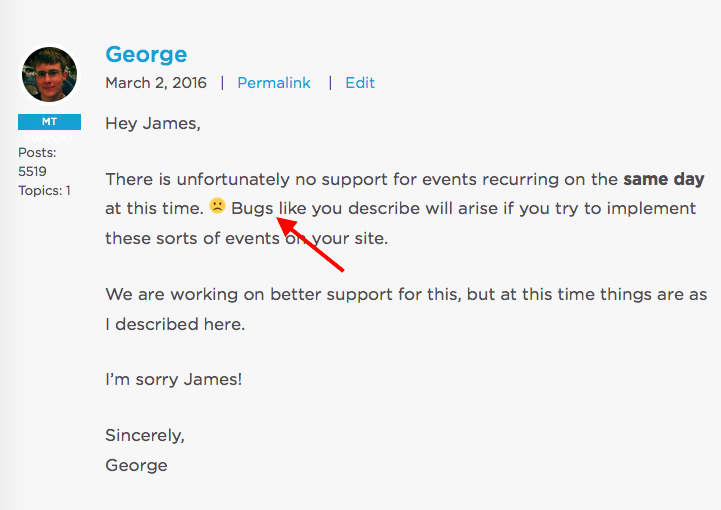
No snark here, James—I just want to make it clear that we are on the same page. This is a bug. We’re working on patching up this aspect of the edit-event process (and simultaneously the actual recurrence engine itself).
I’m sorry about this and appreciate your patience with us while we work on updates.
Let me know if you have any further thoughts on this matter or questions I can address.
Thanks,
GeorgeParticipantThanks for reporting this, Sara.
You could try exporting your events into a CSV file—Google this and how to export post types in this format if you’re not familiar.
Then, you could use The Events Calendar built-in CSV importer to import that CSV file.
This is the best option, but may still not work completely correctly for all of the event data of each event. The order of events, for example, is something that is likely to not kept fully intact in a migration.
You can learn more about the CSV importer and how to use it in these two articles:
• https://theeventscalendar.com/knowledgebase/using-the-events-calendars-csv-importer/
• https://theeventscalendar.com/knowledgebase/csv-files-options-and-examples/I hope this helps!
GeorgeMarch 3, 2016 at 3:42 pm in reply to: iCal exported file seems to have the same number of lines no matter what #1085074ParticipantThanks for testing this David. I’m baffled by why my results are so different from yours. At this point the best next step I can think of would be to do a thorough test for theme or plugin conflicts. It’s possible that one of these pieces of software on your site has its own WP_Query manipulation going on which is messing with things here—or something to this effect….
To test for conflicts, I would recommend leaving your code as-is for now. Leave these plugins activated:
• The Events Calendar
Other than just that one plugin, deactivate every plugin on your site.
What happens when you try to generate a year-of-events feed?
If the result is the same, then I would recommend keeping things in this state and then activating a default theme like Twenty Sixteen.
What happens when you try to generate a year-of-events feed?
Let us know if you can do these steps, and if so, what you can find!
Thank you,
GeorgeParticipantHey @Mad Dog,
Yes, we’ve got a list of all of the capabilities here → https://theeventscalendar.com/knowledgebase/admin-roles-and-permissions/
🙂
George
ParticipantGlad to see this progress, @Ken!
Sincerely,
George -
AuthorPosts